Missing WooCommerce Elements

Hi there,
I purchased Pro so I could use teh WooCommerce Elements. Yet, I have the builder and plugin installed with WooCommerce and there are no additional Elements available.
Please advise.
Thank you!
Tatyanna
-

Hi,
Do you have installed and activated the WooCommerce plugin? Do you have the latest versions of Brizy Free 2.1.5 and Brizy Pro 2.1.3 installed and activated on your dashboard?
If you have all of them, you have to see the WooCommerce elements at the bottom of the Element's list. See here.Best regards,
Sandra0 -

Hi,
I encountered the same issue after updating Brizy Free from 2.0.7 to 2.2.6 (see below):
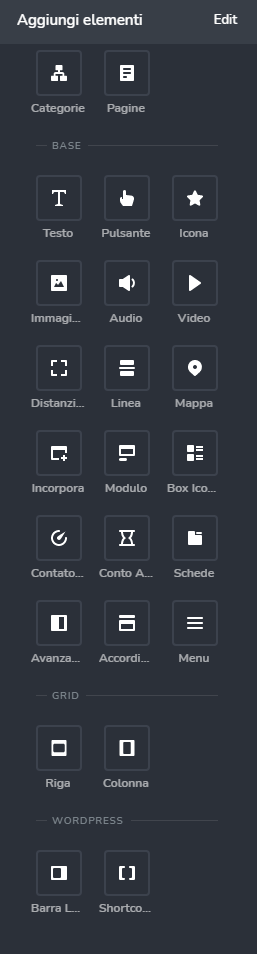
In particular, the WooCommerce Product Page element (the shortcode was [brizy_product_page]) doesn't show the selected product page anymore.
I'm using a Brizy Template for building the the single product page, but now the only message shown is "Please set a valid product".
All my plugins are updated (also woocommerce).
Could you help me, please?
0 -
Hi,
How did you customize the WooCommece Single pages? Did you create a Brizy template for all products? Could you please check how did you create the template for all products? What display condition did you set? Do you have the same condition as in this screenshot?
If you have it, the same, then inside the template you can't add the "Product page" element. You have to add the elements from this section like Title, Content, Price, Add to cart and others you need. With them, you can customize as you want the product page.Best regards,
Sandra0 -
Hi Sandra,
I have just one template for all product (in Brizy > Templates); its settings are the ones you showed me here.
In the Brizy Free 2.0.7, I was present this element (its shortcode was [brizy_product_page]) that dynamically was able to show the Single Product Page of the selected item without other .
I'm recently updated the Brizy Free plugin to 2.2.6 version and:
- the "Product" element disappeared from the Brizy edit menu;
- it is only shown the message "Please set a valid product" when I try to access in details to any product (this is a serious problem for my business);
- (out of scope) if I try to put an ID product to the Product Page element, this error message is shown;
Moreover, you suggested me to use the single elements like Title, Content, Price, Add to cart... but, as you can see here, I don't have these elements.
Hope you can help me to find a solution thanks to these new feedbacks.
Thanks for your support.
I look forward to an answer.
Regards,
Vincenzo0 -
Hi,
I can add a useful information: I tested Brizy with different versions and the result is that up to version 2.0.16 everything works as expected, from version 2.1.0 I get the fateful message "Please set a valid product".
Best Regards,
Vincenzo0 -
Hi,
The integration with WooCommerce and the ability to customize the WooCommerce pages and categories is a Pro feature. Therefore, could I ask you, do you have the Brizy Pro? If you show us that you don't have access to the Product title, navigation, Product Content, Price and other WooCommerce details, I suppose that you don't have activated the Brizy Pro and for this reason, you don't have access to these features.
The Product element isn't available in the Single templates because it will not offer the right result because there you have to introduce an Id of a product and therefore that product will be displayed on all product pages. Therefore isn't recommended to use it.Let us know if we can help you with something else.
Best regards,
Sandra0 -
Hi Sandra,
as I previously specified, I am using Brizy Free and everything works fine with the version 2.0.16 simply by using the Product element into the Brizy Template, without introducing any IDs (I left blank this field): I suppose that it was able to dinamically retrieve the selected product ID. Why it is changed? I think you need to be able to guarantee total compatibility between different Brizy Free versions.
I hope I was clear this time.
I look forward to your reply.
Vincenzo0 -
Hi Vincenzo,
Since Brizy Pro 2.1.0 we release a big update where we added the compatibility with WooCommerce. With this version, many details were changed and improved in the builder. As we added this compatibility as a Pro feature if you want to design and customize the Products pages with Brizy you need to have the Pro version of the plugin. All the dynamic content is available only in the Pro version of the plugin.
Thanks!
Best regards,
Sandra0
Please sign in to leave a comment.
Comments
8 comments