Products / Woocommerce

Lost here.
Have a test product page.
Edit with Brizy.
Add "Products" element.
The single test product entry appears three times (a dynamic element - I understand).
When the time comes to view the product page, nothing appears.
(I have read all the notes and posts I can find. Missing something...)
Thx
-

Hi,
How did you create the product page? Did you create also a template for Single Product page? If you want to open the details of the product and there open the Brizy design, you have to create a template for Product pages.
Let us know if we can help you with something else.Best regards,
Sandra0 -
Unfortunately, the instructions I have found so far are confusing. I will seek to verify and apply your recommendations. (In the meantime, I have reported my difficulties to a colleague of yours who has access to my WP admin. I will report on the results).
Thank you for your reply.
0 -
Hi,
Thank you for your reply. Ok, when you will have some result, inform us too regarding this.
Thanks!Best regards,
Sandra0 -
Still not clear here.
I have created a sample product.
I have created a Brizy product template.
When I edit the Brizy template with Brizy and add the Woo “Products” element, my sample product appears (x3). Name and price are there (no graphics).
When I “View” the sample product page, nothing appears.
(There is no way to “view” the Brizy product template).
My little brain is seek a way to produce and view a product page that I have edited with Brizy.
(When I create the sample product, I have a choice of templates: Default and Brizy Template. Is the Product template supposed to appear there?)Thank you for your patience.
0 -
Hi,
Could I ask you what do you want to create? Do you want to create a page for a single product or a page where you will see all the products? I ask this because the method of creating a template for a single product and for all products are a bit different. If you want to design the Shop page with Brizy and display there all the products you have to follow these instructions:
1 - Set up un the WooCommerce settings what page do you want to set as Shop page https://jmp.sh/bdxiyGA;
2 - Go to Brizy -> Templates -> Add new and create a template https://jmp.sh/V7gT3G2;
3 - In the template add a suggestive name and most important add the right display condition. For the Shop page, you have to select the Product Archive and from here add the "Include -> Shop page". See here https://jmp.sh/mcF5TiR. Don't forget to click on "Add" and after this on the "Publish" to publish the template;
4 - Inside this template, you have to add the elements you want to display on the Shop page (header, footer, block with Archive element - we suggest adding this element because it will select all products from all category and will display on this page) https://jmp.sh/xMRRb1G.One important tip, on the Shop page from "Pages", you shouldn't have activated the Brizy editor. If for the Shop page you see this https://jmp.sh/b5qtE9p, please deactivate the editor for this page in such a way https://jmp.sh/9a5TgwQ.
Best regards,
Sandra0 -
Hello Sandra
Thank you again for your patience and your efficiency. I apologize for not explaining things with sufficient detail. I am setting up a site for a client who sells boats. Starting from a product description page, I want to provide the client with the option to configure a boat (base price + options + delivery charges, etc.). I have a “configurator” plugin installed which functions with Woocommerce.
Things map out as follows:
I have set up a Test product (and corresponding configurator).
Once I edit the Test product page with Brizy, I add the “Products” element under Woo (“Archive” is not there) and it displays the single (test) product title and price (x3) (still in Brizy). I then add a header. Upon viewing the page, the header only appears.
I have created a Brizy template (“Product”) which points to the Test product.
Where does the Brizy product template come into the equation?
Do I create a new page based on the Brizy product template? (When I try to do so, I do not see the Brizy product template I created).
Where is my starting point for displaying the product?(Hope this helps.)
0 -
Hi,
Ok, thank you for all these details. If I correctly understand do you want to design with Brizy the Test product you created. Therefore, you want to configure the Single Product Page. Therefore, you can't apply the steps I provided in the previous message.
To create a template for Single Product page you have to:
1 - Make sure you created the Products in the WooCommerce;
2 - Go to Brizy - Templates -> Create new or select from Brizy -> Templates the template you already prepare for the Single Products;
3 - Give it a suggestive name (if you recently created a new template) and add this Display Condition:
3.1. Template type: Product;
3.2. Display condition: Include - Products - All
Don't forget to click on "Add" to add the display condition and after this to publish or update the template. See here https://jmp.sh/FeciVKq.
4 - Inside the template, you have not selected the Products or Archive element (the Archive element are available only in the template types Archive). You have to select the WooCommerce elements you want to add and see on the Single Product Page, such as WooCommerce Title, Content, Price, Add to cart, Reviews and other elements you need to display https://jmp.sh/qYtmnxm. Don't forget to update the template to save all the modification you make on the page.After this, when you will configure the Single Product page template and when you will click on Preview or will click on "View" from a Product, you will see the template you created but with the individual details from each Product. See here https://jmp.sh/3e1baQC.
Hope I could help you! Let us know if we can help you with something else.
Best regards,
Sandra0 -

Hi Sandra,
I have the issue that i can't publish the product for my store...
I have done all the steps what you are writing but it is still not working.
Also i see on google a lot of 'single product' what you can drag. But i don't have this?
Can you please help me?Thanks
Best regards,
Menno Beuving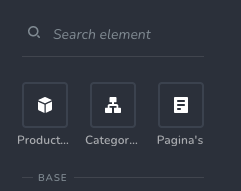 0
0 -
Thank you again for your thorough explanations. In spite of your best efforts, I was unable to follow the logic and adapt it to my needs. (This has more to do with me than it does with the instructions :-) ). I have since dropped Woocommerce and its associated functions in favour of a cost calculator plugin (https://stylishcostcalculator.com) that drops nicely into a Brizy page via a shortcode. uşor. With all of this, Brizy remains the best page builder I have had the pleasure of using.
0 -
Hi Menno,
All the elements I showed here are available in our latest Brizy Free and Pro updates. Could you please check if you have the latest versions for Brizy Free 2.2.0 and Brizy Pro 2.2.0?
Thanks!
Best regards,
Sandra0 -
Hi Yvan,
Thank you for your reply! If you need further help with the WooCommerce and how to create a Brizy template for WooCommerce pages and categories, I'm happy to listen to you and continue helping you. In case, you will want to come back in using the WooCommerce, feel free to ask us any question you have. Also, please send us some screenshots or video with the step where you receive some inconveniences. We will be happy to continue helping and supporting you.
Have a great day!Best regards,
Sandra0
Please sign in to leave a comment.
Comments
11 comments