Brizy builder: Font pop-up menu display problem

Hello
Since I have updated to Pro, I'm struggling to use the font pop-up that appears when clicking on a text block, to change the fon size and interline adjustment.
Before my upgrade (and probably the latest update) whenever I clicked on the T of the pop-up menu, I could use the scrolling sidebar to view and adjust then the text;
now it is impossible to catch it! As I click on it and the T submenu appears to be at the bottom of my video display but when I try to use the scroll bar or the keyboard arrows to adjust the view (and be able to see and click the alignment, the space between characters etc..)it disappears!
I'm not able to edit my text as it's impossible keeping the pop-up open AND scrolling the text to select it.
It is urgent to fix it, please!
P.s. I also noted today that whenever I make some style arrangements in the tablet or mobile views, then the desktop view result modified too!
Can you help?
Thanks!
Michela
-

Hi,
can you please confirm you have this issue with the latest Brizy versions - Free 2.1.5 and PRO 2.1.3? Also, do you have the same problem if you disable all your external plugins? I just checked what you reported but nothing was confirmed.
0 -
Hello Alex
Here’s the screenshot of the version

and how is displayed the pop-up menu
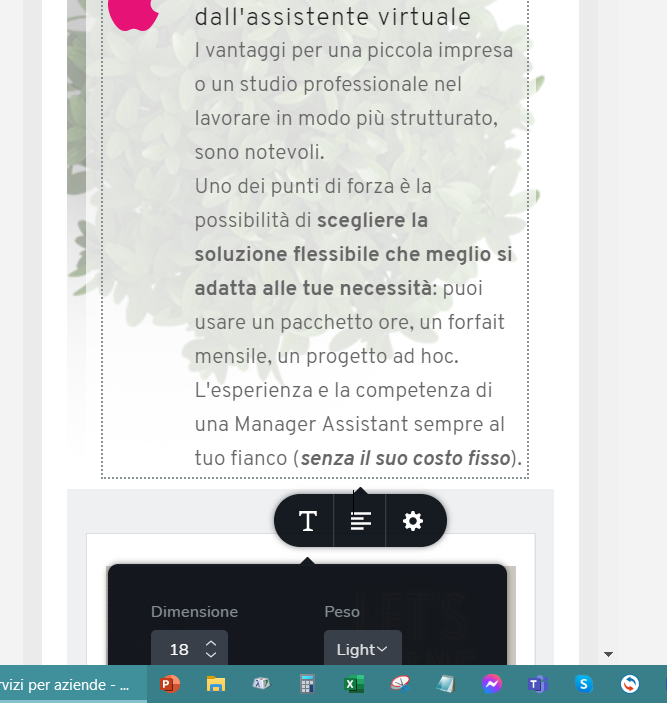
The moment I move the mouse to the scrollbar it disappears. Last night I had to reduce the screen to 75% to manage to have the text and the menu in the same window space.
I have the same problem with tablet and desktop view, despite I can adjust the window it is annoying that the pop-up doesn’t remain open and keep disappearing.
Hope my explanation helped!
Michela
1 -
Hi Michela,
Could you please send such a screen recorder so that we can see the whole problem: https://jmp.sh/0BjqbAb ? As you can see in the video, what you explain in the post - works for us.
Your confirm you have disabled all plugins and the problem still persists, right? We need to make sure that the problem is not caused by a third party plugin. After that, we must try to reproduce the problem on our demo site. If we can't do this, the next step is to inspect the problem on your dashboard.
0
Please sign in to leave a comment.
Comments
3 comments