Linking from Dynamic Post page to Post page Dynamically

I have successfully inserted a Post list on some of my pages.
When i want to go to the detail page of the post via read more my page is totally messed up and shows some kind of WP menu and not the standards of the site.
I have no clue how to correct this and hope somebody can shed some light on this matter, so i can move on with my build.
Thank you!
-

Hi,
Did you create a Brizy template for all posts? If you want to have Single post designed with Brizy, you have to create a Brizy template for them. Therefore, you have to go to Brizy -> Templates and create a new template. Click on the edit template, give a template name and a display condition. In your case, the display condition has to be from Single page and "Include - Posts - All". Like there. Don't forget to add the display condition. After this, public the template and start editing it with Brizy. Inside the template, you can add header block, footer block and all other details you want to display Post title, Post Content, Image with Featured image and so on.
Let us know if we can help you with something else.
Best regards,
Sandra0 -
Thank you Sandra. I have followed your instructions, but the link still goes to the plain WP page,
Hope to get this to work.
0 -
Hi,
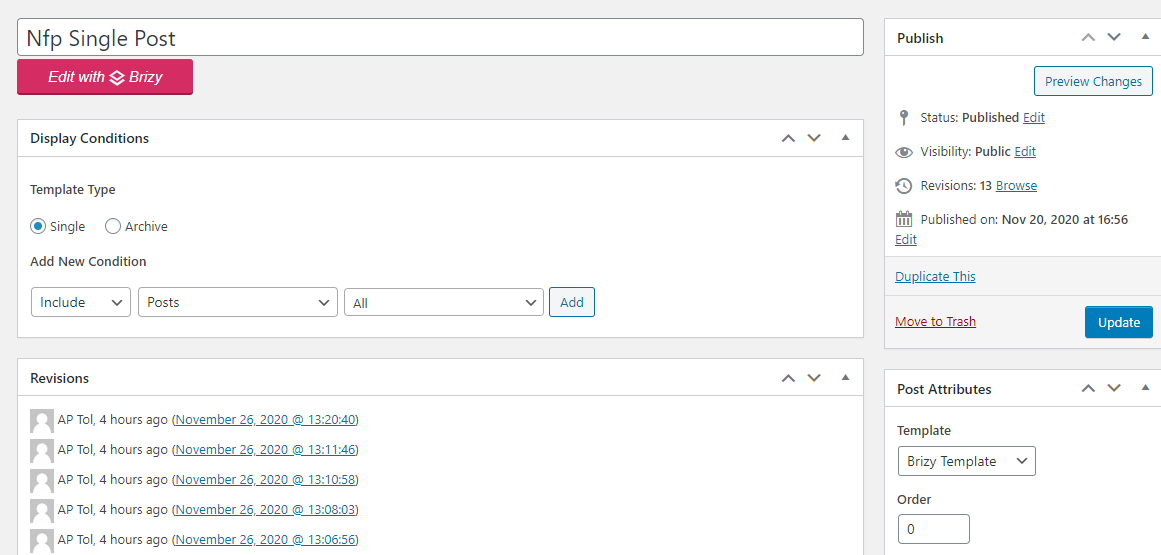
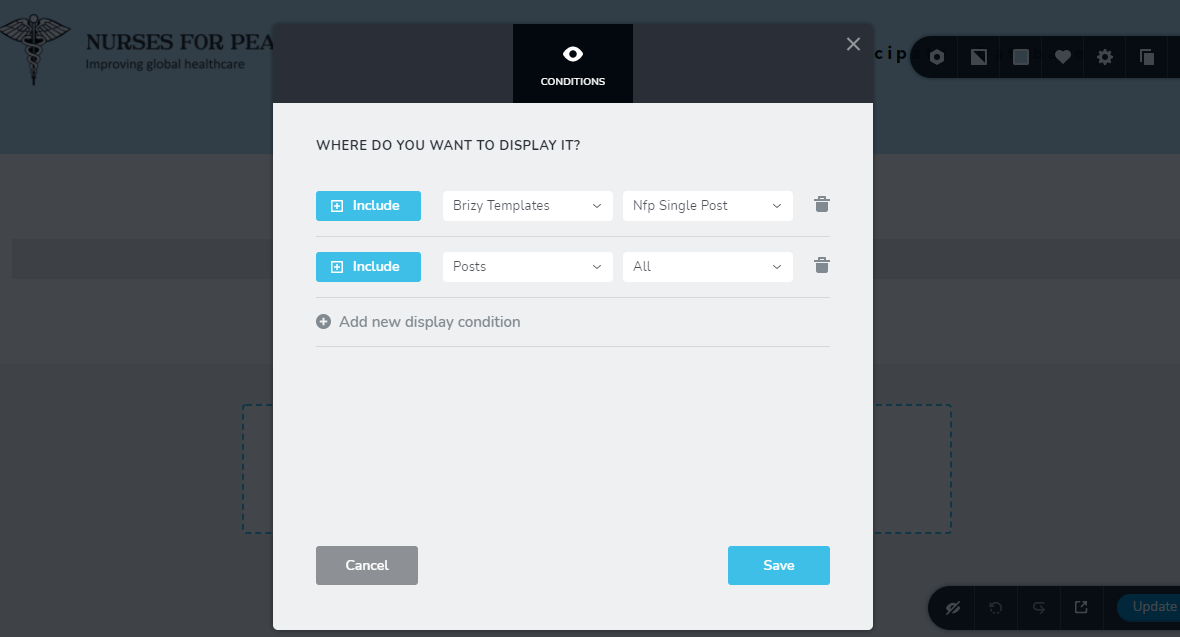
Could you please send us a screenshot with how did you set-up the display condition to the template? Also, could you describe how did you create posts? Could you send us some screenshots?
Thanks!
Best regards,
Sandra0 -
Shall do.. how do i get those to you? via email?
0 -
 0
0 -
 0
0 -
Hi,
Thank you for the screenshots. From there, I found that you didn't add the display condition. Could you please click on "Add" to add this condition and after this on the "Update" button to save this modification? See here.
Thanks!
Best regards,
Sandra0 -
Oeps...it is WORKING...yeah!
Thank you so much for your support and patience.
0 -
The proof is in the pudding...
Added some blocks in template and post title and content...
see what happens...
https://nursesforpeace.org/policies/privacy-policy/
The content get shoved to the bottom?
0 -
it works fine for other posts though!!!!
0 -
Found div issue. Resolved.
0 -
if I may i have a few items to be addressed:
1. in excerpt the author is appended to the text, how can i remove?
2. if some post have image and other do not, how can i make sure if there is not image in the post whilst it is defined in the single post template?
3. can one have mulitiple templates for single post and how does on then link them to a page?
0 -
Hi,
Great to know that all is working fine now! It's my pleasure to help you!
Yes, of course, if you have some other questions, feel free to ask them.
1 - This excerpt is taking from the theme and in such a way the theme generates the excerpt you see on the posts. To eliminate the author-name from the excerpt, I can suggest 2 methods:
- You can add manually the excerpt to the post from there. If you add it manually, the theme's excerpt will be overwritten and in the preview, you will have the excerpt you added manually;
- You can add a Custom CSS to the Post Excerpt element and hide the author name.2 - If a post doesn't have set a featured image and if in the single post template is added an image element to show the featured image of the post, then in the preview will not display any image. Therefore, in this case, we suggest to check all posts and make sure they have set a featured image.
3 - No, it isn't possible to set multiple templates for a single post. You can set a special template for some post but in such a way, in the main template for single posts, you have to indicate an Exclude condition for that post.
Best regards,
Sandra0 -
Hi,
In response on your support!
1. The appending has disappeared. No clue as to why.
2. Added featured images to item in Policies, see footer of nursesforpeace.org. Cookie policy. The image does not really show. I had large image and made them smaller to fit the space, but to no avail. Also if there is not image why not display it all, that would be a nice feature.
3. Understood.
Thank you so much for your support, appreciated.
0 -
Hi,
Thank you too for cooperation.
Regarding the 2nd point - what image did you set to show? How did you add it? Did you set to show the Featured Image? Does this page have set the Featured Image? In this case, the featured image will be added from the current page because this isn't a dynamic page and therefore, the feature image will be set-up from the current page.
Yes, we are working on this feature and in the future, if a page or post will not have set-up a featured image, the image element will be hidden from the page.
Thanks!
Best regards,
Sandra0 -
Hi Sandra, great to hear about the new feature. hope it will be soon, haha.
I set image in Template to Featured image. The page is dynamic, however so i expect the image to be taken from the post.
I have the same template used in News and there is works just fine.It ought to display the image in fit format!
0 -
Hi,
In the pages, if you set a featured image to that page, then it will be displayed on the background sections and blocks or in the Image element. If you don't set a featured image to the page, then it will not be displayed in the page.
Let us know if we can help you with something else.Best regards,
Sandra0 -
There is a page for Detail display from post, correct? I have featured image defined in post of course and then this image is supposed to be displayed like :https://nursesforpeace.org/news/ click on more and page is display as per definition of template.
However go to https://nursesforpeace.org/policies and read Cookie Policy. the image displayed is partial.
Hope there will be a fix so the image fits!
0 -
Hi,
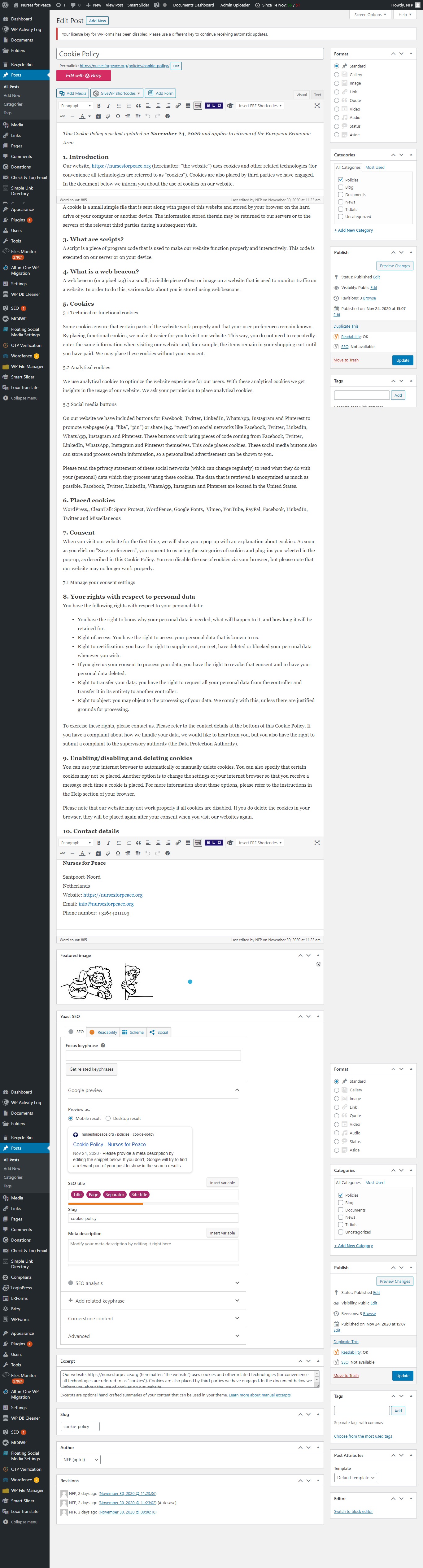
How did you create the Policies? How did you create the Cookie Policy? Where did you set the featured image? Could you please send us a screenshot with how did you create the Cookie Policy page (from the editor mode)?
Thanks!
Best regards,
Sandra0 -
Create as post in category Policies. Classic Editor
 0
0 -
Hi,
Thank you for the screenshot. Unfortunately, I didn't encounter where did you set the featured image for this post. Could you please send us the WP credentials to this site? We want to check this. I created a private ticket for this request, could you please send us the credentials there?
Best regards,
Sandra0 -
replied by email.
0 -
Hi,
I'm sorry but we didn't receive the reply. We send you a message on the private ticket. You have to receive a notification regarding private ticket on your email. Could you please check it?
Thanks!
Best regards,
Sandra1 -
Did not get link to PM. Please send.
0 -
Hi,
We send you one more private message. You have to receive an email on we***@at***om email. Your ticket number is 9952. Could you please check it again?
Thanks!
Best regards,
Sandra0 -
Got your email, but do not see pm link, so do i just reply on that email? or/
0 -
All mails you have sent link to this post, there must be an easier way to get the info to you
0 -
Hi,
Yes, you can reply to us in that email. Just now I send you one more message on the private channel. Could you please check it? This is the easiest and most secured way to receive private data from our users.
Thanks!Best regards,
Sandra0
Please sign in to leave a comment.
Comments
28 comments