Editing page with Brizy does nothing "Edit Page with Brizy"

Hello Brizy Support,
I hope I am writing to the right place if not please help me to send my query to the right address. Thank you!
I have a pro license and need to start my website next week. and I need to move from my previous environment where I am able to edit my Brizy pages.
I need help to be able to edit any newly created page on wordpress plus only brizy and brizy pro.
Please find information below what I found. For more details please drop me and e-mail (which I registered my brizy pro version)
what is NOT working:
steps to reproduce:
install in latest WP 5.5.3:
latest Brizy (free: 2.1.5, pro: 2.1.3)
Plugins activated: Brizy, Brizy Pro
Add new page, publish, "Edit Page with Brizy"
After clicking "Edit Page with Brizy" (on the top the page) wordpress just reloads and nothing is changing.
what is HALF WAY working:
install in latest WP 5.5.3:
latest Brizy (free: 2.1.5, pro: 2.1.3)
install latest theme: Neve (2.8.4) + template "Vet Center" (for Brizy, latest)
Plugins activated: Brizy, Brizy Pro
"Edit Page with Brizy" ONLY works on the main page, on the other pages from the template or a newly created ones it is the same.
I the browsers developer console there is only one issue I found, however I think it is not related:
"init_embed.js:247 [Violation] Added non-passive event listener to a scroll-blocking 'touchstart' event. Consider marking event handler as 'passive' to make the page more responsive. See https://www.ch40mestatus.qjz9zk/feature/5745543795965952"
Logs I found other than "HTTP 200" when "Edit Page with Brizy" worked and NOT worked can be seen below:
Edit with Brizy working:
[18:35:06] "GET /wp-content/plugins/brizy/public/editor-build/161-wp/editor/css/editor.css HTTP/1.1" 304 240 "https://website.com/?brizy-edit" "Mozilla/5.0"
[18:35:06] "GET /wp-content/plugins/brizy-pro/public/editor-build/47-wp/css/editor.pro.css HTTP/1.1" 304 240 "https://website.com/?brizy-edit" "Mozilla/5.0"
[18:35:06] "GET /wp-content/plugins/brizy/public/editor-build/161-wp/editor/fonts/fa-solid-900.woff2 HTTP/1.1" 304 232 "https://website.com" "Mozilla/5.0"
[18:35:06] "GET /wp-content/plugins/brizy/public/editor-build/161-wp/editor/js/editor.vendor.js HTTP/1.1" 304 230 "https://website.com/?brizy-edit-iframe" "Mozilla/5.0"
[18:35:06] "GET /wp-content/plugins/brizy/public/editor-build/161-wp/editor/js/editor.js HTTP/1.1" 304 230 "https://website.com/?brizy-edit-iframe" "Mozilla/5.0"
[18:35:06] "GET /wp-content/plugins/brizy-pro/public/editor-build/47-wp/js/editor.pro.js HTTP/1.1" 304 230 "https://website.com/?brizy-edit-iframe" "Mozilla/5.0"
[18:35:07] "GET /wp-content/plugins/brizy/public/editor-build/161-wp/editor/js/0.worker.js HTTP/1.1" 304 230 "https://website.com/?brizy-edit-iframe" "Mozilla/5.0"
[18:35:07] "GET /wp-content/plugins/brizy/public/editor-build/161-wp/thumbs/blocksThumbnailSizes.json HTTP/1.1" 304 224 "https://website.com/?brizy-edit-iframe" "Mozilla/5.0"
[18:35:07] "GET /wp-content/plugins/brizy/public/editor-build/161-wp/editor/icons/icons.svg HTTP/1.1" 304 245 "https://website.com/?brizy-edit-iframe" "Mozilla/5.0"
[18:35:09] "GET /wp-content/plugins/brizy/public/editor-build/161-wp/editor/fonts/nunito-regular-webfont.woff2 HTTP/1.1" 304 232 "https://website.com" "Mozilla/5.0"
[18:35:09] "GET /wp-content/plugins/brizy/public/editor-build/161-wp/editor/fonts/nunito-bold-webfont.woff2 HTTP/1.1" 304 232 "https://website.com" "Mozilla/5.0"
[18:35:09] "GET /wp-content/plugins/brizy/public/editor-build/161-wp/editor/fonts/nunito-semibold-webfont.woff2 HTTP/1.1" 304 232 "https://website.com" "Mozilla/5.0"
[18:35:09] "GET /wp-content/plugins/brizy/public/editor-build/161-wp/editor/fonts/nunito-italic-webfont.woff2 HTTP/1.1" 304 232 "https://website.com" "Mozilla/5.0"
Edit with Brizy NOT working:
[18:37:44] "GET /wp-content/plugins/brizy/public/editor-build/161-wp/editor/css/preview.css HTTP/1.1" 304 240 "https://website.com/6d91a-our-clinic-vet-center-brizy/?brizy-edit" "Mozilla/5.0"
[18:37:44] "GET /wp-content/plugins/brizy/public/editor-build/161-wp/editor/js/polyfill.js HTTP/1.1" 304 230 "https://website.com/6d91a-our-clinic-vet-center-brizy/?brizy-edit" "Mozilla/5.0"
[18:37:44] "GET /wp-content/plugins/brizy/public/editor-build/161-wp/editor/js/preview.js HTTP/1.1" 304 230 "https://website.com/6d91a-our-clinic-vet-center-brizy/?brizy-edit" "Mozilla/5.0"
Please help to resolve this issue ASAP.
I think that this is a very trivial issue, however I am not a master of this topic.
I know this is easy-peasy task for you Brizy :)
Please contact me soon.
Thank you in advice!
Kind regards,
Bela
-

Hi Bela,
Could you please send us a screenshot with the error you encounter? This will be easier to understand the problem.
Thanks!
Best regards,
Sandra0 -
Hello Sandra,
Please find screenshot attached.
After I clicked the "Edit Page with Brizy" nothing is happening.
Please let me know if you have a solution already for the same or similar issue, so I can try the solution by myself.
In case that you need more input from my side please let me know.
Kind regards,
Bela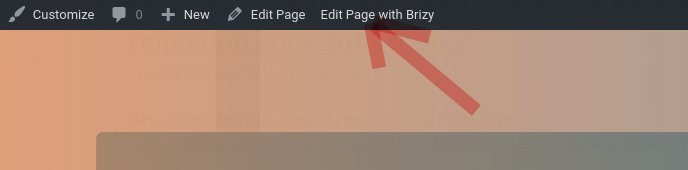 0
0 -
Hello Sandra,
I am still waiting for my message to be approved.
To make the resolution more fluent please contact me via e-mail so I can reply to you in e-mail.
I really need my issue to be resolved ASAP.
Kind regards,
Bela0 -
Hi Bela,
With Brizy is possible to create a new page and only edit Brizy pages. Unfortunately, isn't possible to edit with Brizy, pages that are already created with the theme or another page builder.
Could you please follow all the steps from this video I made and check if you receive the same result? If you receive the same error you report above, please let us know.Thanks!
Best regards,
Sandra0 -
Hello Sandra,
Please find recording from the issue below:
Can you please contact me in e-mail to speed up the process?
Kind regards,
Bela0 -
Hi,
Thank you for all details and the video!
I created a private ticket on this request. You had to receive a notification regarding this on email. Could you send to us in that private message the WP credentials to this site?Thanks!
Best regards,
Sandra0
Please sign in to leave a comment.
Comments
6 comments