Instructions for Brizy Cloud DNS management when working with Cloudflare?

Would you PLEASE provide clear instructions for Brizy Cloud DNS management when working with Cloudflare?
Let's say my custom domain is: mydomain.com
Setting up CNAME is no problem BUT
I am not able to create the suggested A record exactly as
A @ 34.237.47.210
It automatically defaults to
A mydomain.com 34.237.47.210
and nothing works when I try to go to the url: mydomain.com
Here's what I see at Cloudflare (with red box covering data I do not wish to share here):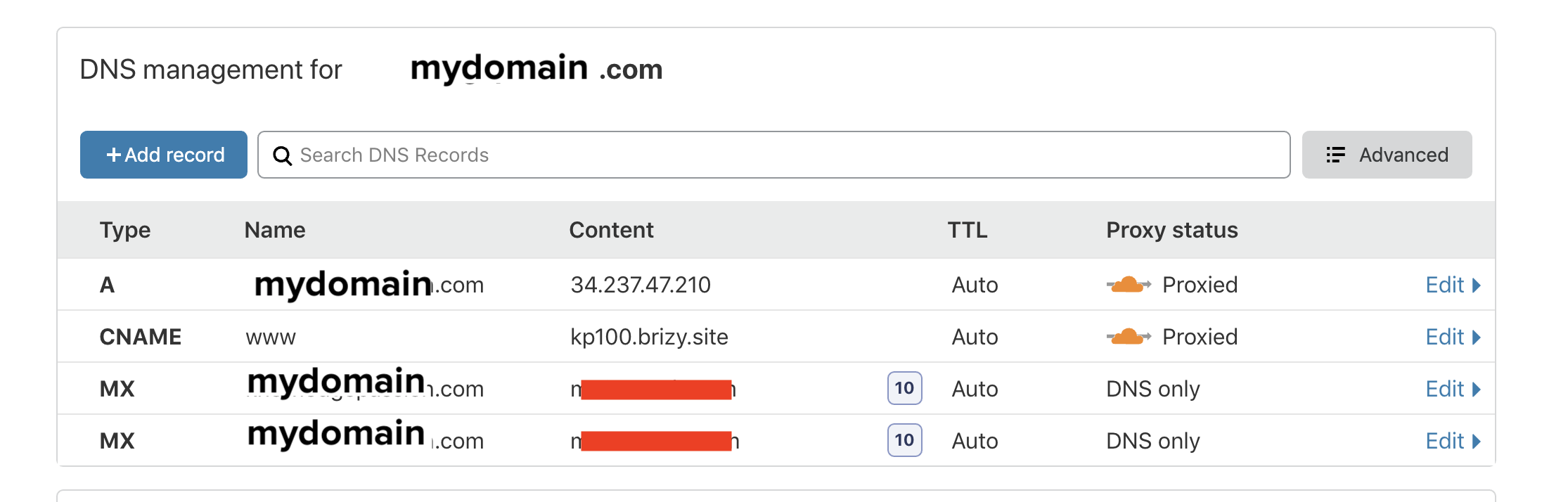
What needs to be corrected here please so that I can use my custom domain and get SSL too, please?
-

Hi,
Could you please deactivate the proxy for A and Cname record and have activated the grey cloud? At the moment Brizy pages will not work if the proxy is activated.
Thanks!
Best regards,
Sandra0 -

I have two sites, one works with proxy on and one doesn't (neither show as connected within Brizy (both names are red) but one works as its supposed to and the other doesn't work at all).
Also, the site that does work was setup a few months ago and I recall both names being shown as connected (green) then whereas its now red. The site that doesn't work currently was only setup a couple of days ago.
If I turn off the proxy for the site that doesn't work now, it is then shown as connected in Brizy (both names are green) but when I try to load the page it shows a default brizy page with no webpage.
Direct chat or a ticketing system would be useful in these situations.
0 -
Hi,
If you registered the Brizy Cloud project on the Cloudflare and you have activated the grey cloud for both Cname and A record and you still receive a connection problem, please send us the URL of the site/sites and we will check where is the problem. If you don't want to make them public, let us know and we will delete them before approving your reply.
Thanks!
Best regards,
Sandra0
Please sign in to leave a comment.
Comments
3 comments