Changing fonts on BUTTON element to Google unicode fonts is not possible

I have Brizy Pro. I am working on website which is in our local language i.e. MARATHI. But I noticed that changing font to Unicode inside the BUTTON element is not possible.
I tried a lot to use Google unicode fonts in our local language but it seems not working.
Kindly provide solution.
Regards,
Chetan Patnekar
-

Hi,
Can you please give us more details? Are you trying to add unicode as a button text? A screenshot or image will help a lot.
0 -
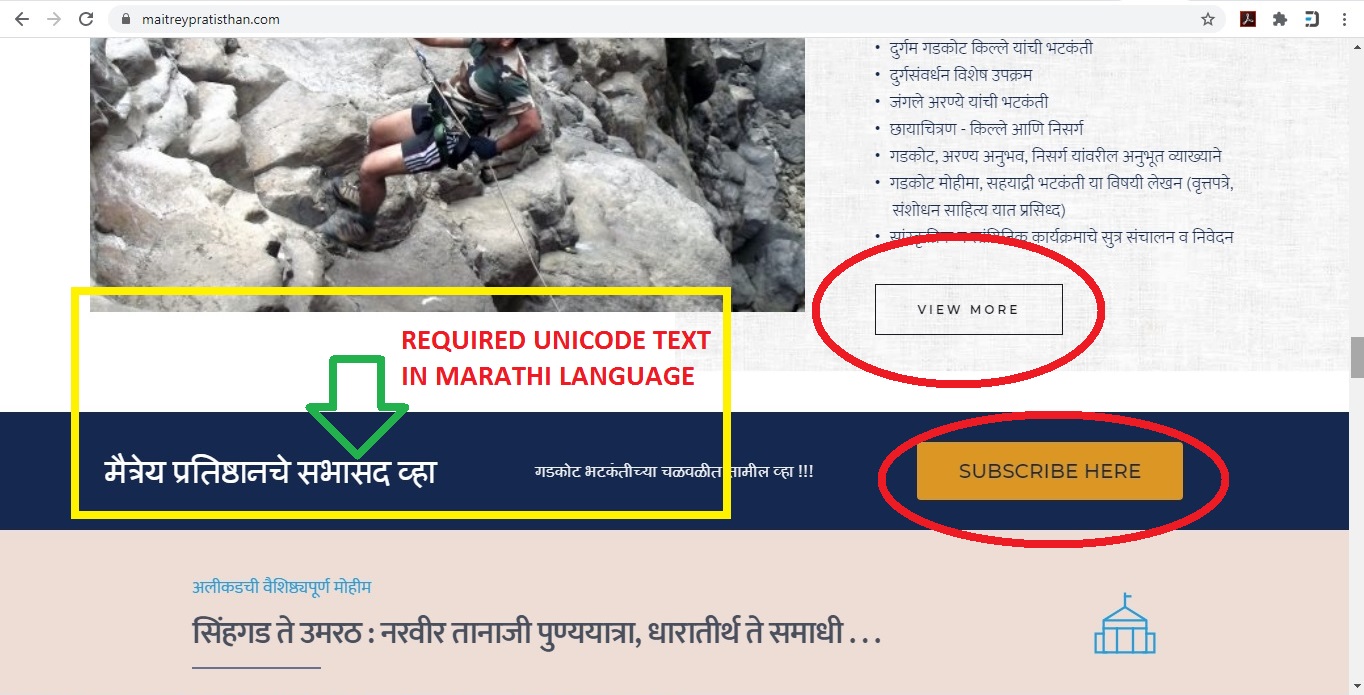
1) All content on this page is UNICODE TEXT except in RED circles. I can add these google fonts on page from TEXT element.
2) BUTTONs are shown in RED circles. The Text in button elements i.e. "VIEW MORE" or "SUBSCRIBE HERE" is to be changed to google unicode fonts. This is not possible from BUTTON element.
I hope you can understand from this image. Kindly check it and suggest me the solution on top priority.
Regards,
Chetan Patnekar0 -
Hi,
I'm not sure I understand how this works with Marathi and unicodes, but why not just copy the Marathi text and paste it on the button: https://jmp.sh/cRp4zjt ?
If this does not work for you then the solution is to use links instead of buttons. You can add unicode using the text element, then add a link to it and customize it as a button with Custom CSS.
0 -
Hi,
Thanks for sharing information.
Will you please explain the process of bellow given your suggestion so that I will follow the same. :
"If this does not work for you then the solution is to use links instead of buttons. You can add unicode using the text element, then add a link to it and customize it as a button with Custom CSS"
Regards,Chetan Patnekar
0 -
You must involve CSS to customize a link as a button. It's something like this: https://jmp.sh/wcGFVLh, but this required some custom work, and unfortunately I can't help you with that. This is something external and you have to do it yourself.
0
Please sign in to leave a comment.
Comments
5 comments