Form checkbox formatting

I have created a form for visitors to consent to Gift Aid in the UK.
It is at: https://lindalecommunitytrust.org.uk/donate
There are 4 checkboxes at the end. The resulting email (the last bit) looks like this:
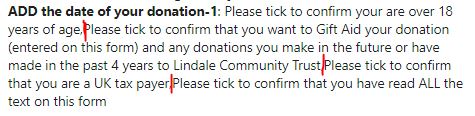
Is there any way that there could be paragraph / line breaks between the checkbox additions - shown by the red lines??
It would be much neater and easier to read!!
-
It would also be good if we could insert text areas between the fields and use them to add instructions or headings? Could this be done by adding a kind of pseudo-field to the drop down in the Form / Fields / TYPE menu. It could be called something like: 'Plain text insert'
0 -
One more suggestion; I would like to be able to alter the colour of the field background (and perhaps other typographical details) for INDIVIDUAL fields.
0 -

Hi,
Thank you for your message. Please find my answers listed below based on the comments received.
1) Unfortunately, there is no option to format the email but I have created an internal issue with this and we will look for a solution.
As a workaround you can add 4 separate checkbox fields instead of one with 4 items:https://jmp.sh/7UGSmio This way, they will be separated on incoming emails.
2) Why don't use the Label option to add description: https://jmp.sh/AM9gYt6 ?
3) I will discuss such an option with the team.
0 -

Excuse me, how did you placed those option checkboxes?
I can't find them
0 -
Hi,
you have the checkbox option in the form settings: https://jmp.sh/TrtwhmI
0
Please sign in to leave a comment.
Comments
5 comments