Brizy adding duplicate DOM object tags

Before I begin, I apologize if I come across rude, but I'm frustrated.
My original post regarding this issue does seem not show in the threads, nor does it show in my activities log so not sure how else to address my latest concerns but to start a new topic. Thus far an adequate answer has not been provided to an obvious bug, nor has a reply to my follow-up post been answered. I received a boilerplate reply to my original post that did not address the bug (claimed all was fine) and when I submitted a screenshot of the issue, no reply was given (been 2 days). The last time I had an issue I was met with the same dismissal that all was working fine before support finally admitted to the bug and ultimately resolved the problem in a future release (although it took awhile). This time I took time to describe the issue in detail only to once again get a reply that all is working as expected (when it clearly is not). No request from me for further information, no response to my follow-up post where I attached a screenshot of the problem. Just nothing.
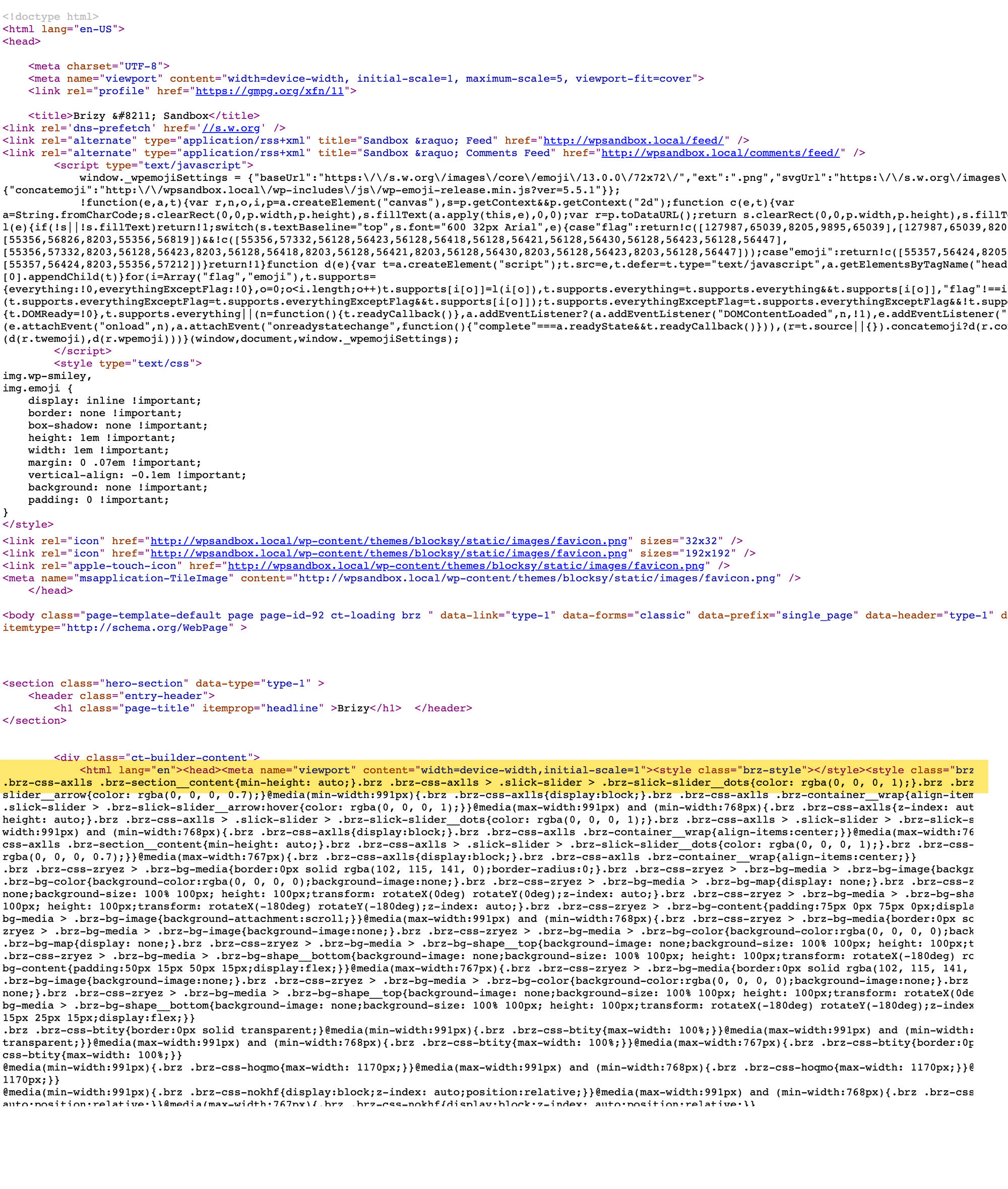
I've attached (again) a screenshot showing the current problem. When using any theme template other than the Brizy blank template, a second set of DOM object tags <html><head><meta><body> are added after the original <body> tag. I have tried on multiple themes and with no other plugins activated, all with the same result.
There should not be two sets of object tags for <html><head><body> (also, the duplicate and irrelevant set generated by Brizy are not even closed, not that it would matter).
For someone who prefers using a theme where Brizy serves up page content only and not the header, footer and navigation, this makes the licensed plugin mostly unusable if validation is a concern.
Again, I apologize for being rude, but my frustration with Brizy support is high right now.
I really, really want to use Brizy on my sites as it's a wonderful page builder with a clean, elegant and intuitive UI but these nagging little issues are keeping me from that goal.
A quick patch release would be much appreciated.
-

Hi John,
we have all your posts and replies, but probably because they are "in pending" for a while and it was the weekend, you created the impression that they did not reach us. However, according to your other post, the problem has been solved and I'm glad to hear that.
0 -
Hi Alex,
Yes, sorry for all the posts. It's a bit embarrassing.
Natalia has responded to the original thread where I later discovered upon further testing that it is Brizy Pro 2.0.7 that has this issue and remains unresolved. It was not the Local vs Live environment as I initially thought. The bug is not present in Brizy Pro 2.0.4 so I have reverted to that version for my live sites.
I'm sure it will get resolved in subsequent releases. Thanks for being so helpful. :)
0 -
Interesting. Please continue the private discussion and we will definitely find a solution for this. It takes some time to be able to reproduce and then to solve.
0
Please sign in to leave a comment.
Comments
3 comments