duplicate DOM tree - once again

I would like to address the problem again here. Hope this doesn't bother you.
What about the duplicate DOM tree in Brizy source code? A website shouldn't (may) have two html, head and body tags? Every Brizy website has the normal html structure and a second DOM tree.
I think Brizy is really good and I really enjoy working with it, but what about this problem? I learned that there can only be one DOM tree per page. From my understanding, the wrong thing to do is to have a double head, body, etc.
What do you think of it?
-

Hi,
You're right, a website shouldn't have two <head> and <body> tags. But, the thing is that we can't replicate such behavior.
We had this reported by another user but in his case, it was a local problem. Could you check if this is not your case?
Post link: https://support.brizy.io/hc/en-us/community/posts/360074150751-Brizy-DOM-Object-Duplicate-Issue
0 -
Thanks for the answer.
Please explain to me if I don't understand something fundamental here. I use the source text view in the browser. That's where I find these things. Chrome / Firefox source code with "Ctrl and U"
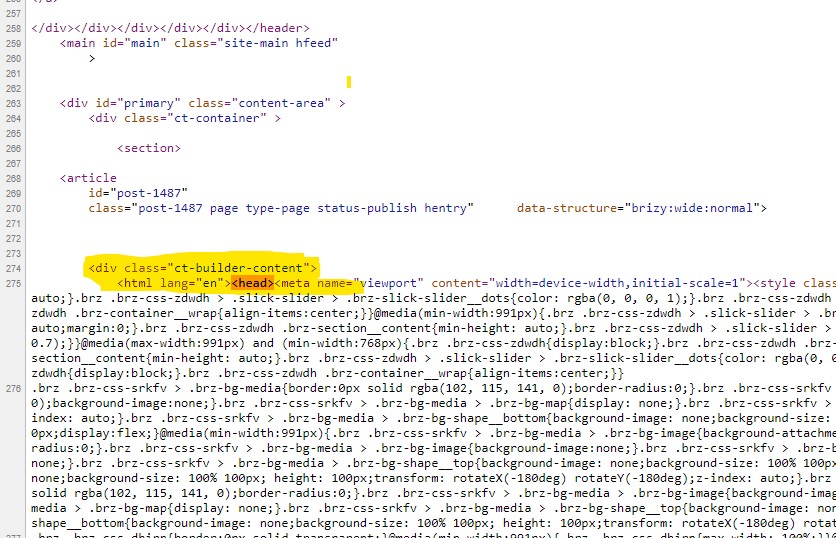
On this website - temporarily on a subdomain in the Internet, not locally - I use Blocksy and Brizy Pro. The Chrome browser shows me head and body twice in the source text view. After the <div class = "ct-builder-content"> follows the <html lang = "en"> <head> ... with body etc.
https://int.basis17-lebensart.de/Just as on the Astra Theme Demo for Brizy, I see head and body twice.
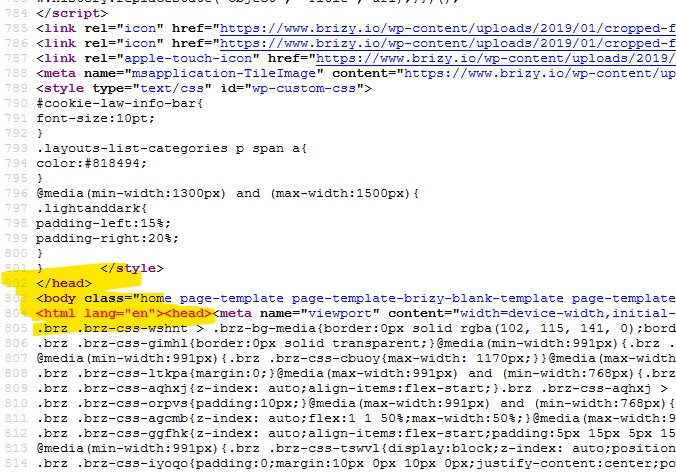
https://websitedemos.net/brandstore-05/I can also find this on brizy.io. After <body class = "home page-template page-template-brizy-blank-template page-template-brizy-blank-template-php page page-id-17031 brz"> follows <html lang = "en"> <head > and so on ...
Don't get me wrong, I don't want to make accusations. I just don't understand this point of view. I love Brizy :-) and really enjoy working with it ...
Where do I get something wrong? Maybe all of this is not so relevant and it is not a real mistake.
The first screenshot is from brizy.io. The second from https://int.basis17-lebensart.de/
 0
0 -
Hi,
what is strange is that I can't see the second <head> tag when I inspect the code: https://jmp.sh/hgF7K8z but, I see this when I click on "View Page Source". I will talk to devs about this and if I have any news I will get back to you.
0 -
As far as I know, the developer tools do not display the original source text of a website, but rather the interpretation of the source text by the browser. You can call up the original source text in the browser with "Ctrl + U" ...
Many thanks for the answer
0 -
Hi,
The problem was fixed. Please update Brizy Free to 2.0.16 and Brizy PRO (if you have) to 2.0.8
0 -
Yes, it works. I already read it in another post this morning.
Thank you very much. You guys are great.0
Please sign in to leave a comment.
Comments
6 comments