page elements freeze in editor - not editable any longer

Hi Brizy Team,
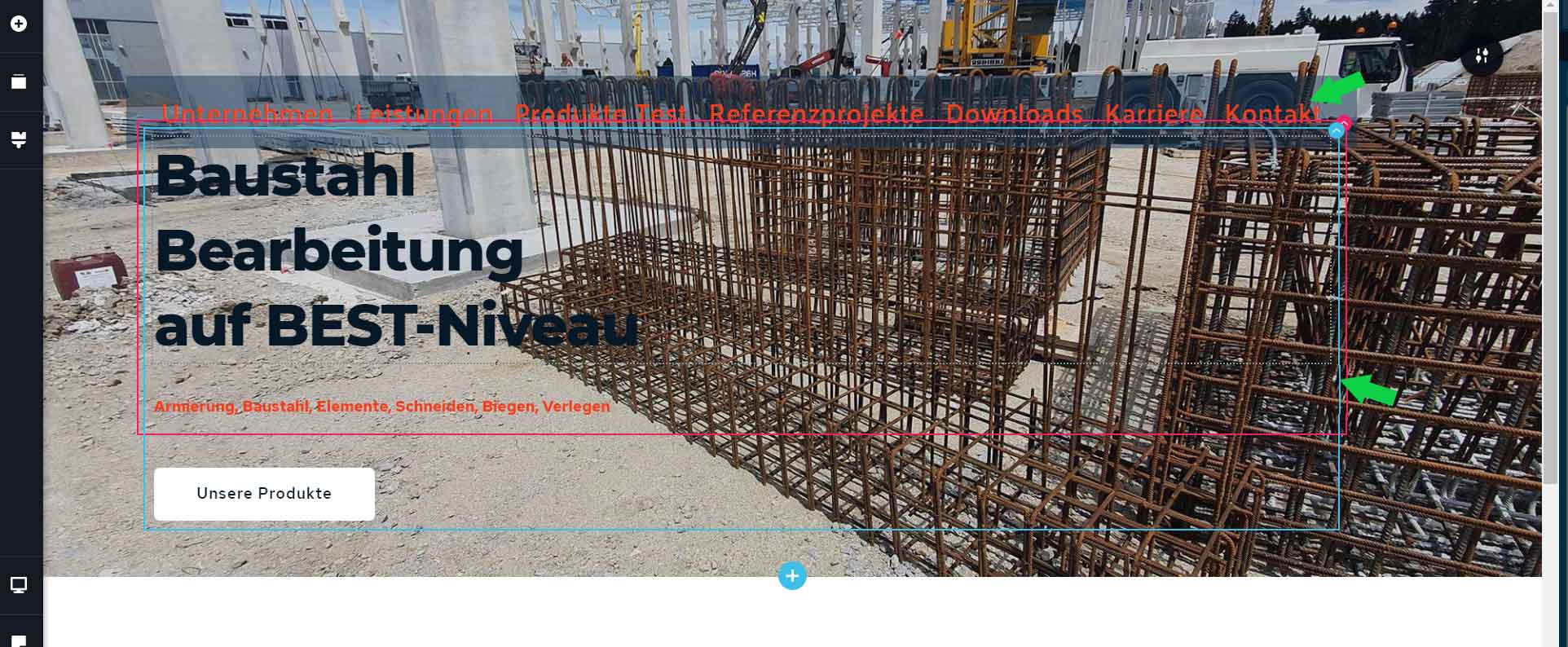
I am still new to Brizy. Adding elements and changing their position in the editor by dragging them around I very often end up with the elemets freezing. I suddenly cannot edit them, click them or access the menues for their properties anylonger. (see screenshot)
For example I add a menu item and can change all settings, when mooving it up to the beginning of the page suddenly it seems to freeze, hence I cannot eddit them anymore and need to revert.
What am I doing wrong? does a Menu item have to be enbedded in a row item? Is it too close to another row, including items?
Best regards,
Max
-

Hi,
Yes, I suppose that the menu element is too near the row element and it overlaps the menu. This meant that the menu element is somehow under the row element and you can't access it.
What I suggest, is to re-make a bit this block. I notice that you have a column and in that column, you added a row element where you deleted one column. I recommend adding firstly the Row element. When you will add the row element, automatically will appear 2 columns. One column you can delete and leave only one column. In that column add 2 text elements and 1 button element. Also, between these elements, you can add Spacer element to add some between elements.
If you want the menu to be on the block near to other elements, you can add the Menu element in the same column and after it to add the Spacer element for space. Something like this.
This tip will help you to arrange and not be confused about what elements do you have on the block.Thanks!
Best regards,
Sandra0
Please sign in to leave a comment.
Comments
1 comment