Drop Down Menu Color and Font change

Hello,
I have a Pro account I want to change the color and the font of the dropdown menu. When I click on them it only gives me "icon" and " setting" it doesn't give me the option for color a nd text.
How can I have access?
Thank you!
-

Hi,
Thank you for reporting this problem. We already informed our managers and team regarding this problem and in the next update, we will fix it. I'm sorry for this inconvenience.
Best regards,
Sandra0 -

Hi hi Sandra!
I have the same issue. I want to change the font color in the menu but there is not way that I can see.
0 -

Hi Santiago,
I checked your problem in our dashboard, with Brizy on the latest versions and everything work fine, please see here.
Also, please check if you have the latest Brizy Free 2.2.14 and Brizy Pro 2.2.10 version?
Regards,
Nelly
0 -
Thanks for your response.
I am using brizy cloud. The file that you attached says “not found” when I try to open it.0 -
Hi Santiago,
I'm sorry for this inconvenience , please check now.
Regards,
Nelly
0 -
Hi Nelly,
Thanks again for your reply.
I think I did not explain myself well. What I am trying to change is the font color. Look at the screenshot attached. In the green menu area, I have the date in white and the rest of the font in black.
My client wants to have everything in white(branding). I have tried to change the font color but I cannot.
Can you pint me to where I can do that?
 0
0 -
Hi Santiago,
I have already answered to you in another post.
Best regards,
Nelly
0 -

hi there this has been 5 year why has this not changed yet changing font should be a simple an imitate task for users
0 -

Hello Jamie,
You can change the color and the font of the dropdown menu. Here is how.
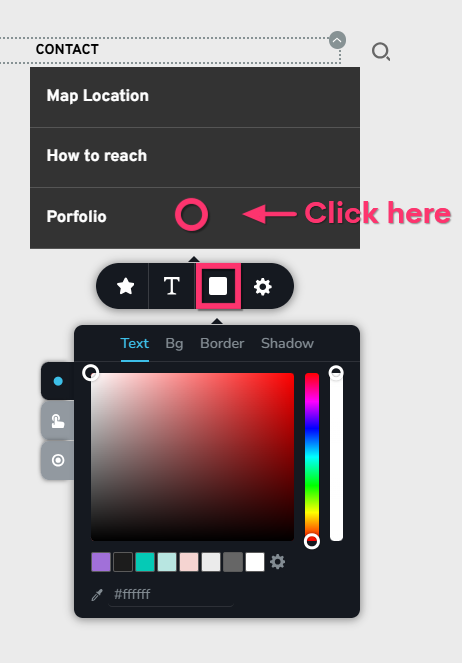
- Open drop down menu by clicking on the appropriate main menu and click somewhere in the drop down menu container
- In the Toolbar that popups, select the color icon. In the color pallette that opens up, kindly set the menu Text color and the Background color for the drop down menu.
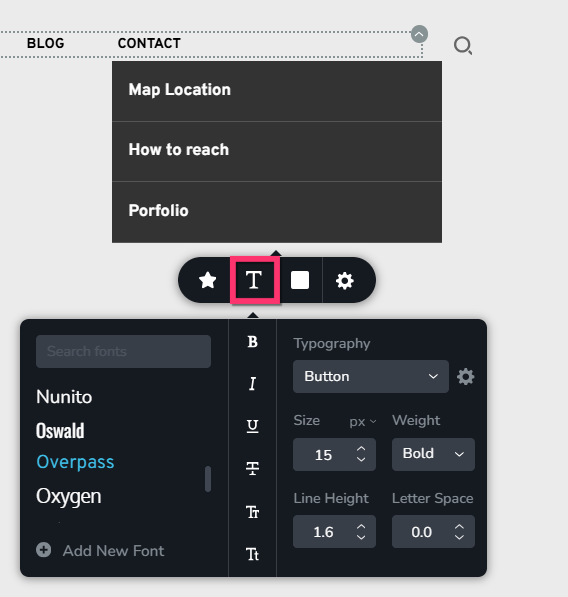
- Select the Typography icon and set the appropriate font for the sub menus
0
Please sign in to leave a comment.
Comments
9 comments