Im getting a weird issue with dynamic content going on to the footer

Hi! I'm getting this weird issue when i used dynamic content. calling on an acf text field. On the editor its look good and everything is on its place but when i check the live view or preview the dynamic content goes under the footer.
This is what it looks from the editor

and this is what it looks like in the preview and live view
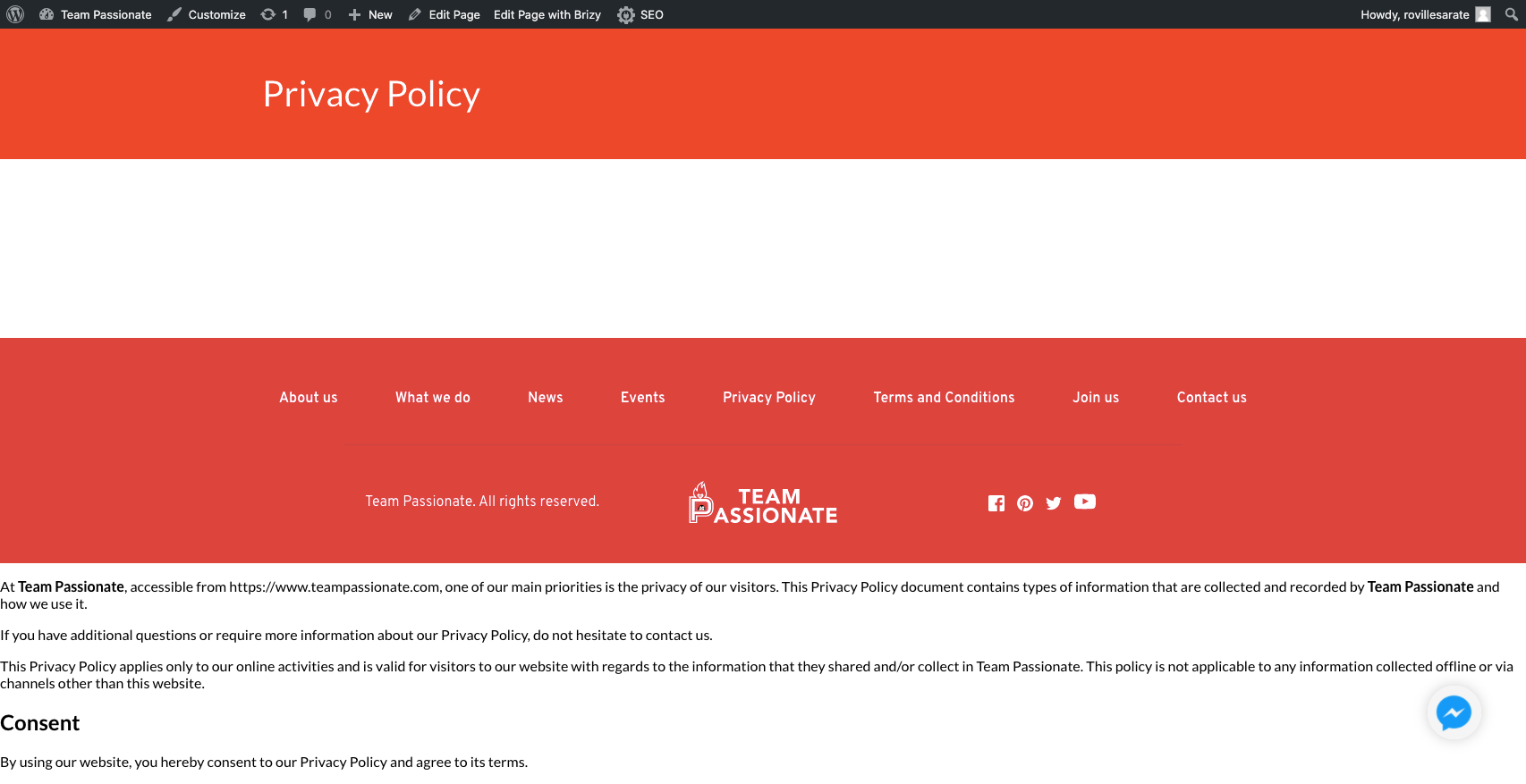
You can view it here: https://www.teampassionate.com/privacy-policy/
`
### wp-core ###
version: 5.5.1
site_language: en_US
user_language: en_US
timezone: +00:00
permalink: /%postname%/
https_status: true
multisite: false
user_registration: 0
blog_public: 1
default_comment_status: open
environment_type: production
user_count: 2
dotorg_communication: true
### wp-plugins-active (10) ###
Advanced Custom Fields: Extended: version: 0.8.7.3, author: ACF Extended, Auto-updates enabled
Advanced Custom Fields PRO: version: 5.9.1, author: Elliot Condon, Auto-updates disabled
All In One SEO Pack: version: 3.7.1, author: All in One SEO Team, Auto-updates disabled
Brizy: version: 2.0.13, author: Brizy.io, Auto-updates disabled
Brizy Pro: version: 2.0.6, author: Brizy.io, Auto-updates disabled
Chatbot Extended UI Addon: version: 1.1.0, author: QuantumCloud, Auto-updates disabled
Conversational Form Builder Pro: version: 1.4.6, author: QuantumCloud, Auto-updates disabled
Disable Gutenberg: version: 2.2, author: Jeff Starr, Auto-updates disabled
Messenger ChatBot Addon: version: 2.0.0, author: QuantumCloud, Auto-updates disabled
WPBot Pro Wordpress Chatbot: version: 10.2.9, author: QuantumCloud, Auto-updates disabled
`
-

Hi,
Thank you for all these details. Could you please give us more details about how did you create this template and this "Privacy Policy page"?
When I open this page, I see it in such a way https://jmp.sh/xOVXp2H. As you can see I could see the Post content. Could you please say how did you create this content https://jmp.sh/Nnxw7ZL? Where did you add it? What display conditions did you add for the template? I notice that you said that you used the ACF, could I ask why did you use ACF for this page? What field from ACF did you use? Could you send some screenshots?
Thanks!
Best regards,
Sandra0 -
I tried putting in another text field just to check if its going to the footer. but it did not. only the text field that is using the dynamic content of an acf wysiwg field is going to under the footer.
At first i was using the page content field as a dynamic text but when i view it on the live version the text disappear and when i go back to the editor. the text is already gone. that is why i used the acf wysiwg field for replacement.
0 -
At the moment we have some problem with WYSIWYG paragraph field type but I can recommend a simpler way to create the Privacy page but without ACF because ACF is more used for posts or custom posts type as Books, Cars, Flowers etc. For a simple page like Privacy page, you can build it in such away:
1 - Create a new page in Wp dashboard -> Pages;
1.1 - It is optional and is regarding by the theme you use, you can set this new page in the theme as Privacy Page;
2 - Add all the content you need but don't activate the Brizy editor. Add all the content in the Wp default editor;
3 - Go to WP dashboard -> Brizy -> Templates -> Add new;
4 - Add a name and display condition "Include - Pages - [Select this newly created page that you set as Privacy page]";
5 - Publish and Update this template;
5 - Click "Edit with Brizy";
6 - Here add the header, footer and Post Content element (also, you can add other elements, blocks you need);
7 - Update the template and preview it.Also, you can create and edit this page directly in the page without creating a template for this page.
Best regards,
Sandra0
Please sign in to leave a comment.
Comments
3 comments