Plugins do not update

Brizy Pro plugins version 2.04 are not updating to version 2.06
I am having to unistall - then upload the new plugin file and put in a new license key
When I have over 20 sites to maintain this is becoming a chore
I use WP manager to update all my sites plugins but Brizy Pro will not update even when tagged to enable updates
-

Hi, Danielle,
Did you receive an error when you tried to update the plugin? What error did you receive? Could you please send us a screenshot? Or you didn't receive the notification about the update? In this case, do you activate a Brizy license on that site?
Thanks!
Best regards,
Sandra0 -

Hey Danielle, I was experiencing an issue related where the Brizzy Pro plug-in had an update, but when I clicked on update, it wouldn't update, but gave out an error message saying update failed. To fix this all I did was deactivate the Brizzy Pro plug-in, then I update it, it updated and then I re-activated the Brizzy Pro plug-in, and all was good.
Hope this was helpful,
Dabia
0 -

All plugins on my site update no problem, but brizy...
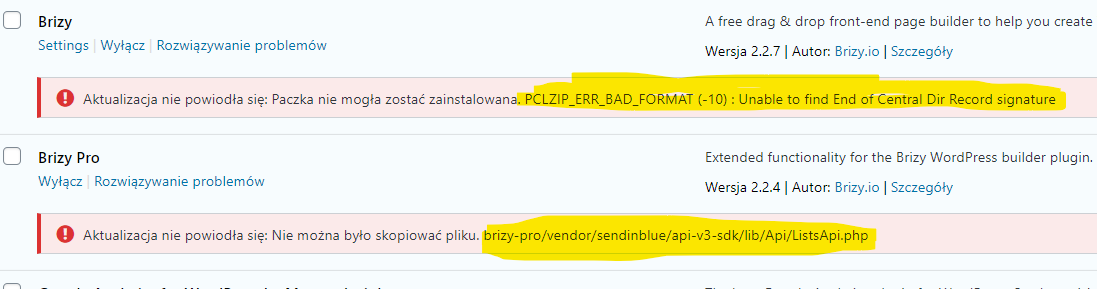
What can I do about it?
0 -
Hi Piotr,
Could you please deactivate and delete the Brizy Free and Brizy Pro plugin and re-install manually them again with the new versions? Did you found some other issues? If you can't install them using WP dashboard, could you try to re-install them through FTP https://www.wpbeginner.com/beginners-guide/how-to-manually-update-wordpress-plugins-via-ftp/?
Best regards,
Sandra0
Please sign in to leave a comment.
Comments
4 comments