Bug with Brizy and Polylang

-

Hi,
Did you find this problem only on this page or in all pages? How did you create this page? Did you use the Brizy template? Did you follow these steps? https://polylang.pro/doc/translating-pages-posts-categories-and-tags/
Thanks!
Best regards,
Sandra0 -
Yes I used a Brizy template.
Yes I did follow these steps.
Except I did clone the French page (I am using Astra theme). Then specified the language as English and translated it.
It all looked fine, but then I realized the 3 pages are always the same whatever I do...
Is there a way to pass you my login if you wanna have a look ?
Thanks
0 -
Hi,
Is this problem happen on all pages or only on the homepage? Also, could I ask you why did you clone the French page?
Thanks!Best regards,
Sandra0 -
Hi Sandra,
I have tried to translate only the Home page for now, so I am not sure if it can happen for other pages as well.
I have contacted my Wordpress theme support as well and they confirmed me that it is an incompatibility issue with Brizy and Polylang. When we change themes, the issues subsists as well.
I have isolated my wordpress site with WPstaging so that you can have a look if you want ?
How can I give you my login credentials for the WPstaging site in a secure way ?
Thanks
0 -
Hi,
Unfortunately, I couldn't reproduce the problem you report and all seems to work fine. See here. But ok, I will create a private ticket for this request and we will investigate this inconvenience from your dashboard. You had to receive a notification regarding this on email. Could you please send us in that private ticket the WP credentials to this site?
Thanks!
Best regards,
Sandra0 -
Thanks Sandra! I will look for the private ticket, thanks!
0 -
Hi Sandra, I have the feeling your team forgot this case or maybe one person is on holidays, as I have no news since the last 13 days. Can you pls help regarding the private ticket ?
Many thanks!
0 -
Hi Sandra, could u pls keep me updated ? I have no news on the other thread you created. Thx
0 -
Hi Solvene,
I'm sorry for the late response. We didn't forget about you, at the moment we didn't receive some concrete information from the team regarding this problem. I was informed by the team that we are still investigating this problem. It is a complex and complicated problem and we need a bit more time to check it. When we will have some notification regarding this, our colleague Natalia will inform you in a private ticket,.
Thank you for understanding!
Best regards,
Sandra0 -
Hi,
Can you pls follow up on this issue ?
I had send request here: (Deleted by Brizy team)
and here: https://support.brizy.io/hc/en-us/requests/12300
Your colleague had sorted the issue for me on my blog coachingnutrition.com but didn't tell me how to solve it and I just need this issue to be fixed also on my 2nd blog entrepreneursclique.com
Many thanks
Regards
0 -

Hi Karen,
We are sorry for the late reply.
The issue from your second blog was fixed already, could you please check now?
Thank you for your understanding and patience.
Best regards, Nelea.
0 -
Yes it is, however the post preview shows the French ones (Category Blog-FR) in all pages.
These two pages should display only posts in their languages and not French: https://entrepreneursclique.com/en/home/ and https://entrepreneursclique.com/es/inicio/
In the Edit mode, I see I chose the good category Blog-ES and Blog-EN for each so it should display the right posts.
0 -
Hi Karen,
A developer inspects your project. Please allow us a bit more time.
Best regards, Nelea.
0 -
Thanks I am waiting for your news then.
0 -
I am including more details for you here to make sure you saw the issue:
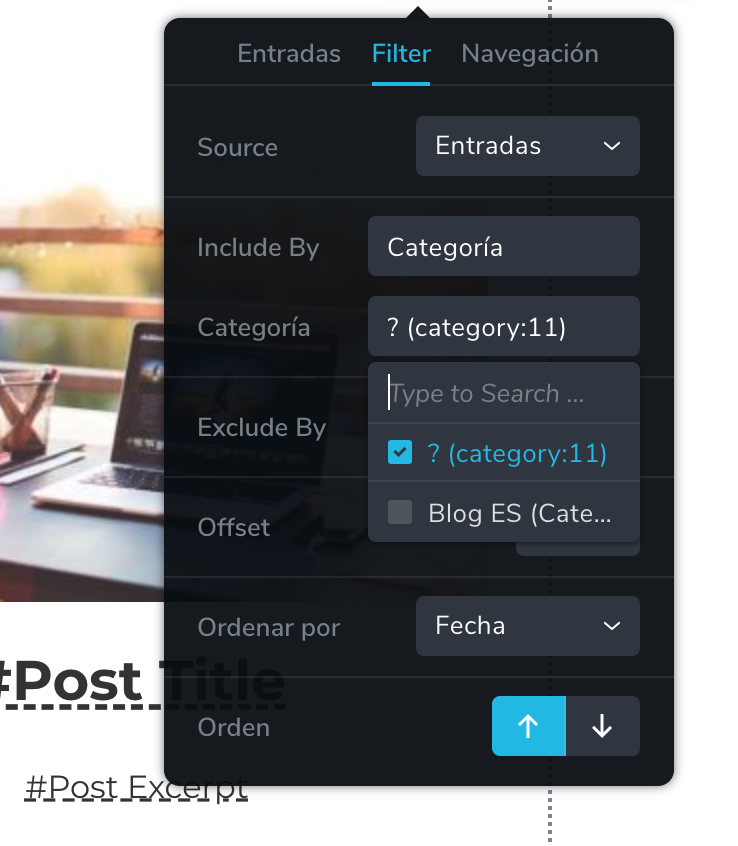
For example I am editing the page https://entrepreneursclique.com/en/home/ where there is 3 posts preview with their photos and excerpts. I have selected for the Filter : Category = Blog EN.
But despite that, this page display posts of the Category Blog FR in French.
Idem for the spanish page where I has selected for the Filter : Category = Blog ES. But see posts of the Catergory Blog Fr in french.
And actually now for both pages I see a new category is selected now so I guess you are working on it ? I have not tried to modify, neither save anything to avoid to enter in conflict with what you do but pls keep me updated.
Thanks!
 0
0 -
Hi Karen,
Thank you for the information and for the screenshot. We are sorry for this inconvenience but the developer team is still working on your project.
Best regards, Nelea.
0 -
Ok thanks for keeping me updated here when solved. Thanks
0 -
Hi
20 days that this issue was mentioned, and it is an important bug, can you pls put it as priority please ?
Many thanks.
0 -
Hi Karen,
I understand this is a time-sensitive bug. The team is working on it and we will try to fix it in the near future. However, it is not the easiest task and we need more time. This is a time-consuming task, and I'm really sorry we can not give you a fast solution on it, no matter how much we want.
Thanks for your patience and for your understanding.
Best regards, Nelea.
0 -
Ok thanks.
I think it is a basic feature that should work however.
So I guess it is under the "Urgent" label...
Thanks, pls keep me updated.
0 -
Hello,
Any progress on this matter ?
Thanks
0 -
Hi,
Sorry for the late reply, support is limited on weekends.
This issue was fixed. My colleagues Natalia and Alex have already written to you regarding this issue. Could you please check again and tell me what exactly problem do you have now?
Best regards, Nelea.
0 -
Hi,
The issue at the very top of this page has been solved indeed,
But not the one I mentioned 2 months ago (see the most recent posts here above).
----
The post preview shows the French ones (Category Blog-FR) in all pages.
These two pages should display only posts in their languages and not French: https://entrepreneursclique.com/en/home/ and https://entrepreneursclique.com/es/inicio/
In the Edit mode, I see I chose the good category Blog-ES and Blog-EN for each so it should display the right posts.
--- Pls also see the screenshot above posted 2 months ago.
And I have already given you my blog login credentials before.
Pls let me know, thanks, as I was waiting for you to fix this bug to be able to use my blog again. Thx
0 -
Hi,
I'm sorry for my late response. I checked the Spam and I found your message there and now I approved it.
We would like to check this problem from your dashboard. Could you please send us the WP credentials to this site? We have created a private ticket for this request. You had to receive a notification regarding this by email.
Best regards, Nelea.
0 -
Hi,
I have already provided you the login details for this site...
Pls see the history... You even mentioned that a developer was working on it 2 months ago & 1 month ago and then no news... Whereas it is an important feature.
Pls see here if you need the login again as it has not changed : top of page here -> (deleted by Brizy team)
But pls see with your developer as you were saying he was on it 2 months and 1 month ago.
Pls solve this bug asap and let me know.
Thanks
0 -
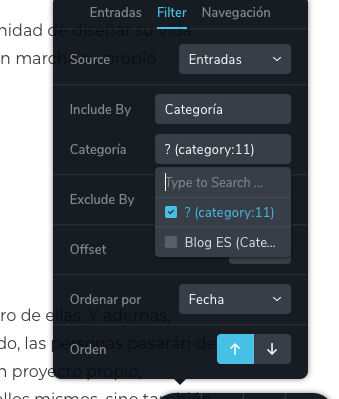
I guess it has been solved by your developer in the meantime as I logged in and saw this so I just changed to the language of the page and it looks fine now, thanks!
 0
0 -
Hello,
Yes, perhaps one of our developers has checked already. I'm glad that everything works fine now.
Best regards, Nelea
0
Please sign in to leave a comment.
Comments
27 comments