Edit Menu in Footer Problem

I cannot edit the MENU in the footer. I am in MOBILE view here. When I hover over the menu icon I get this:
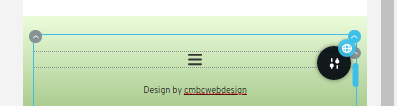
When I move the mouse across to try and get at the greyed out up chevron (to edit the menu) it disappears as shown below (unfortunately my cursor has disappeared as I took the screenshot):

I eventually got round the problem by going into DESKTOP view and going to about 200% magnification. But there must be a better way of doing this?
-

Hi,
Yes, we know about this inconvenience and will found a solution for it. I'm sorry for this inconvenience! At the moment, I can suggest going to the Mobile mode where is the Menu element and adjust the column where is placed the menu. In this case, you will able to make the modifications you need and after this, you have to adjust back the column. See here.
Best regards,
Sandra0
Please sign in to leave a comment.
Comments
1 comment