Bad pagespeed results

Hello,
On our new website (https://www.pulsief.nl/) we notice that pagespeed is being pretty slow due to some Brizy Builder related things. For example we notice slow mobile speed.
It's mostly due to Javascript, Render timings & DOM depth. Desktop speed is acceptable however the mobile speed is not. Normally I wouldn't worry about this to much and just check GTMetrix for example. However with Google announcing it will look more at pagespeed in regard to rankings soon it's a problem.
If I turn on caching for the Youtube vid it improves a tiny bit. But that's not the major problem.
This all is with pretty agressive caching from the Swift Performance Plugin.
What can I do to improve this? Is the Brizy team looking into this issue?
-

Hi,
I checked the site in the GTMetrix and I found that the result is very good. See here. If you want to improve some aspects of the site and make it faster, I can suggest optimizing the site following some basic rules:
1 - Choose a quality hosting plan;
2 - Keep updated your plugins, theme and WP;
3 - Delete the plugins and themes you do not use anymore;
4 - Add a clean cache plugin and run it;
5 - Use an Image optimization plugin (we have an integration with ShortPixel, therefore we are recommending it);
6 - Clean the media library from the images you don't use anymore and the first revisions from the pages and posts you know you will not need;
7 - Optimize the database (WP Optimizer)Best regards,
Sandra0 -
Hi Sandra,
I've done all that and more.
1 - Choose a quality hosting plan;
Answer: The hosting is fast enough, difference is 2 points (out of 100)with our new hosting. But we will upgrade it next year.
2 - Keep updated your plugins, theme and WP;
Answer: Already done.
3 - Delete the plugins and themes you do not use anymore;
Answer: Already done.
4 - Add a clean cache plugin and run it;
Answer: Already done, as stated in the main post.
5 - Use an Image optimization plugin (we have an integration with ShortPixel, therefore we are recommending it);
Answer: Already done, we serve webp aswell.
6 - Clean the media library from the images you don't use anymore and the first revisions from the pages and posts you know you will not need;
Answer: Already done.
7 - Optimize the database (WP Optimizer)
Answer: Already done.Like I said, pagespeed is becoming more important soon in Google Ranking (according to Google itself). The pagespeed on phones isn't good enough by far.
And it's mostly due to DOM and primary thread work (rendering + JS runtime) So it's safe to state that this part is due to Brizy Builder. Can we expect further improvements on this? What can I do right now to improve this?
0 -
Hi,
Thank you for the message. As it is a WordPress site, this result on mobile mode can be generated not only from Brizy. It can be generated from the theme, other plugins you use, the number of pages and blocks you have. Also, the Custom CSS, embed elements, shortcodes elements and other complex structure the same has a great impact on the page speed of the site in the mobile mode. What I can say from the Brizy part, is that we are working hard on the optimization and page speed and from the first release of the Brizy we constantly improved the way is working Brizy and we will continue to improve these aspects.
Thanks!Best regards,
Sandra0 -

Hi Sandra & Niek!
I apologize for jumping in on this thread, but I'm running into virtually the same issue with an embedded YouTube video on our development site (https://2020.cirinos.com).
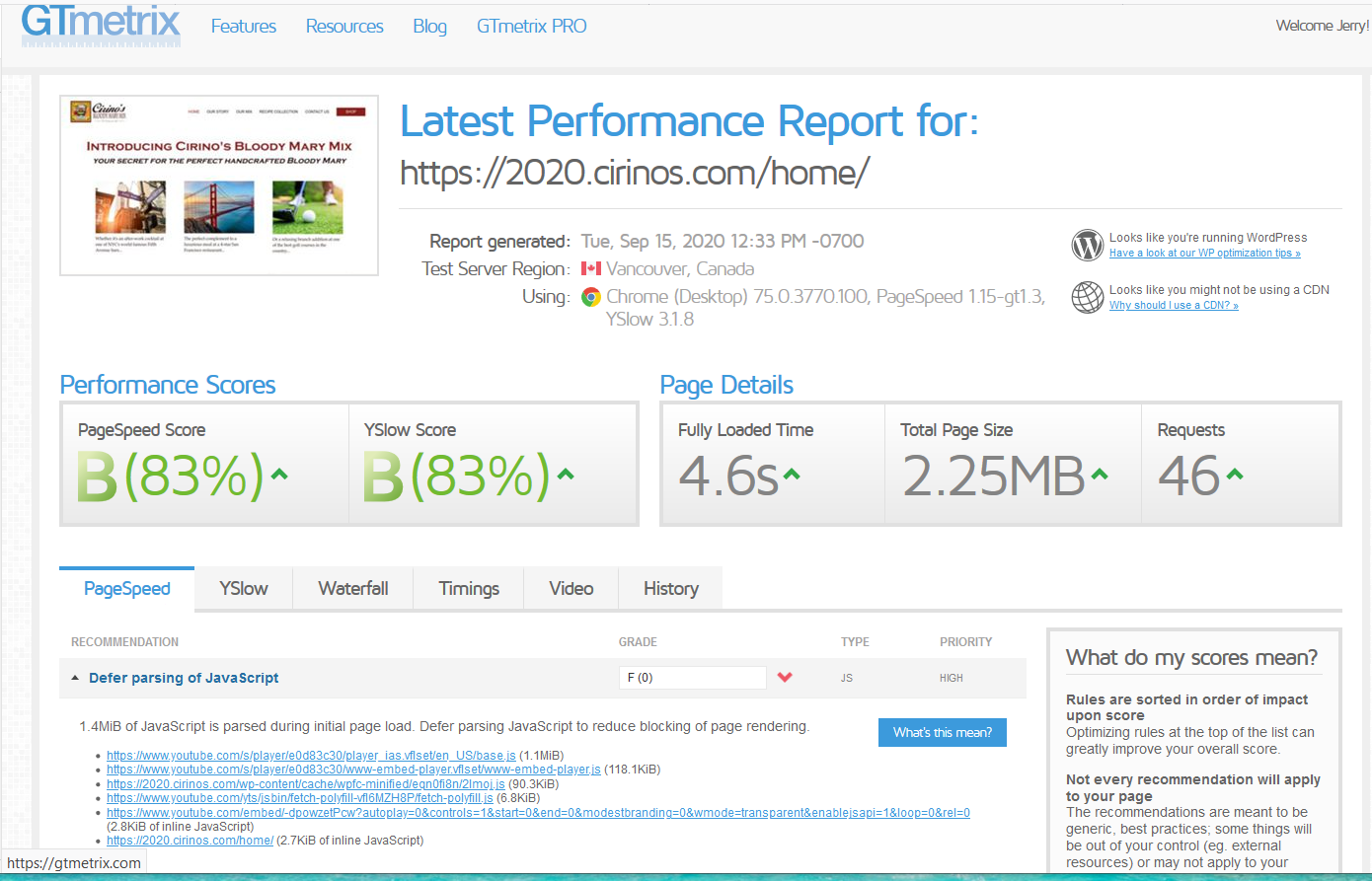
When I run it through GTMetrix, the "Defer parsing of JavaScript" rating is 0. As the attached screen grab shows, the vast majority of the load issues are related to the embedded YouTube video.
The home page is the only page on the site with this issue... and the only page with an embedded video. The rest of the pages - all built with Brizy - don't have embedded videos and GTMetrix gave them great ratings for the "Defer parsing of JavaScript" rating.
I can't get any of the JavaScript defer/async plugins I've tried to work - presumably because the YouTube is embedded within the Brizy editor. If possible, I'd love to get this resolved before we roll the site out.
Any suggestions for how to defer the YouTube loading until the rest of the page loads, when it's embedded within the Brizy video box?
Thanks in advance!
Keith
 0
0 -
Hi, Keith,
Could you please try to optimize the entire site using some basic steps?
1 - Keep updated your plugins, theme and WP (for Brizy at the moment we have the 2.0.10 version for Brizy Free and the 2.0.5 version for Brizy Pro);
2 - Delete the plugins and themes you do not use anymore;
3 - Add a clean cache plugin and run it;
4 - Use an Image optimization plugin (we have an integration with ShortPixel, therefore we are recommending it);
5 - Clean the media library from the images you don't use anymore and the first revisions from the pages and posts you know you will not need;
6 - Optimize the database (WP Optimizer)Thanks!
Best regards,
Sandra0 -
"Any suggestions for how to defer the YouTube loading until the rest of the page loads, when it's embedded within the Brizy video box?"
- Or as a background vid. The dependencies (js, css) for the video gets implemented into the mobile view where there isn't even a Youtube vid playing. Since we replaced it with an image there. Seems weird to me.
Default options like stated above don't work for this problem Sandra. We tried Async loading of the Youtube vid aswell, but it doesn't quite work, as Keith stated.
0 -
Hi, Sandra - thanx for the quick reply!
I did eveyrthing you mentioned - and more - yesterday before I made my post here. And I was logged in with my Brizy Pro account, so everything should have been fine.
As I said, in my original note, it's only the JavaScript error on the one page that is creating issues (see previous image. And of the 6 items, 4 of them - and over 90% of the file size creating the load issues - are related to the YouTube video embedded in the Brizy builder.
So what I'm looking for is a way to tell that YouTube JavaScript to defer loading. But the ways I know how to do it require making changes to the embed code (including plugins that do it) or edit the functions.php file.
The plugins I've tried don't seem to work with Brizy (or any page builder, for that matter), And I'm not sure that the functions.php adjustments will work because the video is in Brizy.
So I'm looking for a way to defer the JavaScript related to the YouTube embedded in Brizy. And I figured I can't be the first person to have had issues with this - which is why I'm asking for your help.
I'll look forward to hearing from you soon.
Until then, make it an outstanding rest of your day!
Keith
0 -
Hi,
Yes, it is a bit complex question. It is normal that the Iframe added in the Brizy builder to load its scrips and also it is normal that these scripts need to be optimized. We will investigate and discuss with the team how this can be optimized by the Brizy but I can't promise that this will come soon. As I said it is a bit complicate question and need a bit more time for investigation.
Thank you!Best regards,
Sandra0 -
Thanx for the reply and follow up, Sandra!
As I mentioned, this is something that probably wouldn't matter to a small vanity website creator. But I know that Brizy is not just aimed at those users - it's also used by agencies and commercial companies (like me :-) ).
This is a big issue with the embedded video and delaying the load (or at least allowing ASYNC as Niek mentioned) - because it's a huge drag on the page load speed. And I expect this will become even bigger as video becomes more prevalent on websites (testimonials, etc.).
My guess is also that this is not unique to Brizy, but probably affects most page builders. So if the Brizy team were to solve it, as a direct response copywriter this seems like a BIG benefit that could be sold to customers. ;-)
I'll look forward to an update.
Until then, make it a wonderful rest of your week!
Keith
0 -
Thank you for the message. Yeah, we will investigate this and will strive to found a solution!
Have a great day!
Best regards,
Sandra0 -
Hi, Sandra!
I'm following up to see if any progress has been made on this issue. We'd love to figure this out as we're holding up deploying more video sitewide so we don't detrimentally impact our search ranking any more than necessary.
I'll look to hear an update from you.
Until then, make it a wonderful week!
Keith
0 -
Hi,
In this period we made some improvements fro the builder and Brizy pages. Now, we have the 2.1.5 version for Brizy Free and the 2.1.3 version for Brizy Pro. See here the changelog. Could you try to update them and see if some GTMetrix's indicators were improved?
Thanks!
Best regards,
Sandra0 -
Hi Sandra,
Something else that might resolve this issue is local video. Currently we're not able to put any other videos than YouTube or Vimeo in the background. However it is possible to put local videos in video blocks. So this shouldn't be to difficult to implement for background videos aswell.
I already made an inquiry about this in March (before this support system was created). Followed this up with Natalia in June and she said it's still being worked on. When is this due for release? It would probably really help out a lot of users!
Thanks in advance for the answer.
0 -
Hi,
Yes, at the moment, it isn't still possible to add custom video on the background. In this period we have other important feature we planned and plan to release but this doesn't mean we will not implement this feature request or will ignore it. As Natalia already said, we have already created a feature request on this suggestion and our developers are investigating it.
Thank you!Best regards,
Sandra0 -
I appreciate the updates, Sandra. When I went into our staging site today and did the updates, the formatting for the embedded video row got messed up.
So rather than wasting any more time with this, I installed the "Simple Video Management System" WordPress plugin. It solved the formatting issue that the update introduced, AND solved the delayed loading issue.
Hopefully, the developers can fix these issues for the others who need the functionality and don't have access to a good WordPress plugin.
Thanks again for the continued communication!
Keith
0 -
Hi Keith,
Thank you for updating us regarding this inconvenience! Great to know that you could find a solution to this problem and all is working greatest. We will inform this notification and this suggestion to our team.
Thank you!Best regards,
Sandra0
Please sign in to leave a comment.
Comments
16 comments