How to change default language on Brizy cloud?

Hello,
I would like to change the default language on my website created with Brizy Cloud. The content on my website is in Spanish, but when a user sends a form, the alert message is shown in English ("Message was sent succesfully"). I want to show this message in Spanish.
Also, for SEO purposes, I would like that the configuration default language to be Spanish instead of English.
Thank you!
-

Hi,
At the moment isn't possible to change the default language of the site from English to Spanish but if you want to change the message "Message was sent successfully", you can do this. For this, you have to click on the Submit button, go to the Links and then to the "Message". From here you will be able to change the message for Succesful and Error situation. See here.
Best regards,
Sandra0 -

Any update here? I want to switch between languages. This way I can clone projects and set the second language as the default language in the cloned project.
0 -

Hi Pedro,
Thank you for reaching out to us.
Unfortunately, this is currently not possible. When you clone a project, the language of the original site determines the basis for its translation. The original language is always set as the default language.
However, you have the option to create a website in your preferred language and then establish the translation from that language to English or any other language you prefer.
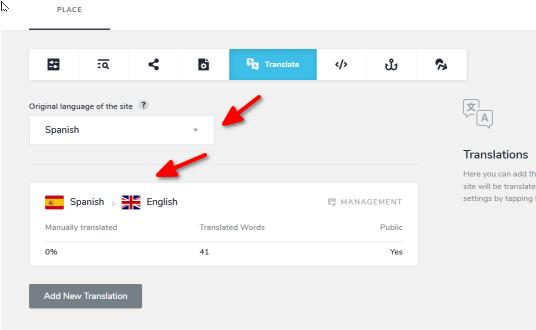
Sorry for the inconvenience.
Best regards,
Ariel H0
Please sign in to leave a comment.
Comments
3 comments