Text color and text background color

I have a few instances of white text on a dark background.
I evaluated the page for accessibility using wave.webaim.org. It reports that in fact, it sees white text on a white background.
I reported this as an apparent error to the test site. I said:
" URL: https://electriscan.com/
Here is their response:
-
Additional issues
The report shows an unlabeled link, apparently for the "request a sample report". It may be referencing the contact form that is linked, but I am not sure.
I definitely don't know how to fix it, though.
The contact form was built with Fluent Forms, as the Brizy Form element did not have enough flexibility.0 -

Hi,
To be honest, the response that was provided is a bit uncertain and I suppose that these questions should be addressed to him because it is their report and they should offer you some advice how to fix this errors as they know better how to make the site in such a way to be accessible for all users. Here I can see some Brizy errors. From the investigation of the site and the Wave's response, I found that here the errors are regarding the styling and the design of the page.
Regarding the first issue - I can recommend adding a background colour to be the column where is added the text.
Regarding the second issue - unfortunately here we can't help you with something else because the form isn't the Brizy one. Anyway, here can be also the problem from the wave.webaim.org report. If the link is added and also it has a label, then, in this case, I may suppose that the report has some inconveniences.Thanks!
Best regards,
Sandra-1 -
Hi Sandra,
I have tried to fix the issues, but working on the older, development site, which reports the same errors, except for the "missing form label". See below. The URL is electriscan.websitesbykts.com. I then mirrored my work on the production site, electriscan.com. Most, but not all, results were comparable.
The errors at the top are in a global block. I did find in a few cases that the background color was a black, but opacity was set to 0, or very low. I changed that. Starting from the largest or widest place, I checked the background and made it the style's black (#1C1C1C) and opaque. I did this to the block, to the row, and to the columns in the row. The text box (an icon box) does not offer that ability. For the icon in the icon box I was able to set "bg" to the black with a white icon. I could not do anything with the text itself. (This is for the left and center columns containing the phone number and email.) The display did not change. The report from wave.webaim.org changed a little. At one point it went from 4 to 3 low contrast errors. It then went back to 4. However, the icons no longer show as white on white when the error is checked, only the text portion in the icon box continues to show white on white when it is examined in wave.webaim.org.
The other area is the page title in the purple stripe. It is a simple block with a text element in it. I don't have any option to set background color in the text element, only the text color. The block has an overlay set to provide the background. The error there persists.
There are also 9 instances of "empty links". These are the 4 social media links at the top, the 4 at the bottom, and the phone number link at the bottom right. Other links, like the many other ones in the footer are not called out. They have text displayed and then a URL behind it. The social medial ones have only the graphic with a URL behind it. I don't understand why the phone number is called out in the bottom. It appears that some readable text needs to be associated with the link, which is not happening for the social media links. Is there some way to address that?
The form label error only shows up in the production site, not in the development site. The links for the sample report are identical as entered. However, in the production site a large amount of code, apparently relative to the form that is linked is visible in the analysis tool, at the unlabled form error when the styles are turned off. This appears to be an error in the migration. However, I recreated the link in Brizy in the production site, by making another and removing the old one. The embedded form code persists. Do you have any thoughts about how to get rid of it? There is similar, but not identical code in the two versions of the sites. It can be seen in the View Source. (Search for name='__fluent_form_embded_post_id' value='12' to be put near the beginning of it.) I understand that this is related to a plugin that's not yours, but any help would be appreciated.
Any and all help appreciated!!
Thanks
Jack
0 -
Hi,
1 - If you want to add a background colour for the text element too, you can add it using the custom CSS. This one:
element {
background-color: red;
}
Instead of "red", you can add the hex code of the colour you need (e.g. #1c1c1c).
This code you have to add in the "Text element -> Settings -> More settings -> Advanced -> Custom CSS". See here https://jmp.sh/5DWf167.
The same you have to do for Icon element. https://jmp.sh/GF28l9D2 - If you want to add some readable text to the icon, I can recommend using the icon box and add there the link. See here https://jmp.sh/NRTgt7M.
3 - Regarding the form - I'm sorry but here I can't recommend something because it isn't a Brizy form and we can't find a solution for it.
Let us know if we missed something.
Best regards,
Sandra0 -
Hi Sandra,
Thanks for those tips!
The problems in the header are actually in icon boxes, although I was previously able to address the icon part directly with the settings tools for the icon itself, I could not address the text portion. I used your suggested technique on the 2 icon box elements and on the text box for the page title. That got rid of the 3 flags! I did have to use a color picker rather than the color displayed for the page title block, since it is not at 100% opacity, but that was minor.
That left one contrast error flag, which I had yet to be able to find on the page. I shut off styles in the wave.webaim.org interface and was then able to find it. It's the submit button on the form. BTW - it has exactly the same color scheme as the submit button on this support page! I understand that that is an issue for the third party plugin, but thought you'd like to know.
Regarding your suggestion to add readable text to the social media icons, I'm not sure that would work as you anticipate. Based on the behavior of the phone and email links in the header, I think that adding the text with a hyperlink and also having the icon, like the F for Facebook, have a link as it does now, would continue to have an error report for the icon/link combination, although should not have one for the text/link combination. I don't know if it's either possible or would even address the issue, but is it possible to set up the capability for an icon box element to have a universal hyperlink capability, so that clicking anywhere in the box would work? My concern about its not working, is that the text in the box might not be seen as connected to the link, as it is now in the phone and email links. Note that the icons for those do not have links under them.
Best,
Jack
0 -
Hi, Jack,
I recommended the tip with the icon box because you said that you have a problem because the social media icon has only the URL attache and doesn't have some readable text. I supposed that this will help you to solve that problem. In this case, I can't say exactly what you can do to avoid this inconvenience.
Thank you for all details and updates regarding these problem. Please, let us know if we missed something or if we can help you with something else.
Best regards,
Sandra0 -
Hi Sandra,
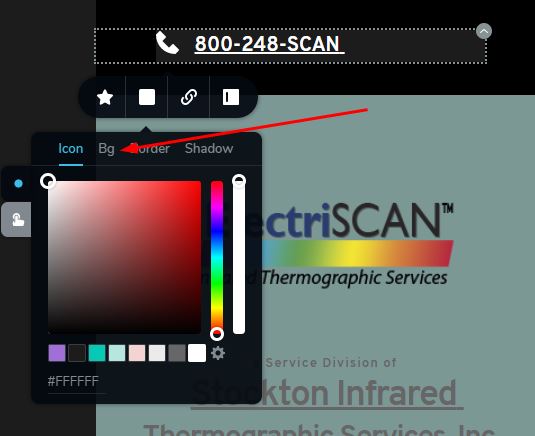
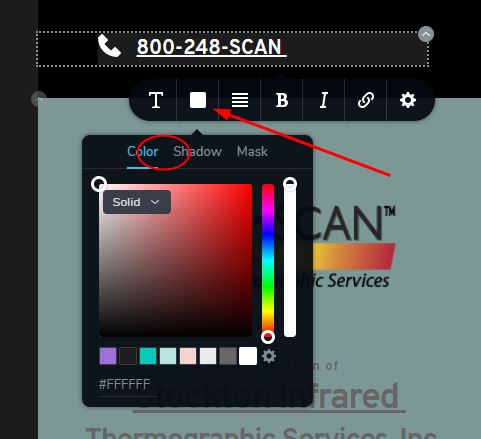
The CSS approach you suggested certainly works. However, I'd like to suggest that Brizy consider adding a background option in the color selections for text elements and for the text in an icon box. There may be other places where it would also be useful.
I saw that the color tool for icons, both individual icons and icons in an icon box, includes "bg" as one type of color to adjust (first image). This would be a good addition to those text areas (and any others) if possible (not there - 2nd image).
Thanks,
Jack
0 -
Hi, Jack,
Thank you for your suggestions! We will send them to our managers and we will take them attention!
Thanks!Best regards,
Sandra0 -
Thanks. Ever onward and upward! Brizy to dominate the page builder universe!
 0
0
Please sign in to leave a comment.
Comments
9 comments