Visibility of Control Block Spacing top and bottom

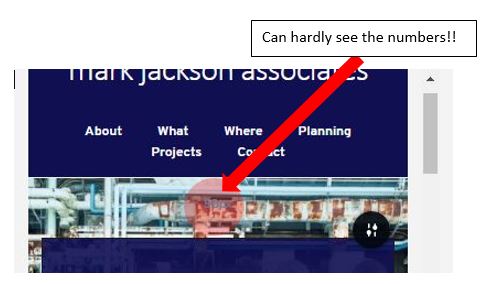
Can we have an option to change the visibility (colour and background) of the control to change the padding at the top and bottom of the blocks. From the screenshot below you can see that it is very difficult to make out what the number is. (If the default was a dark text on a light background that would make life easier.)
It would a GREAT enhancement if we could click on the number and then type in a value!
I asked a long time ago if we could have the little arrows to click on to increase / decrease the numerical values when adjusting padding and margins - but this request was ignored. That seems strange when it seems to be a useful feature of all you competitors. (Can't find the pages on Github where I left this suggestion!)
TWO pictures below:

-

Hi,
You face this problem because the background image is very similar to the font we use for the padding value. I can suggest changing that value manually by adding a certain value (yes, we have this option). For this, you have to go to the Block options -> Settings -> More settings -> Styling. Here you will find the "Padding" option. You have to change from here the padding-top and/or padding-bottom value. See here.
Thanks!
Best regards,
Sandra0
Please sign in to leave a comment.
Comments
1 comment