ISSUE: Templates don't work with exclude/include condition on pages

I have the following (below) set and the template do not show up when I go to create a new page.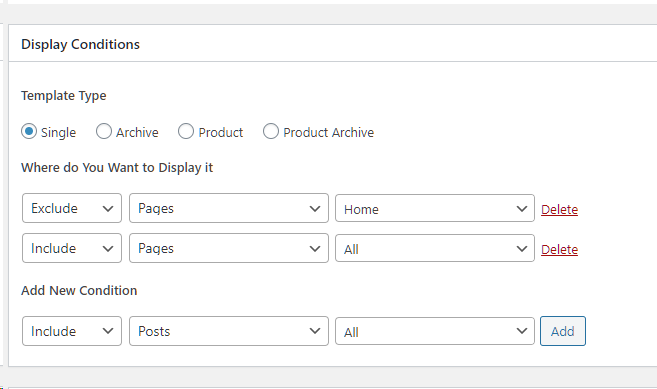
-

Hi,
Yes, we knew about this problem but we already fixed it in one of the last updates. Could you please check if you have the latest versions for Brizy Free (2.0.7) and Brizy Pro (2.0.4)? Also, I want to add that if you have edited all pages with Brizy, if you add the Brizy template for all pages, the template will not be displayed because it can overlap the existing Brizy code. The template will be applied on the non-Brizy pages.
Thanks!
Best regards,
Sandra0 -
Yes. I have those versions. And that conditional template isnt working. :(
Can you explain what you mean about adding Brizy to all pages?
I am using the brizy wordpress template and i want to use brizy templating for most pages and all posts.0 -
Hi,
Thank you for the question. With "if you have edited all pages with Brizy" I want to say that all pages are edited with Brizy. For example, see here, I have all pages edited with Brizy except "Blog" page. In this case, if I would have the Brizy template with the display conditions you set https://jmp.sh/pdnInqD then only "Blog" page will display the template I created. Therefore even if you select "Brizy template" or "Default template" as page template inside the Page https://jmp.sh/kPs2f4K it is having the Brizy code and Brizy template can't overwrite the existing Brizy code.
Also, could I ask you why do you need a Brizy template if you already designed all pages with Brizy?
Thanks!Best regards,
Sandra0 -
Also, could I ask you why do you need a Brizy template if you already designed all pages with Brizy?
Because of structure purposes. I wanted to resize the max width of the body. Should I not use the Brizy Wp template? What could I use that does not clash with the css styling?0 -
Hi,
I'm sorry but isn't possible and not recommended to change the max-width of the body. This can generate other problem inside the editor, preview and responsive view.
Best regards,
Sandra0
Please sign in to leave a comment.
Comments
5 comments