Broken Images Troubleshooting

I have some images that are working while others give me the broke image icon. The ones that work tend to be older. But, not always working for me. I think I used them before in Brizy before getting the paid edition.
- Uninstalled every other plugin other than brizy and brizy pro
- Update the Theme and made a page in it without issue (non-Brizy page)
Here it is working with an older image.
Here it is with a newer image.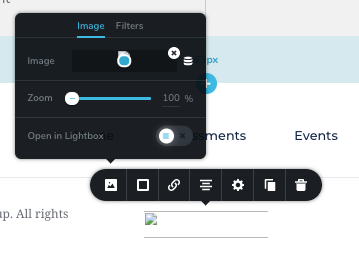
-

Hi,
Could I ask you how did you add/upload the images? Did you upload them through Media Library? Did you have the latest version for Brizy Free (2.0.7) and Brizy Pro (2.0.4)? What were your previous actions before encounter this problem? Did you migrate the site? How did you migrate the site?
Could you send us the URL link of the site? If you don't want to make it public, let us know and we will delete the URL before approving.Best regards,
Sandra0 -
Yes, I uploaded through the Media Library.
Yes, had the updated Brizy, now auto-updated to Version 2.0.13
Yes I had the Brizy Pro, now updated to version 2.0.6
I only had a problem after the upgrade as I can recall, but crashes from app issues have happened as well. I attempted to troubleshoot via FTP to remove and re-add Brizy Pro, but that may not have been the best idea.
The site was never migrated. I've built it where it lives. I'm a novice, I know about child's themes but haven't learned how to do some of that and if this site breaks it's not going to be pretty.
I manage through Namecheap and have backups. So, at one point, it did have issues and I was able to restore the site and removed all plug-ins adding one at a time until I figured the culprit.
Here is a URL, specifically to the current page I am trying to apply edits and I keep having challenges.
https://chaneycoachinggroup.net/coaching-that-will-change-your-life/events/
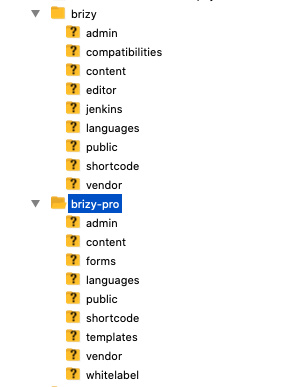
Here's what the FTP is looking like if that helps on the Brizy and file folders front. I have a feeling I missed or duplicated something.
 0
0 -
Hi,
I checked the page you share us and find that all images are displaying fine https://jmp.sh/VWJsECM or I'm missing something? Did you receive other problems? Could you please give us more details?
Thanks!
Best regards,
Sandra0 -
I'm wanting to use this image in the top event on the page which I uploaded to the media folder.

However, what I get when I try to use it (And the vasty majority of any images in my media folder) is the following

You'll probably see that I just added a Brizy cloud pop-up embed which shows the image as well.
Curious, is it possible to build the whole page in Brizy cloud and embed onto the page I'm trying to edit in Wordpress as a workaround?
0 -
As far as other problems, I don't think this is related at all, but when designing the pop-up in Brizy cloud, I forgot to change the color of the button on that pop-up at first and it was not the standard orange for our branding. When I embedded onto the events page, the color of all of my headings changed from orange to that previous blue/green.
I fixed the button in Brizy cloud and refreshed the embed code for that pop-up, but now the heading won't hold the color I had applied in the beginning in Wordpress.
SCREENSHOTS
of the Heading difference I'm seeing of the pop-up as it stands now.

 0
0 -
Hi,
Regarding the problem you receive when you try to add an image in Brizy pages - I already created a private ticket on this request. Could you please send us there the WP credentials to the site? We want to check this issue from your dashboard.
Regarding the second problem with Brizy Cloud embed pop-up - I'm sorry but we don't recommend to use the embed code of the pop-up you created in brizy Cloud into the WordPress site. That embed code was generated yo use in the Brizy Cloud projects as a global pop-up. Therefore I suggest to delete that embed code and create in Brizy from WordPress the pop-up you want. If you want to create an external (global) pop-up, you have to go to WordPress dashboard -> Brizy -> Pop-ups and there create the pop-up and add all triggers and conditions https://jmp.sh/F7C5ahQ. If you want to attach a pop-up to the button or another element, you have to go to the Links -> Pop-ups of that element and there create or select one of the pre-made templates https://jmp.sh/T7n3uuB.
Regarding this "is it possible to build the whole page in Brizy cloud and embed onto the page I'm trying to edit in Wordpress as a workaround?" - at the moment this isn't possible but you can add into "Saved" a block or entire layout in the Brizy Cloud project and then use it in the Brizy WordPress. See this video https://www.youtube.com/watch?v=iid5ZagYpuE.
Best regards,
Sandra0 -

Am I having the exact same issue while building a new site and all the thumbnail and images showing broken links.
0 -
Hi,
Could you please, give us more details regarding the problem you encounter? Did you find it on Brzy Cloud or Brizy WP plugin? When did you encounter it? What were your previous actions? It is happening only in Brizy pages? If it appears on the Brizy WP plugin, could you please what hosting provider did you use?
If you temporary deactivate all external plugins and activate a WP default theme, did you found this problem?
Thanks!
Best regards,
Sandra0 -
I had tried removing apps and seeing if I had the issue in WP, but it was too long ago to recall well. I don't think I had this issue outside of Brizy for WP. I haven't had issue with Brizy cloud.
Sorry for the delays on my end. I saw the previous comment "Could you please send us there the WP credentials to the site? We want to check this issue from your dashboard." I'm looking for the private ticket you mentioned so that I can provide that information. Assuming there is a link under my profile image or an email I need to reply to. If you do not receive something from me momentarily, please advise how to send you access.
0 -
Hi, Linda,
We created for you a private ticket with the 9207 number. You have to receive a notification regarding this on your email. There, my colleague Natalia got in touch with you a week before and I see that today you send us the credentials. Please, let us a bit more time to investigate the problem with images you report.
Thanks!
Best regards,
Sandra0
Please sign in to leave a comment.
Comments
10 comments