Thanks to the update to 2.0 , but.....

I am using Brizy Pro as a wordpress plug-in and I am happy to see 2.0 is released. However, I found that the menu in the interface is not updated (as attached image here)....since I've check that the Brizy plugin is updated to 2.0.x I wonder where are the new features like soundcloud or something else?
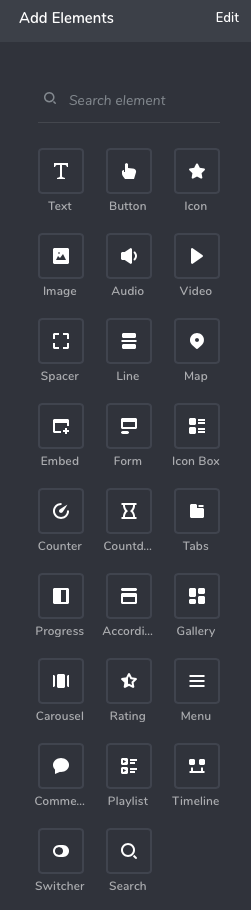
-

Hi,
Could you please give more details about what did you mean that the Menu isn't updated?
Regarding the SoundCloud - at the moment this element is called "Audio" and you can find it here.
Also, could I ask you if you have the latest version for Brizy Free (2.0.5) and Brizy Pro (2.0.2)?
Thanks!Best regards,
Sandra0 -

Mine is as attached in my white label mode. How could I update the pro into 2.0.2? Uninstall the plug-in and re-install it? or we have some launcher thing to do it?
The audio button seems not quite working until I cleared my browser cache, it now works perfectly :D
0 -
Hi,
Great to know that you could find the Audio element and fixed the inconvenience you found.
Regarding the update of Brizy Pro - do you have activated the license on the dashboard? Could you please activate it? In this video from minute 02:58, you can see how to do this. I want to note that each site need to have its own license and therefore you have to generate a license for each site you create with Brizy Pro.
After you will activate the license, please log-out from WP dashboard and log-in again. After this, you have to see the update for Brizy Pro in the dashboard.
Let me know if I can help you with something else.Thanks!
Best regards,
Sandra0 -
Thanks Sandra, yes it was activated but the version is still keep unchanged. I wonder if 0.0.41 is the most updated one? I can't find any update options in the list....
0 -
Hi,
Could you please upload manually the newest Pro version? For this you have to:
1 - Delete the current Brizy Pro plugin;
2 - Go to the Brizy account;
3 - Download the Brizy Pro 2.0.2 (don't unzip it);
4 - Go back to the WP dashboard -> Plugins -> Add new -> Upload plugin
5 - Upload the zip folder you downloaded from Brizy account.
6 - Activate the plugin.Let us know if we can help you with something else.
Best regards,
Sandra0 -
Thanks Sandra, it works now :)
0 -
Hi,
Thank you too! Great to know this!
Let us know if we can help you with something else.Best regards,
Sandra0
Please sign in to leave a comment.
Comments
7 comments