Sticky Image on page

I would like to set an image to be sticky in a column so as the user scrolls down the text scrolls but the image remains constant until the end of the block. It doesn't look like there is an option to do this so I have been trying to use custom CSS. The CSS doesn't seem to apply when I use the custom attributes or when I give it a class and specify global CSS in the theme Additional CSS properties box.
I am using the Brizy Pro Wordpress plugin
-
I found that I forgot to include the !important tag in the additional css page to supersede the default stylesheet. Still not sure why the CSS options in the Advanced tab aren't rendering though.
Despite having the sticky property set and the image being located on the top in the Brizy editor, the image displays as centered vertically and does not have the sticky behavior. Not sure if this is an issue with the Preview functionality or why I don't see the expected behavior.
0 -

Hi,
recently we added a new feature in the Brizy builder. It is "Fixed and Absolute position", I think this feature will help you to do this task. See here more details regarding this feature https://www.youtube.com/watch?v=aB8Ki6HTXYo.
Best regards,
Sandra0 -
Thanks for the comment Sandra, but this is actually a different behavior than I am looking for. I want the image to slide when scrolling through that section but then move off the page when you have slid to the next block. The CSS property "position: sticky;" is actually a standard CSS functionality now.
I was able to add the css properties to the "Additional CSS" but it still doesn't render properly in the page.
0 -
Hi,
I'm sorry but I suppose that the problem can be in the Custom CSS you added. It is working on the WP editor? I suppose that you need help from a CSS specialist. I would like to help you with this but I'm not a CSS speciality and in our team, we don't have the Custom work department.
Best regards,
Sandra0 -
Sandra, I will work on debugging the CSS I added myself as I understand that is outside of the Brizy builder.
My issue that is specific to Brizy is that the CSS options in the Advanced tab don’t seem to be rendering when the page is built. I can specify a CSS class and that works, but using the CSS elements section or the custom CSS within Brizy don’t appear to work. I have not been able to find any documentation on proper syntax or usage for using this part of the builder. Is there more information available?
0 -
In the Brizy Custom CSS box isn't a specific syntax. You only have to use the proper class to apply the Custom CSS in the Brizy page. I can suggest investigating a bit on how is build the page, the classes we are using for the divs, containers and so on. Create the address where apply the Custom CSS more appropriate with the Brizy pages. We tested some Custom CSS in the builder and with a good structure all worked fine.
Best regards,
Sandra0 -
Sandra, I'm afraid I don't understand what you are trying to say here.
Do you have documentation or examples of how the CSS in the Advanced tab is used?
The syntax for the position: sticky feature seems relatively straightforward if I can get it to apply to the correct div in the builder.
0 -
Hi,
At the moment, we don't have an article or a video regarding the Custom CSS box. To add a Custom CSS for a Brizy element, you have to indicate the concrete class where you want to apply them and in the "{ }" you have to add the styles. For example:
.custom-text span {
code;
}
In this case, the .custom-text is the class we created and declared for the text element https://jmp.sh/TYaJMLV.Also, in this way can work the code:
element {
code;
}
or this one
element .brz-rich-txt {
code;
}
This structure you can use for more generalist styles.You can try and find what structure is more appropriate with what you need and what is working for you.
Best regards,
Sandra0 -

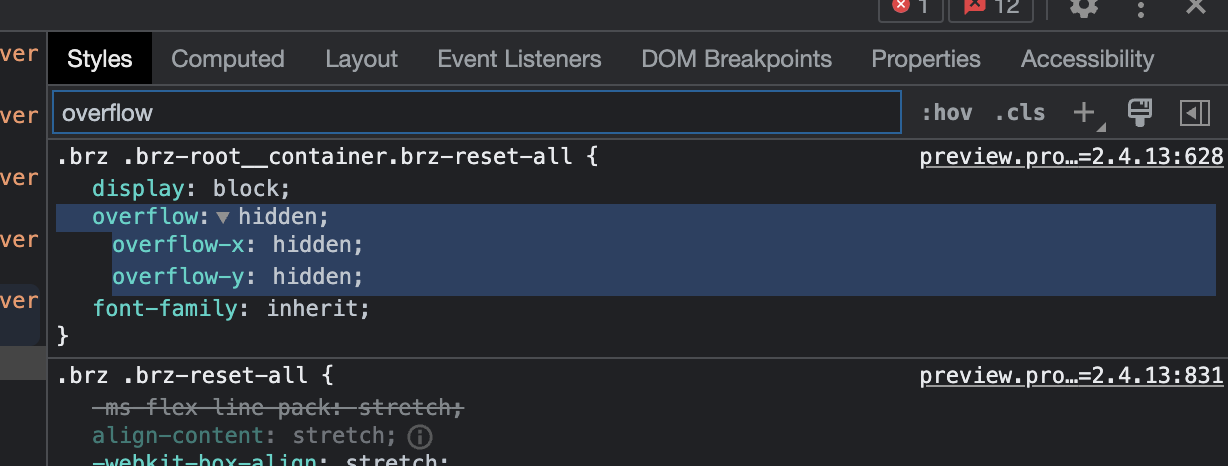
This is an issue with classes .brz .brz-root__container.brz-reset-all having set overflow to hidden. See screenshot below.
Once this style is deactivated, you will get the desired behavior.
I really like brizy, but honestly this is the issue with builders that practice excessive div nesting and assign classes you can't modify in the frontend.
 0
0
Please sign in to leave a comment.
Comments
9 comments