Feature Request: Attach Multiple Images to display in a full screen "Page" Lightbox

Wikipedia has small images distributed throughout the article. But if you click to expand one, it expands to a full screen image/lightbox WHICH ALSO HAS all the other images from all over on the page. making it extremely convenient to scan/arrow thru all the other images at full size. Saving the close, click & open activity for each thumbnail.
I'd like to be able to do the same with Brizy.
Even better would be able to "Enroll" an image/thumbnail into a virtual lightbox scrolling display group.
Default: Each image expands to its own full screen image. The NONE group. (as it does today)
Default Group: The image could be linked to the PAGE group. Works like Wikipedia so that you can easily see all images on the page, except those that have been excluded.
Might even be better to have all images on page participate in the PAGE lightbox, And you need to explicitly set an "image lightbox group" to NONE if you don't want that feature.
Custom Group(s): Add you own group & give it a name. This would permit Multiple Sets of Lightbox Groups in a page. So for long articles; clicking on a Team member would open a full screen image & let you "next" thru all the team members on the page. Then clicking on a chart thumbnail, would let you cycle they the Charts without being interrupted by the Team images. All other thumbnails would be grouped in the PAGE group.
The reason why the standard lightbox controls suck, is they force a specific layout. Typically one where all the pictures are all together. This is not good when the article text is most important, and the images are there to help convey meaning. The images have a lot of detail & need to be seen big to get the understanding. But you don't want large images to destroy the layout.
(ie See many Wikipedia articles & a lot of technical & medical pages)
-

Hi,
Thank you for your feature request and for all these details. We will take them into consideration. I will send it to our managers and they will make a decision regarding it.
Thanks!
Best regards,
Sandra0 -

That is a good ideea. We need to be able to open lightbox gallery
0 -

Hi Terra,
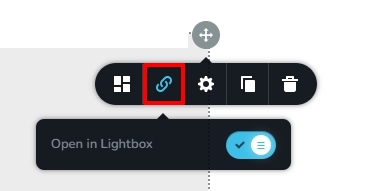
The feature to open images in lightbox is available in the Brizy Gallery element. You can find this option under the 'Link' icon.
 0
0
Please sign in to leave a comment.
Comments
3 comments