Font upload problem

Hello,
I am having a problem uploading a custom font for my site. I am trying to upload a custom font to my website and what happens is I get a different font in the brizy interface than the one uploaded. The software can recognize the font correctly when adding variations as it shows the writing of the font type in the font style. However when in the text or styling interface the font appears totally different than the font style should be and it does so for multiple types of fonts uploaded, the same different plain font (similar to times new roman). What can I do to fix this? I cleared cookies and cache from my browser, it happens on another less used browser too. I removed brizy free and pro and reinstalled them and still the same problem. It only happens in brizy, not in brizy cloud. The only other plugin I have installed is Slider revolution.
-

Hi,
Could you please let us know the name of the font that generate this inconvenience?
Also, could you please activate one WP default theme and deactivate all plugins (except Brizy Free and Pro)? Do you have the latest versions of Brizy Free (2.0.5) and Brizy Pro (2.0.2)?
Thanks!Best regards,
Sandra0 -
Hello,
The name of the fonts I am trying to use are Segoe UI and Myriad Apple Text with their respective variations.
I am using brizy starter theme and deleted all other themes. I deactivated all plugins (only slider revolution) and the problem persists. My brizy plugins are updated to their latest versions.
To help you possibly track down the issue I will share my steps:
I select a text then go to font, choose upload new font, go to upload fonts, I upload them and when I upload the variations the text is displayed in that font's style ex: Bold, Semi Bold, Medium etc. As I finish adding variations the font appears in the font list next to my selected text but it appears as some standard font similar to times new roman. This happens in both cases when I use Segoe and Myriad, they are both displayed in that basic standard font. So somehow Brizy recognizes the font when displaying the variations but when adding it to the list it adds just the name of the font i uploaded while the font is displaying in another style.
Best regards,
Dorin
0 -
Hi,
I tried to add both fonts in my test site with 3 of the variations and all seems to work fine https://jmp.sh/tpoTNYE. Could you clean the cache and try again? Also, could you try using the Chrome browser?
Thanks!
Best regards,
Sandra0 -
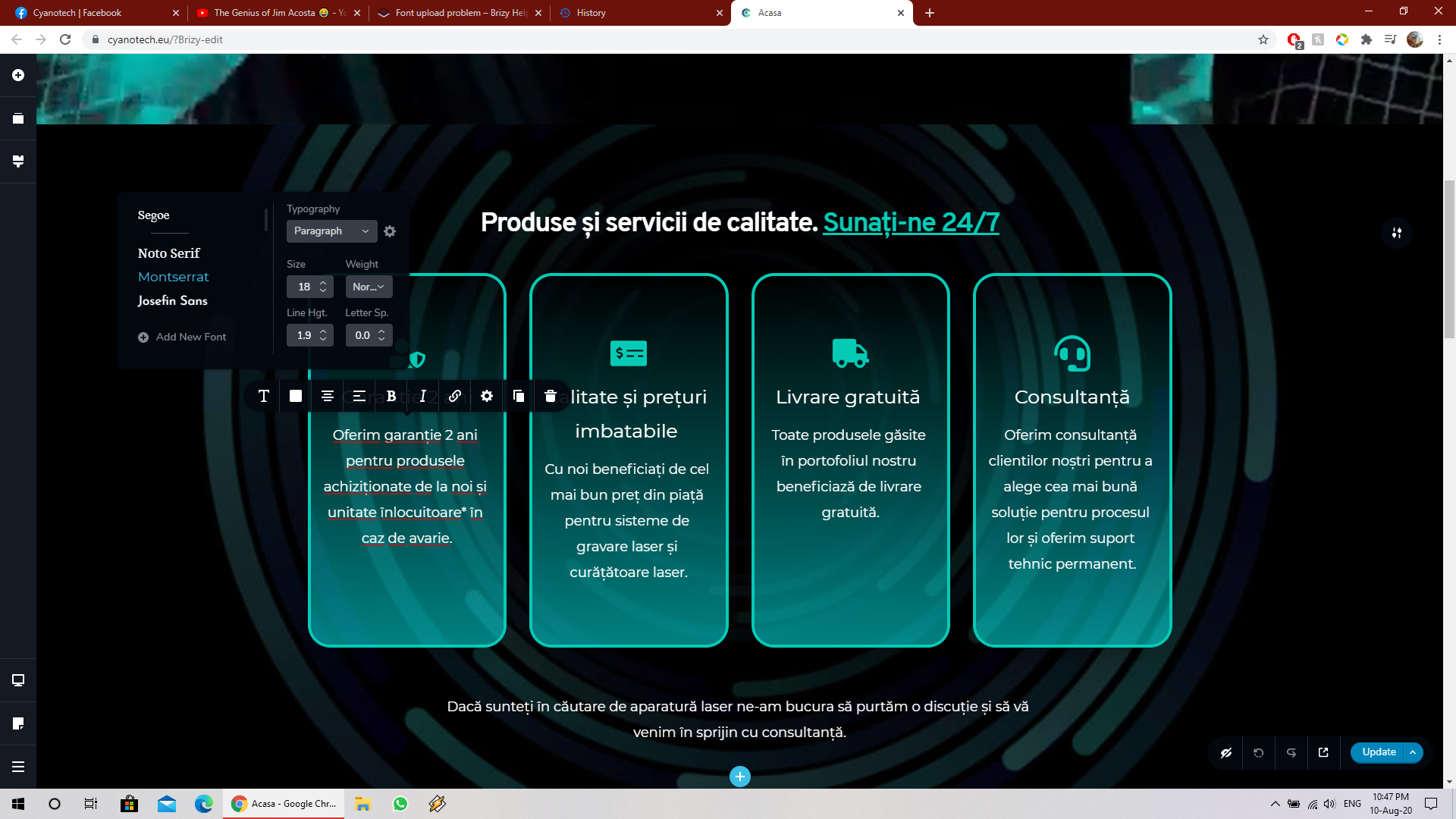
I just cleared cache and added the font again and I get the same wrong type of font displayed. Also this happens with microsoft edge. So it's most likely an internal error of some kind and not a browser related issue.
0 -
Update: I converted the .tff file to .eot, .woff, .woff2 extensions and I get the same result. Can you tell me in which folder brizy stores the uploaded fonts? Maybe there is a hammer way of just shoving the file in a folder and brizy would recognize it in the builder?
0 -
Hi,
I created a private ticket on this request. You had to receive a notification regarding this on email. Could you send to us in that private message the WP credentials to this site?
Thanks!
Best regards,
Sandra0
Please sign in to leave a comment.
Comments
6 comments