WP Brizy Icons issue

Hi,
One more time, I have an Icon issue. This is coming up like every 3 month.
Sometimes it shows up and suddenly it doesn't load. I've disabled every plugin it doesn't change anything.
Using the Brizy starter Theme, I assume it isn't the problem.
But this issue is very common, I already had to ask 3 or 4 time support for this issue.
I'm a real fan and ambassador of Brizy. But for now, I'm really fed up with this constant problem.
Here's the website, where I have the issue : https://home-expo.lu/
-

Hi,
Did you encounter this problem on a certain page? I checked the homepage of the website you send us and I didn't find some error on the pages or in the console and all icons are visible. See here.
Could you try cleaning the browser cache?
Thanks!Best regards,
Sandra0 -

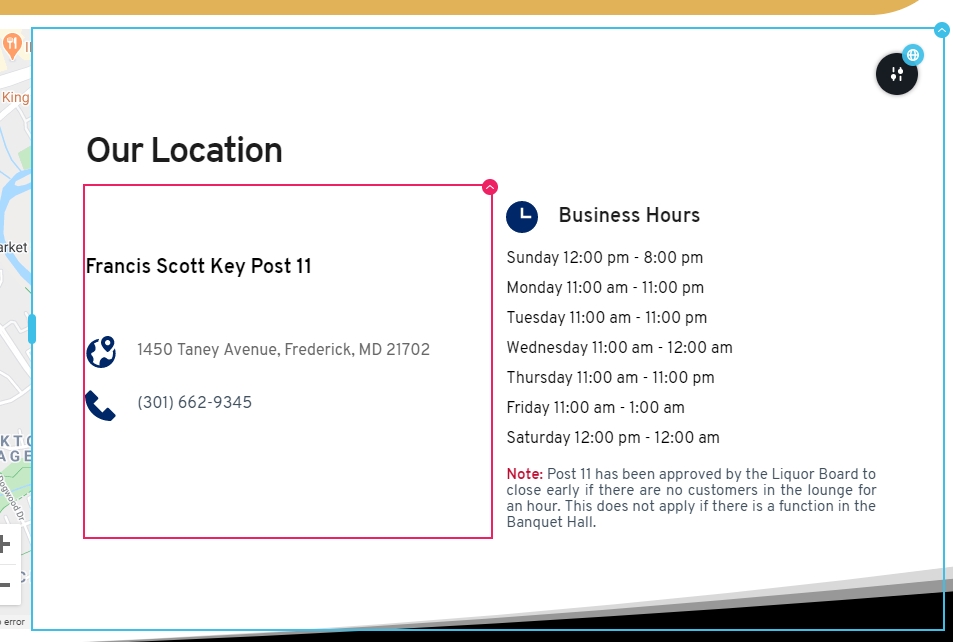
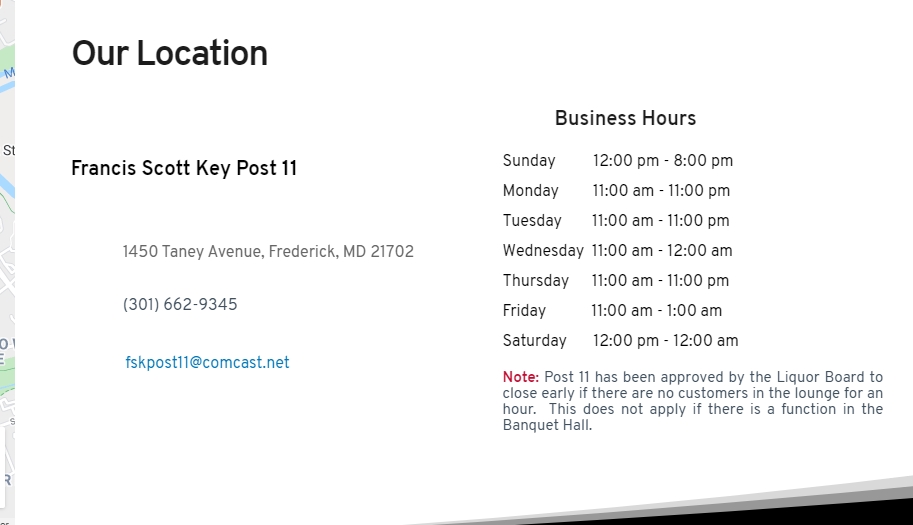
I am having the same issue after updating to Brizy Pro v2.02 (WordPress). The icons display in the editor, but when the pages are viewed in the browsers the images do not display. I have cleared cache in the browsers and still the icons do not display.
This is in the editor:
This is the view in a cleared cache browser:
 0
0 -
Hi,
Could you please, send us the URL link of the page where we can check this inconvenience? Also, could you please make some basic checks that will not affect your site?
- Do you have the latest Brizy versions - Free 2.0.5 and PRO 2.0.2? (you have installed both of these plugins)
- If you change the theme do you have the same problem?
- Do you have the same problem if you disable all external plugins?
Thanks!
Best regards,
Sandra0 -
Sandra,
1. I have the latest Brizy versions - Free 2.0.5 and PRO 2.0.2 installed.
2. I still have the problem when I changed the theme.
3. I have the same problem when all external plugins are disabled (Brizy free & Brizy Pro are only active). Disabling everything did affect my website; it messed up a footer widget and I had to rebuild it. Was easier than trying to restore from a back-up.
4. This icon issue is occurring on a global block (see above screen captures of this block) that is on the
Welcome page
https://dev11.webmax.xyz/
Contact Page
https://dev11.webmax.xyz/contact/5. This was all working prior to updating Brizy free & Pro.
6. This is a development site that will be migrated to another domain when complete and is currently password protected to keep search engine/bots from accessing the website. I can send you access credentials if you provide me with a brizy.io email address to send it to; referencing this subject and/or support ticket.
Thanks,
Michael
0 -
Hi,
I created a private ticket on this request. You had to receive a notification regarding this on email. Could you send to us in that private message the WP credentials to this site?
Thanks!
Best regards,
Sandra0
Please sign in to leave a comment.
Comments
5 comments