Cannot edit font NAME so cannot continue

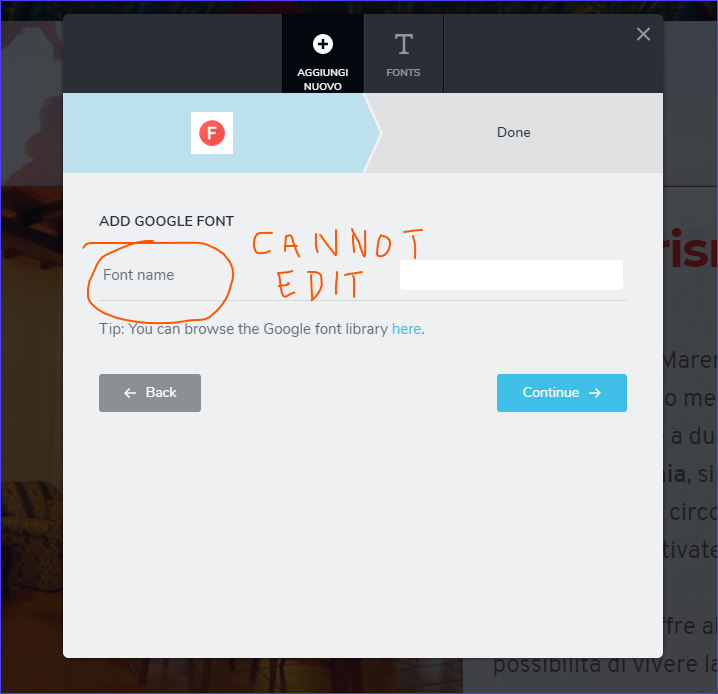
Hi, when I try to add any font, I get a screen that asks to input font name, but no way to put this name, so no way to continue... See screenshot;
-
 0
0 -

Hi,
From your screenshot, I found that you try to add a Google font. Therefore in that label, you have to add the name of the font you add in the dashboard. I checked in your dashboard and all seems to work fine. See here.
Best regards,
Sandra0 -
Yes, you're right, that's working. Problem is about graphical interface: as you can check in my screenshot, it's almost impossible to be aware that there is an input box, as it is white on very very light cyan, no border, and far right with text on far left!!
Pls check my screenshot.
So I was trying to input above or on right of text, but not so far on right. I think that would be better to improve this screen
Have a good day.
0 -
Thank you for the suggestion. We will take it into consideration.
Let us know if we can help you with something else.
Have a great day too!Best regards,
Sandra0 -

I was confused by the same thing
the UI isn't working here
needs more contrast
0 -

Hi Ben,
We will take it into consideration your suggestion too.
Best regards, Nelea.
0
Please sign in to leave a comment.
Comments
6 comments