About VIDEO not showing online - only on editor

I've this weird behaviour, embedding video in section or in element, it shows only in editor, and doesn't swoh online! Check attached screenshot, page is: https://new.baroncella-saturnia.it/video-test/
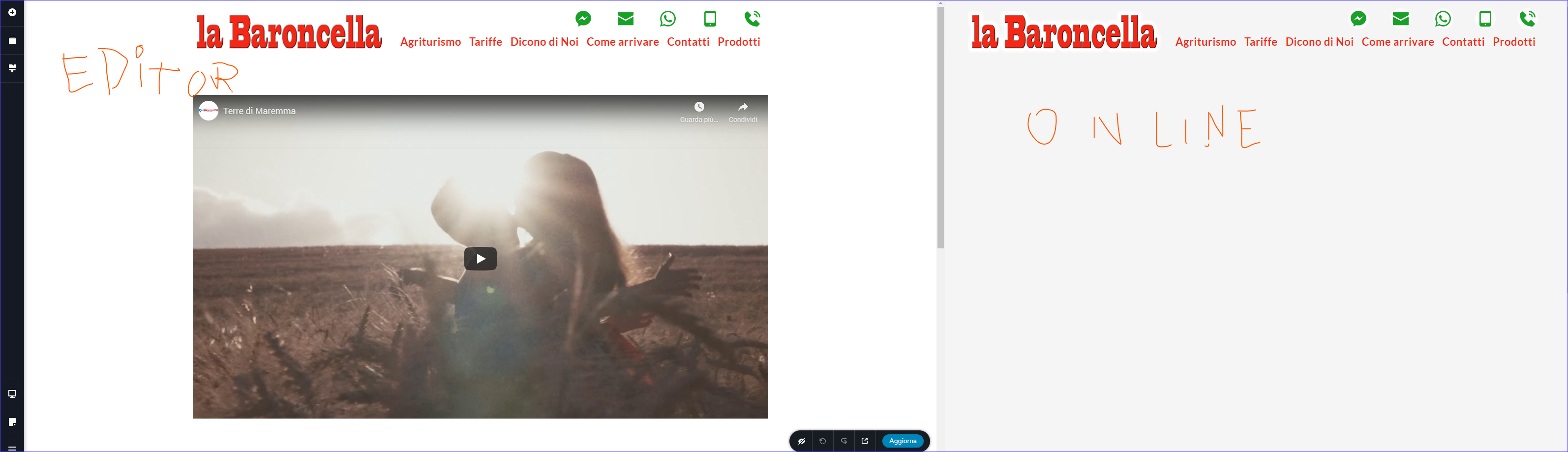
-

Hi,
Unfortunately, I can't enter in the dashboard of your account. I received an error and couldn't log in. Also, I delete them because after we approve the post, it is public and in such a way we protect you.
I investigated your page and added in my test site, the video you try to adding too. At me, all worked fine. See here the editor mode (and how I added it) and here the preview mode.
I want to ask you for some details:
- Did you add the video in the way I showed in the first screenshot?
- Do you have the latest Brizy versions - Free 1.0.126 and PRO 0.0.41?
- If you change the theme with a WP default theme do you have the same problem?
- Do you have the same problem if you disable all external plugins?Thanks!
Best regards,
Sandra0 -
Hi,
You say:
Unfortunately, I can't enter in the dashboard of your account. I received an error and couldn't log inR.
I've checked login before send you, and re-checked now in a different pc, it works perfectly, pls double check login as it works well, is it possible login via user or email, simply use url login (that is important) and past and copy login and password; pls note that password ends with charachter: (
Pls try to login as I think is the main way to check this situation, here are login details, delete it if you want:-----------------------------------------------------------------------------------
You say:
Also, I delete them because after we approve the post, it is public and in such a way we protect you.R.
Yes I know, but it seems that post is the only way to get in touch with you... BTW is there any private ticket system for this?-----------------------------------------------------------------------------------
You say:
Did you add the video in the way I showed in the first screenshot?R.
Yes, absolutely... I'm not totally beginner at Brizy-----------------------------------------------------------------------------------
You say:
Do you have the latest Brizy versions - Free 1.0.126 and PRO 0.0.41?R.
Yes, absolutely
-----------------------------------------------------------------------------------
You say:
If you change the theme with a WP default theme do you have the same problem?R.
as it's ASTRA PRO theme, I haven't change it and I will not do it,
as ASTRA is among themes YOU advice and it's a standard,
so simply Brizy MUST work with ASTRA-----------------------------------------------------------------------------------
You say:
Do you have the same problem if you disable all external plugins?R.
I did not try this as I need all installed plugins, and these are the same I'm using on almost all sites,
and I'm developing last sites with Brizy.Pls try to login and check; if you want you can temporarly disable all plugins you like, as this site is in staging;
also if you want you can modify https://new.baroncella-saturnia.it/video-test/ as you like as it's only a test page.0 -
Hi,
Thank you for these details.
I couldn't enter in your dashboard because I didn't have the URL link for log-in. I added the /wp-admin https://jmp.sh/qFtGnXD but I receive an error and for this reason, I couldn't log-in. Now, I could log-in and found that the problem was in Complianz | GDPR/CCPA Cookie Consent plugin. I deactivated it and all started to work fine. Could you check, please?You said - it seems that post is the only way to get in touch with you... BTW is there any private ticket system for this?
Reply - yes, after you create a post and if we found that the problem isn't caused by the theme or a plugin, or it is a bit delicate issue, we (Community Team) can create private tickets.Let me know if I can help you with something else.
Best regards,
Sandra0 -
So it's clear, finally! It's NOT any plugin conflict, is that this plugin does what this stupid GDPR law says to do,
it means that blocks any external service before explicit approval, except for pre-approved features and so on. So it's mainly a plugin setup issue!
Now I've reactivated plugin, configured it, and now page works.
OK thanks, you can close this ticket.
0 -
Great! I'm happy to hear this!
Thank you too! Let us know if I can help you with something else.Best regards,
Sandra0
Please sign in to leave a comment.
Comments
5 comments