Webp images (Imagify) not loading in Brizy sections

Hello,
I'm having issues showing webp images on pages I created using Brizy. The images still show as JPG or PNG files and are not displaying as webp images. I can confirm that this is linked to Brizy, because the blog posts don't use Brizy, and those pages are properly displaying webp images.
Can you help?
- Brizy Page: https://devhistoricalbricks.kinsta.cloud/products/antique-building-materials/building-brick/
- Non-Brizy Page where webp images are working: https://devhistoricalbricks.kinsta.cloud/the-blog/choosing-brick-street-pavers/
Please let me know if you need any other information on my end!
-

Hi, Aaron,
Thank you for getting in touch with us!
Yes, at the moment images added in Brizy builder can't be added with webp format. In the next update, we will add this feature and you will be able to add webp images in Brizy builder. Also, I want to add that Brizy doesn't have any compatibility with Imagify plugin.Best regards,
Sandra0 -

Hello,
I have found the same issue, 4 years on.
Is Brizy still not compatible with Imagify?
0 -

Hello Mrs Julia,
Brizy Image element allows you to set either "Custom", "Original" or few other size options for your images.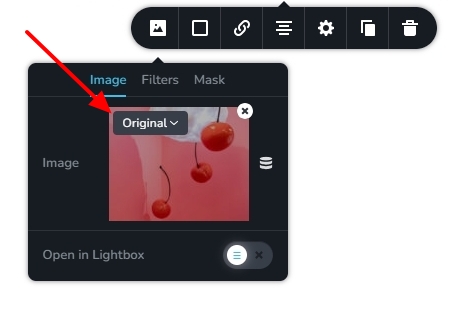 When selecting the "Custom" option, images are resized and optimized by Brizy. This option is selected by default for all images. Images added using the "Original" and other size attributes can be be optimized by Image Optimization plugins.If you like your images to be optimized by "Imagify" (or another image optimization plugin), kindly select the "Original" size option for all your images in the Image element.0
 -
All the images I'm using are set to original already
1 -
Mrs Julia,
I installed the Imagify plugin, optimized two images in my Media Library and added those images to a Brizy page. The Brizy page is able to deploy the images that are optimized by the plugin in the webp format. Have a look at my test page at https://brizy.online/imagify/ If you right click on the images and check the image paths, you will see that those are JPG images. If you download the images, you will notice that they are webp (optimised) images. Have a look at this screen recording https://jmp.sh/7ziEJjha
From my tests, Imagify plugin appears working fine with Brizy. However in case of a few images, I have noticed that even though the image is optimized, Brizy does not display the optimized version of the image.
0 -
Can I get an email address to discuss this further?
0 -
Mrs Julia,
I have created a private ticket for you. Kindly look for an email from support@brizy.io and carry forward this discussion
0
Please sign in to leave a comment.
Comments
7 comments