Inheriting Theme Fonts & Button Styles

Hello :)
How can I allow Brizy to inherit font + button style settings from my theme?
I'm using Blocksy theme currently and these settings are located in the customizer.
This is possible in Elementor, but I can't seem to find out how to make it work in Brizy.
Thanks :)
— Chris
-

Hi,
At the moment, in Brizy editor isn't possible to inherit the styles from the theme. In Brizy editor you can set your own styles for all text types and they will be applied in all Brizy pages. Here you can set them.
Best regards,
Sandra0 -

I'd like to add my voice here that this is an essential feature.. All other builders inherit theme styles by default, and then let you override via the builder styles..
For instance, im using the Blocksy theme, as recommended by Brizy.. With the way Brizy currently works, I now have to set multiple style settings (blocksy and brizy).. Brizy should default to the Blocksy settings (fonts, buttons, colors), while also having the ability to change these on a page by page basis.. Perhaps even a sync optionn of some sort could work.
Additionally, having Brizy default to the blank canvas template should be a user-defined option.. If im using a theme's header and footer, i dont want to have to swtich to the default template every time i make a new page.. It should default to the default template (hence the name), or at least let us choose which template is the default (default wp, or brizy canvas)
Thanks for considering :)
1 -
Hi Andy,
Thank you for your implication and your feedback. For us each comment matter. I will inform our managers regarding this feedback.
Thank you!
Best regards,
Sandra0 -

Any word back from the managers / developers on this? Using specified fonts based on the theme is crucial for brand consistency. I vote up this feature! 😊
Also, it would be nice to not only inherit the font, but the style. E.g. an H1 tag is styled at a 700 weight, slightly tracked out, initial caps, and a dark gray, Brizy would retain that theme defined type style. Would be helpful for all typographic elements be this way (headings, paragraphs, lists, links, block quotes, code, pre, etc.).
Thank you!
0 -
Hi,
Unfortunately, at the moment, it isn't possible to inherit the theme settings in the Brizy builder. You can set up manually all the typography settings in the Brizy builder and they will be applied for all Brizy pages from your site. Here you can find where you can set-up globally the typography inside the Brizy builder. Also, I can suggest you this tutorial about Brizy Global Typography.
Best regards,
Sandra0 -
That's not too bad. At least custom fonts can easily be added too! I'd still prefer to have the builder inherit the theme's typography styles.
I looked, but was unable to find a way to add a blockquote or a pull-quote. Is this an add-on feature?
0 -
Hi Adam,
Thank you for your reply! Unfortunately, at the moment, we don't have the blockquote or pull-quote element or typography but we added it to our Feature Request list. Our team will investigate it and when we will receive some more details about it, we will inform you too.
Thank you!
Best regards,
Sandra1 -
That would be great. Thank you, Sandra!
0 -
Happy to help!
Best regards,
Sandra0 -
Is there a way to know what features are in the queue to be worked on?
There currently isn't a way to style headings the exact way I'd like them to be. It's really important that (especially) headings match my theme's (and brand's) style. Wrapping text with H tags (or other HTML tags) just by assigning a text block to a style would solve so many stylistic problems.
Maybe there could be a global typography setting to either inherit the active theme's styles or allow styles to be set in Brizy?
I really want to use Brizy to build pages, but this is holding me back from completing any. I also purchased a lifetime license.
Thank you for considering this!
0 -
The way that the Brizy builder currently functions, it may just be needing more control options for heading styles. AS WELL AS ADDING H1, H2, ETC. TAGS IN THE HTML FOR SEO PURPOSES. VERY IMPORTANT! I don’t see a way to change the color or add a solid line above or below the heading, then adjust the spacing and thickness of that line. This is how my theme’s headings are styled, for example. However, I cannot duplicate this style in Brizy. Is this something you guys are planning on implementing in the near future? Some projects of mine are on hold because this feature does not exist. I might have to consider other builders or options if this is not something that you guys are planning on doing. I really think that typography is a super important thing, considering that 80% of design layouts is typography. Thank you!
0 -

Hi Adam,
Brizy works a bit differently and instead of global colors for headings they are separated so you have global colors and global styles for text. This way you can organize things yourself in the project. For example, you can select color number 3 for headings only. So when you change color 3 it will change in all the places where you used it: https://youtu.be/sseToVtsPi0
For example we used this structure for Kit 2
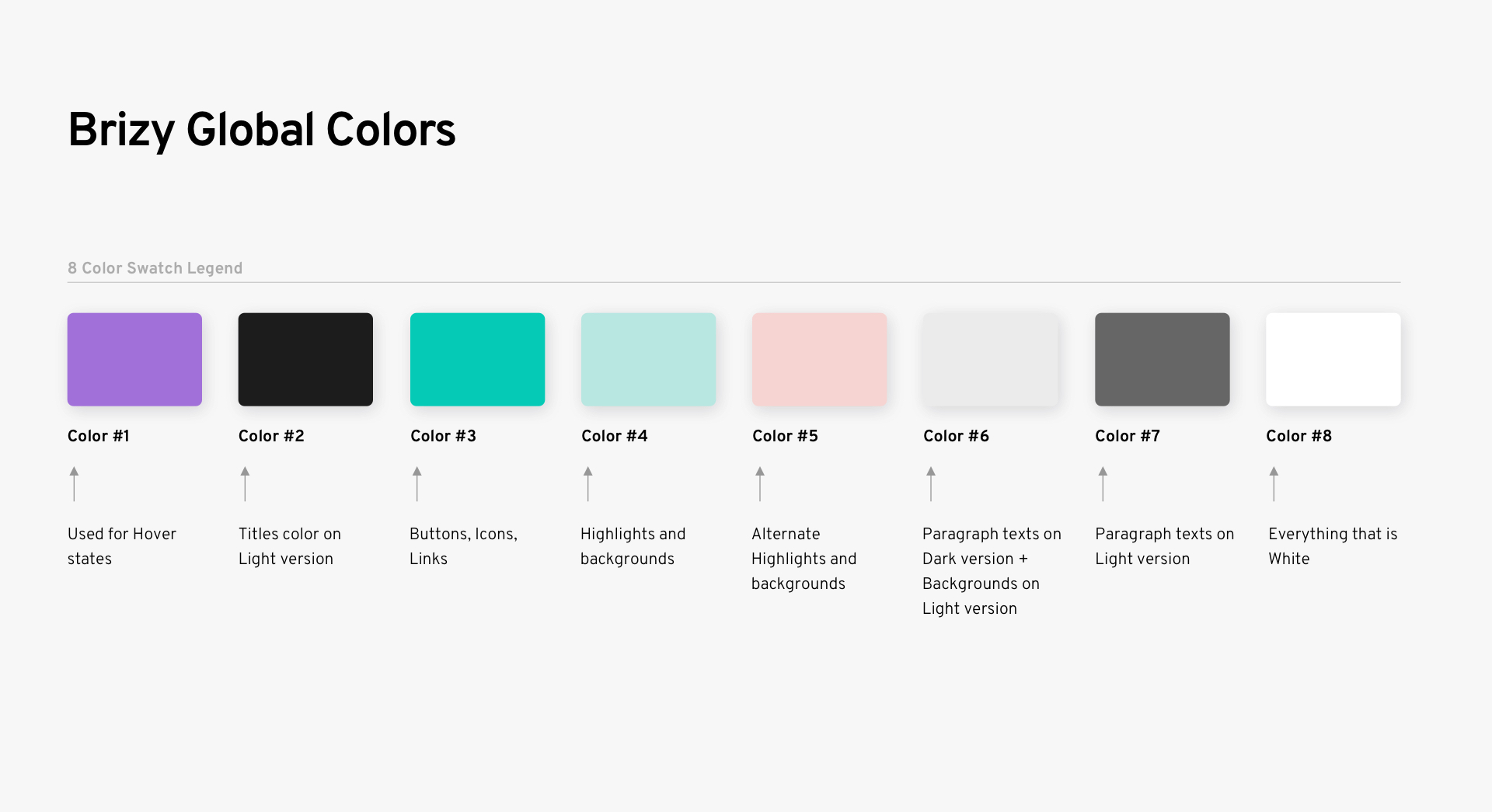 they are separate but you can connect them according to your own logic.
For typography, you can set global styles but you cannot set global HTML tags so you have to manually edit the text elements where you need a certain HTML tag.
Regarding "inherit theme styles", unfortunately, we don't have an ETA for that. It is still on our list of feature requests.
0 -
Thank you, Alex! This helps clarify how colors are used. Glad to hear that the "inherit theme styles" is on your list of feature requests! That would be so helpful!
0 -
Anytime ;)
0
Please sign in to leave a comment.
Comments
14 comments