What are Custom Attributes in Advanced Block Settings used for?

What are the custom attributes of a block and how do I edit them?
-

Hi,
In the Custom Attributes field, you can set the custom attribute for the wrapper element. More about Custom Attribute you can find here https://www.w3schools.com/tags/att_global_data.asp and here http://html5doctor.com/html5-custom-data-attributes/.
0 -

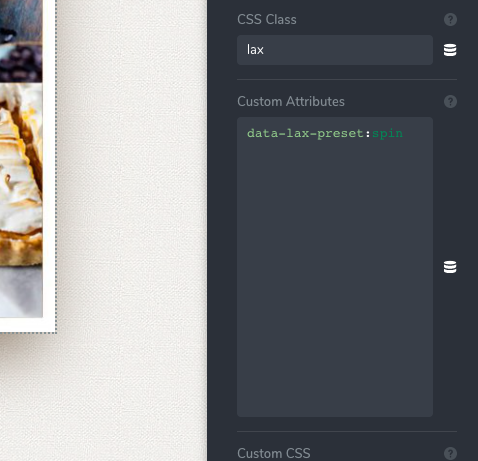
@Sandra Prunici: I tried that but it didn't seem to work. I'm currently trying to add Lax.js to create scroll animation in Brizy. However, when I added their attribute like below, it ended up showing ' preset="spin" ' in the actual HTML code
data-lax-preset="spin"
 0
0 -
Hi, Quang,
Yes, we know about this problem. Our developers are working on it and in one of the future updates, we will release the fix for this problem. I'm sorry for this inconveniences.
Thanks!
Best regards,
Sandra0 -
@Sandra: Thank you so much for letting me know. I'll wait for the feature to be updated.
Have a great day!
Quang
0 -
Thank you too! Have a great day!
Best regards,
Sandra0 -

Hi there,
Trying to get a custom attribute value with a whitespace character, e.g.:
aria-label:Apple Music
So far tried the following, nothing works:
- aria-label:Apple Music
- aria-label:'Apple Music'
- aria-label:"Apple Music"
- aria-label:`Apple Music`
- aria-label:Apple:Music
Is it something possible? If yes how? If no can it please be raised with the dev team.
Thanks
0 -
Hi Pierre,
We already fixed the problem with the custom attributes and now all should work fine.
Regarding your question with the custom attribute value - thank you for reporting this issue. We will inform our team regarding this inconvenience and they will investigate it.
Thanks!
Best regards,
Sandra0 -

I try to add a custom attribute.
ex:data-ex1="fade-up"
It doesn't work. I check and on Chrome the added attribute is:
data-ex1="fade"
0 -
Hi,
This problem is already fixed. Could you please check if you have the latest versions for Brizy Free 2.2.10 and Brizy Pro 2.2.7? If you temporary deactivate all external plugins and activate the Twenty Nineteen theme, do you have the same problem?
Just now, I checked on my site and all worked fine. See here how I set up the custom attribute in the editor mode and see here how it is looking in the preview in the Console.
Best regards,
Sandra0 -
My problem is with Value, not Key
Ex:
key_1 = "value-a1"
in the browser it will be
key_1 = "value".I have tested on both the latest BC and WP news version
0 -
Hi,
In the screenshots I send yesterday, I highlight both cases for key and value that are working fine. In the example I showed you, I used this key and value data-power: "super hero" and it is displaying fine in the preview mode. For the value, I used the whitespace. Also, for the value, I can suggest using the whitespace or if you want to use the dash "-" symbol, I recommend using the underscore "_" symbol.
Thank you!
Best regards,
Sandra0 -
I need it for a motion effect. keys and values need to Correct to work.Anyway, thanks for the enthusiastic support from you.
0 -
Hi,
Happy to help!
Let us know if we can help you with something else.Best regards,
Sandra0 -

Hi,
What if there is not an option to use underscore or whitespace, but is has to be dash? I'm connecting link to an external service, and for it to work value has to have dash separated attributes. I can't change how it reads the attributes, so I need a way for Brizy not to break them.
Example:
Key-attribute pair in settings: key:value-separated
What should be value on site: value-separated
What the value is currently: value
Is there a fix for this? It's very crucial for me to work.
0 -
Hi,
I'm sorry but at the moment the syntax for the custom attribute's value doesn't allow the "-" symbol. I will inform our team about this and they will investigate this aspect.
Best regards,
Sandra0 -

@Shandra
When I add the custom attribute style:"some style here" Brizy breaks0 -

Hi Sam,
Thank you for reaching out to us.
I have been unable to replicate the issue as described. To assist you further, please provide us with the specific steps you took that led to the issue. Additionally, try disabling all other plugins except for Brizy and Brizy Pro to check for any conflicts. You can also switch to another theme to see if that resolves the issue.
I am looking forward to your response.
Best regards,
Ariel H.0
Please sign in to leave a comment.
Comments
17 comments