Screenshots of Global Elements in Block Library are showing incorrect screenshots

Dear support,
For a website I am working on for a client I noticed that the generated screenshots don't work.
For each global block I have two versions, one for english and one for dutch, however as you can see in the screenshot my blocks all look like each other while this is not the case.
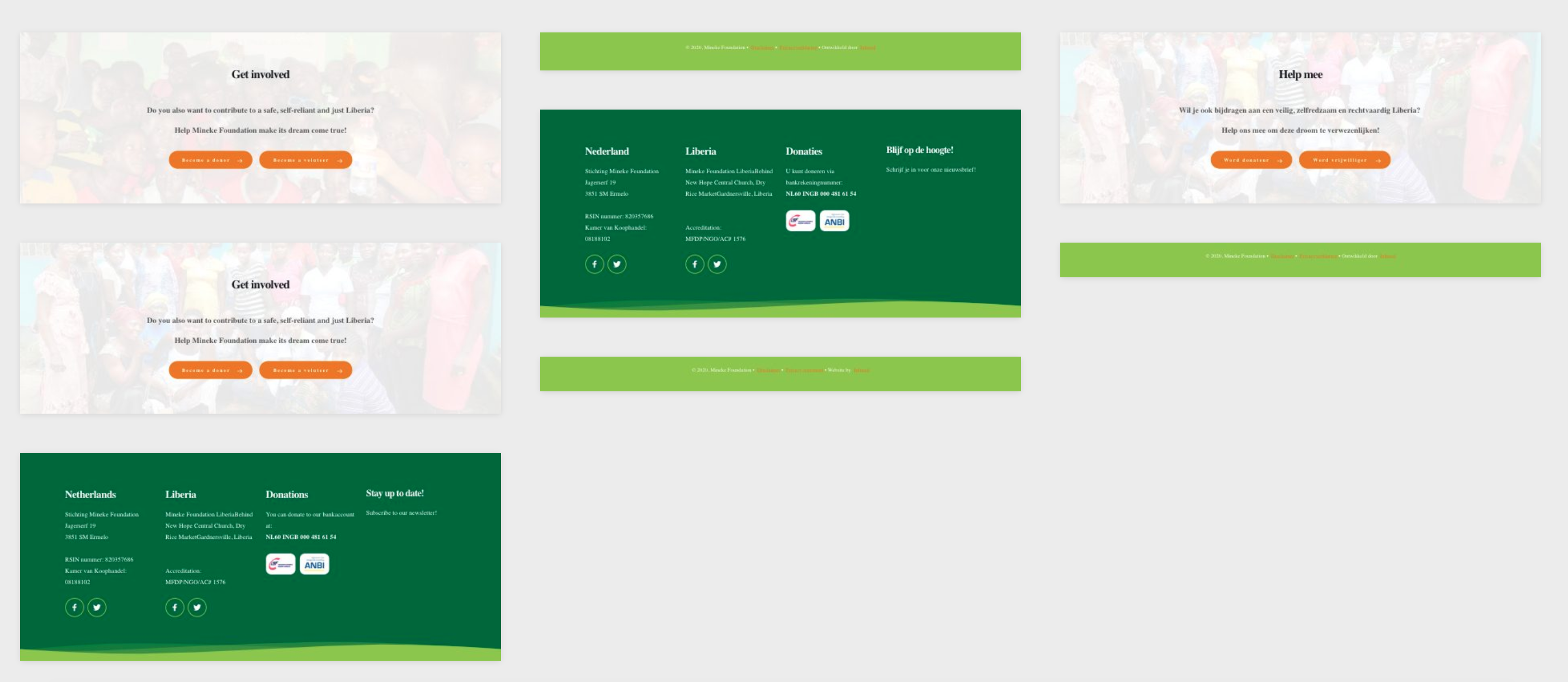
The screenshots you see in the image above is not correct. Only a few are correct, you only know for sure what you place on the page once you actually click on any of the global elements and just hope you have the right one.
This makes using global blocks really difficult and frustrating. For example you see three small green footer sections while in fact there are only two, one for the Dutch language and one for the English language and the third one is actually a Hero banner.
Update after update I keep getting weird bugs like these which makes working with Brizy for clients damn near impossible and really frustrating. For example with the previous version all my social media icons in global blocks just disappeared. This now seems to be fixed but with every update I have strange things happening which cost me loads of time, money and angry clients.
Please let me know if my issue can be solved, otherwise I am forced to leave Brizy forever as I can't work like this due to all the problems. If needed I can provide login credentials so let me know when you guys can help out.
Best regards,
Christiaan
-

Hi Christiaan,
Normally these screenshots are made by the browser and should be updated from time to time. I have created a ticket for you so please send your login details there and we will look into it. Thanks.
0
Please sign in to leave a comment.
Comments
1 comment