Couple of questions about Brizy

Hello,
I just purchased the Lifetime Pro. My first Page Builder. Used to code all my sites.
Having a couple of issues getting up and running.
1. How do I change the gutter width on columns? Can't find it anywhere?
2. When will WooCommerce features be available?
3. Can Brizy pull in customiser colours and typography from a theme, like you can in Elementor?
4. One more question, how do you make text uppercase. Can't spot it
-

Hi Daniel,
Thank you for your order! Welcome to Brizy!
1 - If you want to change the width of the columns, you have to drag the margin and maximize or minimize the column's width https://jmp.sh/OQYw6c1
2 - At the moment it is possible to display in Brizy pages the WooCommerce pages, products, product, categories but isn't possible to edit these elements with Brizy. To make this possible our team are working on Dynamic Content for WooCommerce. Now, it is in the "Progress" work and we will strive to release it as soon as possible. It is a bit complex and complicated feature and we need a bit more time to release it, therefore I can't say when we will release it. https://trello.com/c/kjqKYGtd/21-dynamic-content-woocommerce
3 - No, in Brizy isn't possible to import colours and typography from the theme. You can set them in Brizy pages and when you will set them globally from "Styling", they will be set for all Brizy pages.
4 - At the moment, Brizy builder doesn't have an option to make a text as uppercase, but you can add a custom CSS code and set a text with Uppercase, or you can manually add it with uppercase.
Thanks!
Best regards,
Sandra0 -

Hi Sandra,
Can you explain how exactly one can make text upper case with CSS code? You must be one of the only builders without a button to make text uppercase.
0 -

Hi Seb,
It's easier than you think, and the only difficulty can be finding the right selector, but it can be done with the Inspect Element tool. Please refer to this video: https://youtu.be/Xb6ZIlYj2OY
0 -
Hi Alex. Thanks for your reply. I'm fine with CSS, but I think Brizy should have this simple option available. Thanks for your reply!
0 -

Hi Seb
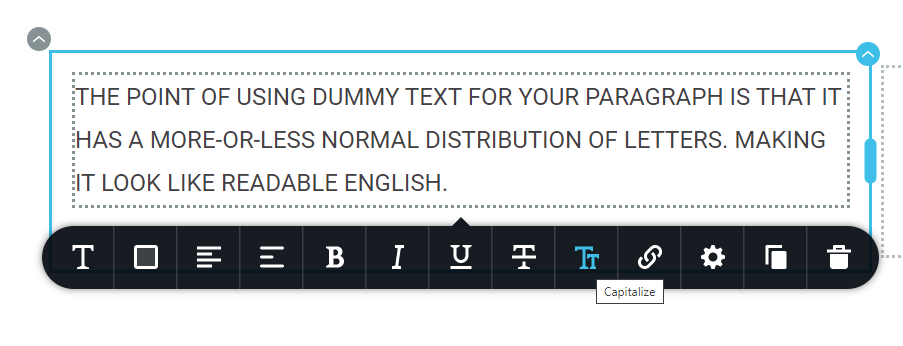
To make text ALL CAPS, please click on the "Capitalize" button in Typography toolbar
 0
0 -
Kc George, how do we make all H1 headings uppercase by default?
0 -
Hi Seb
It looks like we do not have a way to make heading 1 uppercase globally.
0 -

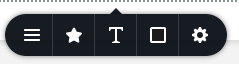
Hi, is there an option to make Menu Text Capitalised? Currently I do not see an extended Typography Bar when editing a Menu's text:
 0
0 -

Hi Dennis,
Thank you for reaching out to us.
Unfortunately, the option you're looking for is not available. However, you can achieve the desired effect by using this custom CSS:
.brz-menu{
    text-transform: capitalize;
}
Alternatively, if you prefer to have uppercase letters in the menu, you can use this CSS:
.brz-menu {
    text-transform: uppercase;
}
To add this CSS, navigate to "Appearance" → "Customize" → "Additional CSS" on your website.
If you have any further questions, please let us know.
Best regards,
Ariel H.0
Please sign in to leave a comment.
Comments
9 comments