Favicon

I am unable to upload png file for the favicon. It only accepts jpg. This caused my favicon to have a white background. Any ideas how to solve this?
-

Hi Ming Wei,
I suppose that you find this inconvenience in Brizy Cloud because only here you can add through Brizy builder the favicon for the site. I tried to reproduce the problem you mentioned but I can't. Here you can see that I could add the png image as favicon https://jumpshare.com/v/AIpd1oefKdajVufgT0vD and here you can see how it is displayed on the live view https://jumpshare.com/v/uKAva0ymSKldqYr5hYls All seems to be ok.
Could you please check again? Could you send to us the image you try adding as a favicon?Best regards,
Sandra1 -
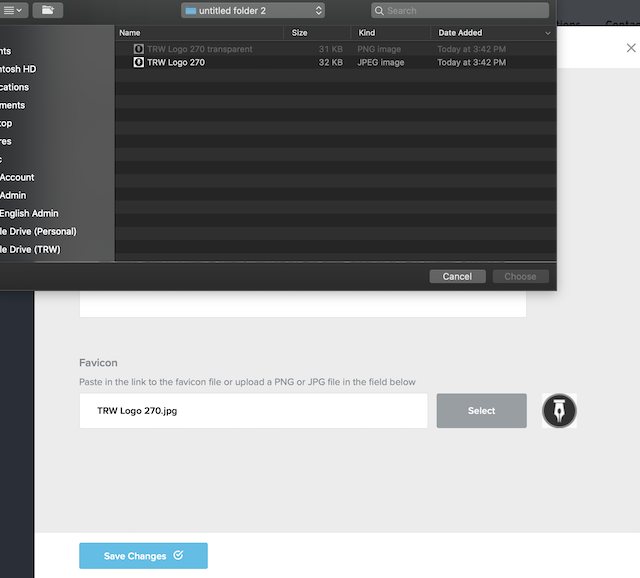
You can take a look at the photo. I am unable to select the png file format.
 0
0 -
Hi Ming Wei,
We could reproduce this problem. It happens only in Safari, in Chrome it is working fine. I created an issue for our developers and they will investigate it and find a solution for it. For the moment you can log-in Brizy Cloud from Chrome and make all the modifications you need.
Thanks!
Best regards,
Sandra0 -
Thanks! Have solved the problem using google chrome.
0 -
Thank you too! It's my pleasure to help you!
Best regards,
Sandra0 -

Is it possible to delete the uploaded favicon? I tried but failed. Seems you can't delete or input a link in the settings.
0 -
Hi,
Yes, it is possible to change the favicon. For this, you have click on the "Select" button and select another favicon. After this, don't forget to click on the "Save changes". See here.
Best regards,
Sandra0 -
@Sandra Prunici
Thanks for your kind and quick response.
Can I just delete the favicon, and leave it blank? Because only png and jpg images are supported, I'd like to upload an .ico image for favicon.
BTW, is it possible to input a image link for an ico favicon?
best wishes,
abe0 -
I'm sorry but at the moment isn't possible to delete the favicon and leave it blank. Also, isn't possible to input an image link for the favicon.
Best regards,
Sandra0 -
Thanks. Looking forward to new updates.
0 -
Thank you too for understanding!
Have a great day!
Sandra
0
Please sign in to leave a comment.
Comments
11 comments