Brizy Sub-Domain Showing on Self-Hosted Pages

-

Hi,
Did you make any changes to .htaccess file?
0 -
I was able to resolve the issue.
0 -
I'm glad to hear that. What was the problem?
0 -

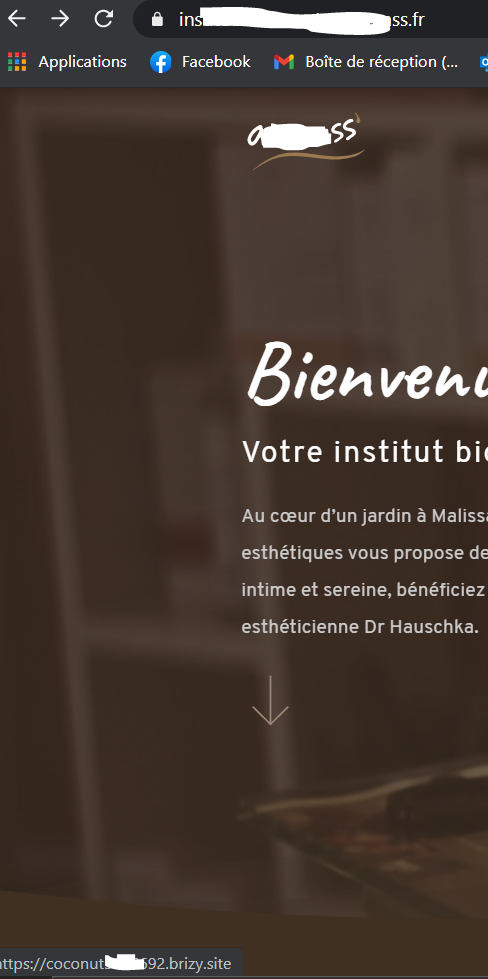
Hello, I had the same problem with brizy cloud. The logo link refers to the pre-production of brizy (coconut...). Impossible to change it, even by adding a custom link. How to have the good url (not coconut)?
 0
0 -
Hi,
can you please send the link to your website so we could test this on your page?
0 -
Hello, here is the link: https://www.institut-de-beaute-aromass.fr
0 -
Hi,
how was this project published? By Exporting HTML? If so, you will need to edit the code and modify this link manually.
0 -
With the brizy server sync as well. You can see it live, if you click on the logo
0 -
Hi,
so the project at this link is published using the server sync method? The problem is only with the links or any changes you make in Brizy editor will not be reflected on your project?
0 -
The project is currently published on the synch methode server. It concerns only the links
0 -
In this case, have you changed the logo image link in your cloud project: https://jumpshare.com/v/SZuSOdauNkqHrk3ZAS8M ? If you have done this, then in the https://coconut5976692.brizy.site/ project you should have the logo link directed to https://www.institut-de-beaute-aromass.fr but I don't see that. Could you set a custom logo link in your project and send me a screenshot? Then I will check the project in the frontend: https://coconut5976692.brizy.site/
0 -
Hi,
I had already tried to customize the logo link. I tried again by adding the https.
https://snipboard.io/OKAtdQ.jpg
The problem may be with the synchronization. I have been getting "Synching in progress" for 30 minutes. But I let you see for yourself. I haven't changed the site since then.
0 -
Hi,
I took a look at your code and it looks like you set a link to the column that is over the logo that has the correct link. Respectively when you click it goes to the link of the column: https://jumpshare.com/v/htBKpjN02gRvj91B00Uw You need to remove the column link: https://jmp.sh/7mtX4Hd
1 -
Hello, yes it was. I hadn't thought of that. Thanks for your help
0 -
Anytime ;)
0


Please sign in to leave a comment.
Comments
15 comments