Brizy and Yoast (premium)

It seems Brizy may have some problems working with Yoast plugin (Premium included).
Please confirm formally your compatibility with Yoast. And do not try to say all work ok or pass links to Yoast Toturials (like in this post: https://support.brizy.io/hc/en-us/community/posts/360057869911-Seo-and-brizy#comment-overview)
As Yoast formally states (https://yoast.com/help/is-the-plugin-compatible-with-xyz-visual-page-builder/), that they gave up integrating visual page builders with Yoast and they push this responsibility to page builders development teams.
So its you who integrate with Yoast.
Please confirm integration status of Brizy (Personal) with Yoast (free and premium)
I have bought both Brizy and Yast premium and it seems this dont workl!
-

Hi Bartosz,
As was said in that post, Yoast works with Brizy as with others page builder. We are compatible with Yoast and during the time we fixed some incompatibilities with Yoast and therefore many of our users use it with Brizy.
Could you please describe what problems did you encounter between Brizy and Yoast? Could you describe it and send to us some screenshots to better understand the problem?Thanks!
Best regards,
Sandra0 -
Hello Sandra and thank you and sorry for delay (I did not get notification).
The problem is simple. Yoast sees almost no content made in Brizy. It sees only what we see when we edit Brizy Page/Post in Wordpress editor (HEAD of HTML not BODY!). It doesn't see BODY of a page/post, SEO score in Yoast is not generating (it doest see content, <h1> <h2> ...)
This is critical for me and my site which is content marketing driven, my Yoast premium is also useless.
I'm really thinking of removing Brizy, but creation of site took so much time and the work will be lost :(0 -
Please find simple example. Yoast PREMIUM sees 0 headings and 0 paragraphs (last screen). But H1 is set in Brizy (second screen) and visible in HTML (first screen)
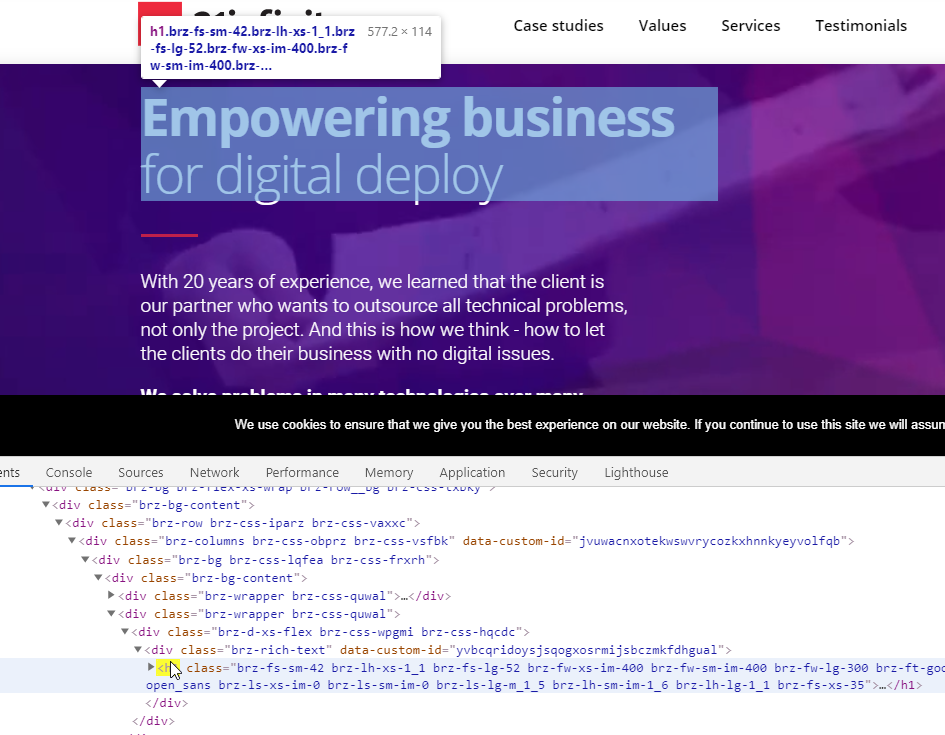
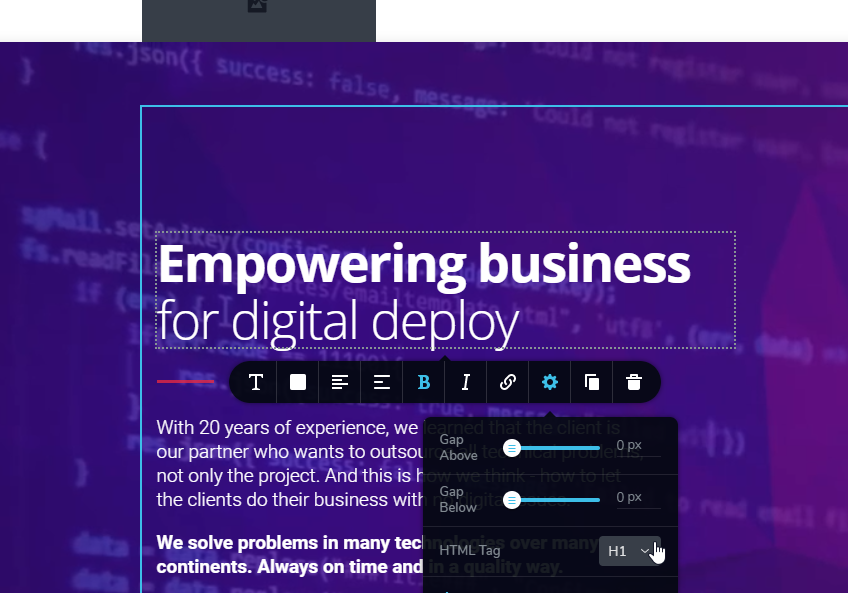
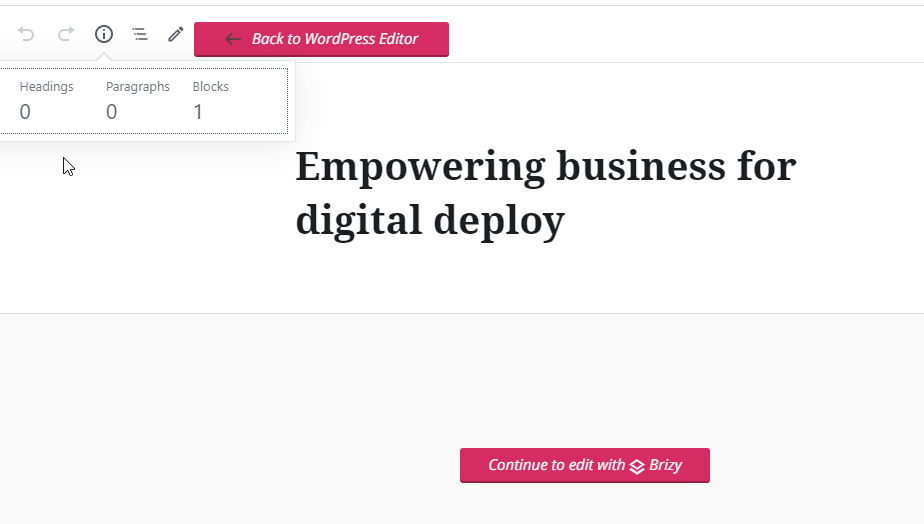 0
0 -
Hi,
Thank you for your reply! It's ok, don't worry!
The Yoast Seo Analysis you can see in the Edit mode of the page, not in the Brizy editor. If you will go back to the WP dashboard, then access again Pages, you will see here SEO score for all pages https://jumpshare.com/v/iTAniNgXNka2fMxd3PWm
The Full SEO Analysis for a page you can find when you click on "Edit" (not "Edit with Brizy"). At the bottom of the page, you will find the full analysis https://jumpshare.com/v/L7DPVrtaqDC3FnUSU45w From this screenshot you can find the Yoast can read the content of the Brizy page.
Could you please check too?Thanks!
Best regards,
Sandra0 -

Hi Sandra, I have the same problem. My Yoast SEO Analysis shows no text or pictures on the page.....and sure there are.
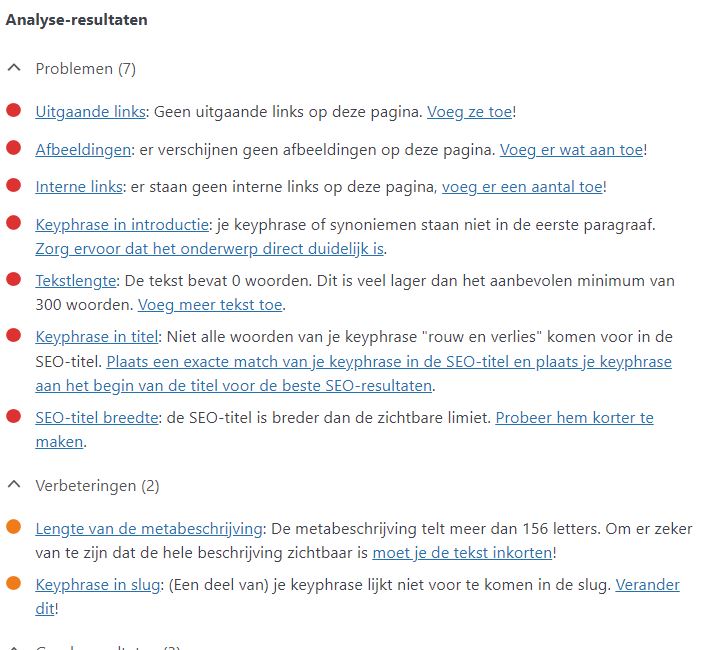 -1
-1 -
So what could I do? I have build all the pages with Brizy and it seems that it can't read pictures, text and links
I looked on the analysis according to yr instructions above.
Please advice,thanks Pauline from Amsterdam
0 -

Hi Pauline from Amsterdam,
Can you please give us more details? Does it happen in posts or pages? Can you please confirm that we are talking about the latest Brizy versions - Free 2.3.33. and PRO 2.3.26? I just checked this and Yoast show me a good result: https://jmp.sh/4B2w5cQ Do you have the Premium version? If so, do you have the same problem with the free version?
0 -
Hi Alex,
I have the PRO version 2.326.
The Yoast SEO analysis as an example the HOME PAGE shows there is 0 text, there are no images and links ...well this is not the case..it contains text and images see below. Same for other pages..Coaching page...it gives in analysis 156 words...not correct..it says no pictures...not correct. So for some reason it does nit get the info of the pages...Post have not done yet...still trying to get the pages
sorted out ...it says only 156 words...this is also not correct.
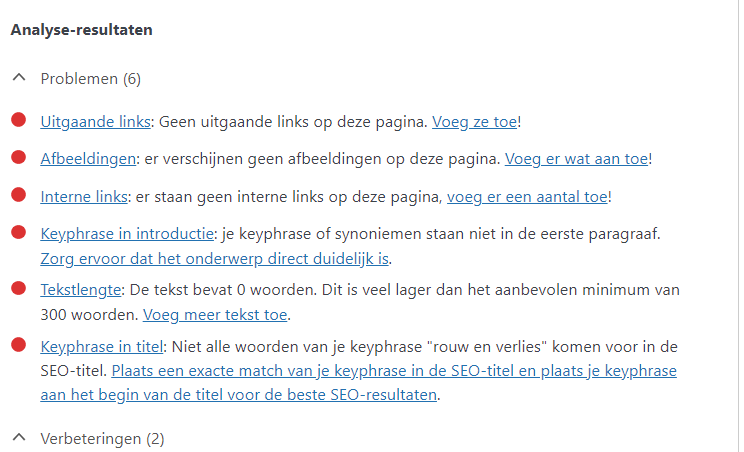 0
0 -

Hi Pauline
I have looked at the Yoast Analysis of your homepage http://paulinehoogervorst.nl/ This is what I see
Your homepage scores 0 in the Flesch Reading Ease test. Yoast analysis did not say that your homepage has zero text, no images and links. Please check it again.
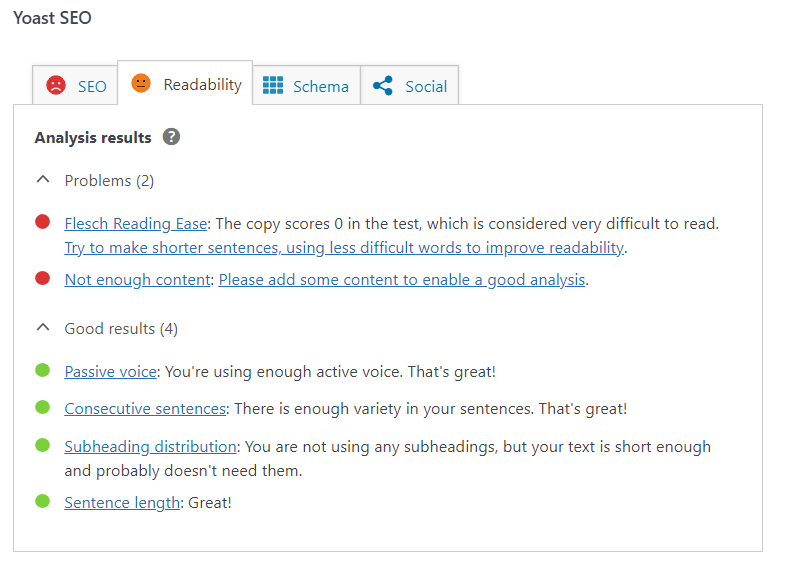 0
0 -
Hi Kc George
Thanks for your reply.
But please check the SEO analysis, there it mentions clearly 0 Text, no images and links...as an example the Home page SEO analysis..... Please explain?
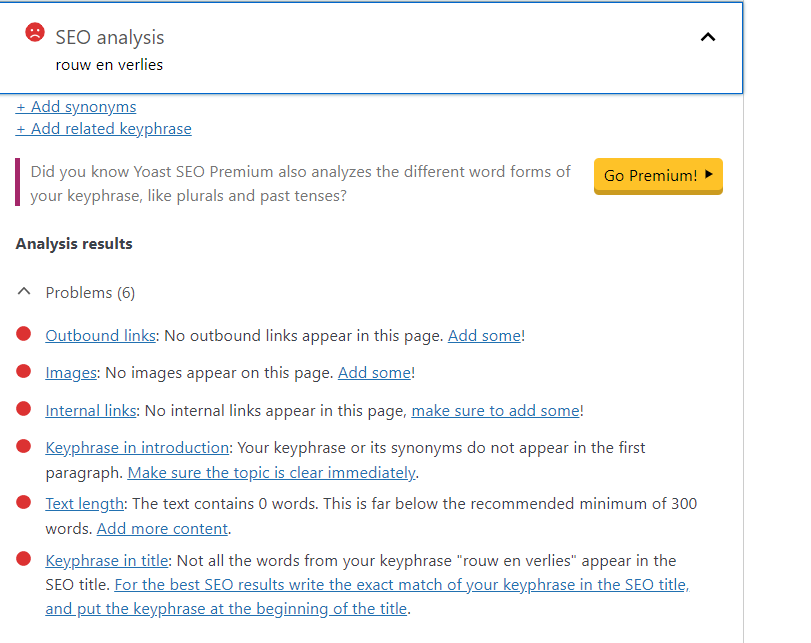 0
0 -
Hi Pauline
You are right. It does say 0 words, no images and links etc. We do not know how Yoast SEO analysis works. Can you please post your question here? https://wordpress.org/support/plugin/wordpress-seo/.
Your post can say something like this. "This is my homepage: http://paulinehoogervorst.nl/ As you can see I have a lot of text and images in my homepage. I also have internal links on few buttons. This page is developed using Brizy page builder. Do you know why Yoast SEO analysis says.
- "Text contains 0 words"
- "No images appear on this page"
- "No internal links appear in this page"
0 -
Dear Kc,
I have done as you mentioned.
However I cannot find a solution yet, and in the Brizy support forum I saw other mentioning of this issue.
So can you please check again your side what I can do right now to solve this issue?
Or what SEO tool should I use to avoind this problem?
Thanks Pauline
0 -
Hi Pauline
I would advice you to focus on SEO and not on Yoast internal analysis of your homepage.
Have you submitted your sitemap to Google Search console? If you have not done it, please do that first. It is better to focus on the analysis Google Search Console gives you rather than look at Yoast analysis.
0 -
Hi Kc,
Thanks for yr message. Yes, I have done Google earch consult.Will leave Yoast for what it is.
Another strange thing you might be able to asiist me with.
I have used the Advisor template for my website paulinehoogervorst.nl
The menu buttons will collor when sliding on them before clicking ...but there is only a very small area where it works..only when yr mouse hits the area above the text of the button. And also on the tablet version with the finger it is difficult to find the spot. how can I change this? Is it a setting?
You still have my log in credentials...can you please check?
Thanks pauline
0 -
Hi Pauline
In your website header, the phone number was overlapping with the logo and the menu. I added a new column and placed the phone number inside it. Please see your header design in desktop, tablet and mobile design views and check if everything looks fine. Please make necessary design changes if required.
I have also made your phone number clickable by linking it your number. Please click on the phone number on a smartphone and check if it dials the right number.
0 -
Hi Kc,
Thanks, it works fine now!
Only I noticed this look in the Tablet landscape version

If I look at the Tablet version in Brizy I only see the Portrait layout and that looks fine. So do not know how to adjust menu for Tablet 'landscape'version. an you check please?Thanks Pauline
0 -
Hi Pauline
I have made some changes to your header. Now the phone number should appear in a single line. But the menu may still appear in two lines in the tablet landscape view. If you need to fix this issue, you may need a logo with better width to height ratio. Something like this. With a redesigned logo, you can make it smaller and it will still be visible.
 0
0 -
Hi Kc,
Thanks so much for your help. For the moment I will leave it like it is now. But understand with smaller logo in witdth I could change the 2 lines for the Tablet. Have a good weekend!Pauline
0
Please sign in to leave a comment.
Comments
18 comments