Facebook Element

Brizy Pro Facebook Element:
Like - Share Function: Share works, but like reveals a white box with a frowny icon
Page Function: Choosing Page and Timeline then adding the page link, the element just disappears; all but the dotted line around the element. If I delete the link, the Brizy FB page shows, but on the very top of it with no way to reveal the rest or align it. Same with the Group function, but the full page shows (Brizy page that is...not the page I link to....it disappears again when I add a link).
Both happen on the Brizy builder, preview and live page.
Thanks for any insight.
-

Hi Chris,
Like - Did the Like works at your site in such a way? https://jumpshare.com/v/TaEz3eGItp3ta3mrvQLv - In such a way is working this element? Do you have other expectations?
Regarding the problems with Facebook Page and Group element, I will create a private ticket. You have to be informed regarding this on your email.
Thanks!
Best regards,
Sandra0 -

I am having the same issue
I add element and it just disappears
0 -
Hi, Ben,
Could you please check if you have the latest versions for Brzy Free 2.0.14 and Brizy Pro 2.0.7? Could you send us a video that will illustrate this problem?
Also, could you please temporary deactivate all external plugins and activate a WP default theme and check if this problem is still occurring?Thanks!
Best regards,
Sandra0 -
I had a lot of ad and javascript blocking happening on my browser and without that it works
As theres a call to facebook and many people block facebook its a good idea to maybe mention this in the videos for this element
0 -
Hi, Ben,
Thank you for your suggestion. I will inform our managers regarding this.
Thanks!
Best regards,
Sandra0 -
couldn't get this working is there changes to authentication at Facebook which need developer API app token to work?
0 -

Hi Ben,
This is a 2-year-old post so I should ask you: do you have this problem with the latest Brizy versions - Free 2.3.28 and PRO 2.3.21? Also, please give us more details. Do you have any difficulties using the Like / Share Facebook element?
0 -
couldnt get the like button to work, share works fine, maybe change your code to either include facebook API key or just remove the like element and only have share
0 -

Hi Ben,
You are right; the Facebook 'Like' does not work. Thanks for reporting this. We will work on fixing it
0 -

Hi Ben,
Could you also please provide us a screenshot of this issue from your end?
I am looking forward to your response.
Best regards,
Ariel H.
0 -
2ndimageishowitsworkingonceclicked

 0
0 -
Hi Ben,
Sorry about that, we're now looking into this issue, could you also please provide us with the error showing in the console in your browser?
To check console errors in web browser, you can:
- Go to the page in your account where you are having the problem and click on the 'Like' button.
- Right click on the page, and choose “Inspect”.
- Select “Console” in the menu that appears.
- Take a screenshot of the errors that appear under the Console tab.
0 -
chrome-error://chromewebdata/:1 Refused to display 'https://www.facebook.com/' in a frame because it set 'X-Frame-Options' to 'deny'.
VM222:5 crbug/1173575, non-JS module files deprecated.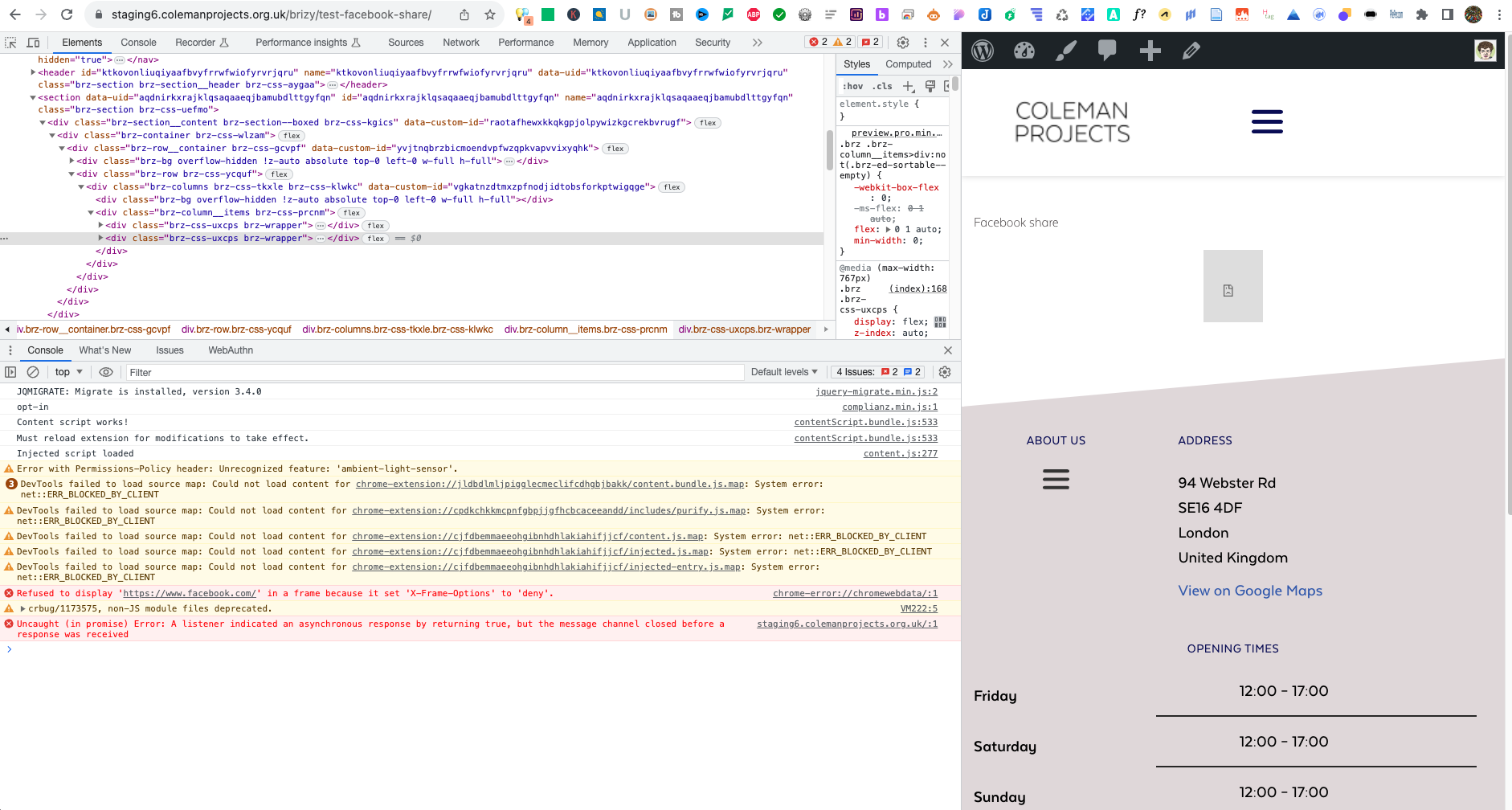 0
0 -
HI Ben,
Thank you for your patience.Regrettably, we do not currently have a solution for the issue you raised. The situation is complex, and it may require a different approach for implementation, as you mentioned in one of your previous responses.
This issue is a result of the changes made by Facebook, which are explained in the following links:
- https://stackoverflow.com/questions/43155557/facebook-like-button-disappeared
- https://developers.facebook.com/docs/plugins/like-button?locale=en_US
Nevertheless, we have noted this problem as a potential feature improvement for future updates.
Meanwhile, you may want to explore third-party plugins that offer similar functionality. A list of recommended third-party tools can be found at this link: https://automatorplugin.com/the-best-social-media-plugins-for-wordpress-in-2023/
Sorry for the inconvenience.
Best regards,
Ariel H.0
Please sign in to leave a comment.
Comments
14 comments