Menu added in brizy page runs items together or wraps round. How to add carriage return after each item

-
 0
0 -

Hi Bevis,
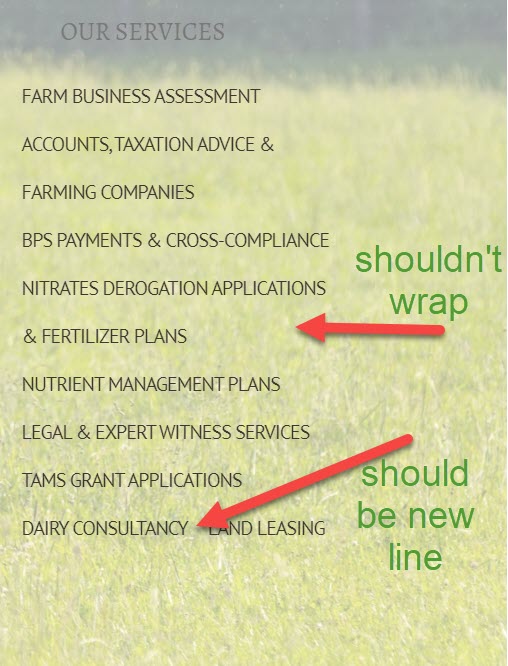
The menu as another element is added in a column. Both menu and column have a certain width that can be added custom by the user and it is determined by the device width. In this case, the menu item "Nitrates Derogation applications & fertilizer plans" is too long to fit in the device width and menu width, therefore, a part of the text is wrapping to a new line.
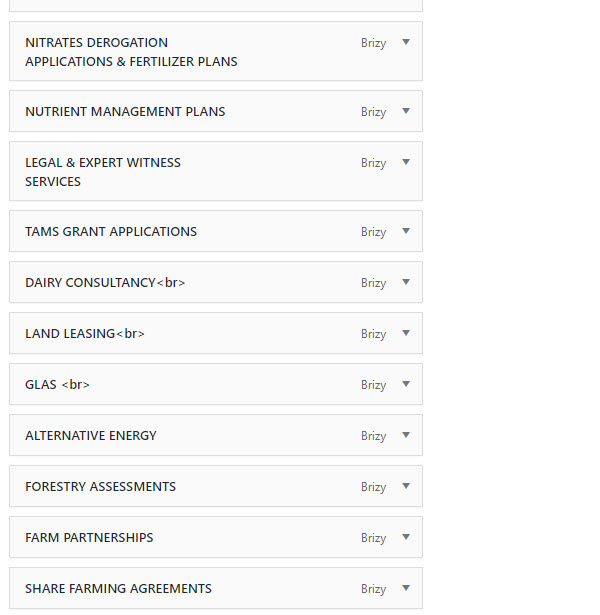
If you want that the menu item "Dairy consultancy Land leasing" to be in 2 lines, this action will be a bit difficult to do. For this, you have to go to Menu from WP dashboard and for this menu item, after "Consultancy" to add <br> tag. In this case, in the editor mode, you will see the <br> tag, but in the preview, you will not see it and the "Land leasing" will be a break in a new line.
Thanks!
Best regards,
Sandra
0 -
Hi Sandra
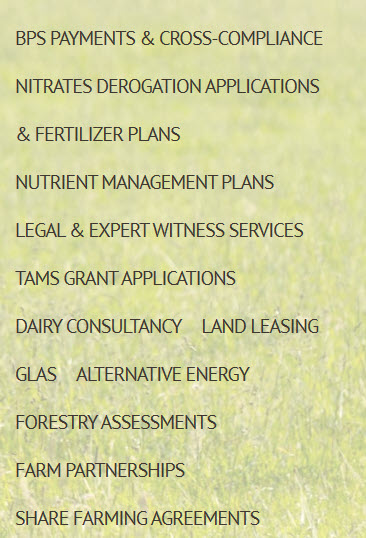
Thanks for the comment. I tried adding the break to the menu but it doesn't seem to have made a difference. Am I missing something? Regards
Bev
 0
0 -
I'm sorry Bev, I think I didn't understand you well. Could you please send to us the URL link of this page with this inconvenience?
Also, could I ask you if you have the Pro version of the Brizy plugin?
Thanks!
Best regards,
Sandra
0 -
Hi Sandra
Yes, the page is at http://ceresac.com/accounts-taxation-advice-farming-companies/ and I am using Brizy Pro.
Kind regards
Bev
0 -
Hi Bevis,
Thank you for the URL. Now is clearer the situation. I thought that you found this inconvenience on the hamburger menu. Checking the page I found that you try to display the menu in the vertical position. At the moment isn't possible to display the menu in such a way, we allow only the horizontal position. I can't understand exactly how did you create that menu in that position (but I suggest you minimize the column and therefore some menu elements go in a new line) but anyway if one menu item will have enough space to fit in the same line with the previous one, it will not break in a new line, because the main structure and setting of the men are to be positioned horizontally. For this reason, you see some menu items (like Land Leasing and Alternative Energy) in the same line with other menu items (like Dairy Consultancy and Glas), because they can fit in the same line.
Thanks!
Best regards,
Sandra
0 -
Hi Sandra
Thanks for taking the time to look at this. It is a pity that it can't work (something to develop?) but I will see how I can make it fit better as you describe.
Kind regards
Bev
0 -
Unfortunately, at the moment we don't have the vertical menu in our To-do list but if you need to position the menu in the vertical mode, you can try adding some Custom CSS. https://jumpshare.com/v/ocpxMwM291ZYHUqElWp1
You can try using this Custom CSS
element ul {
display: block !important;
}Best regards,
Sandra0
Please sign in to leave a comment.
Comments
8 comments