Bug in brizy forms

I have a form in my website:
https://library.imperialcounty.org/services/
The select fields have a strange behavior.
Attached are 2 images
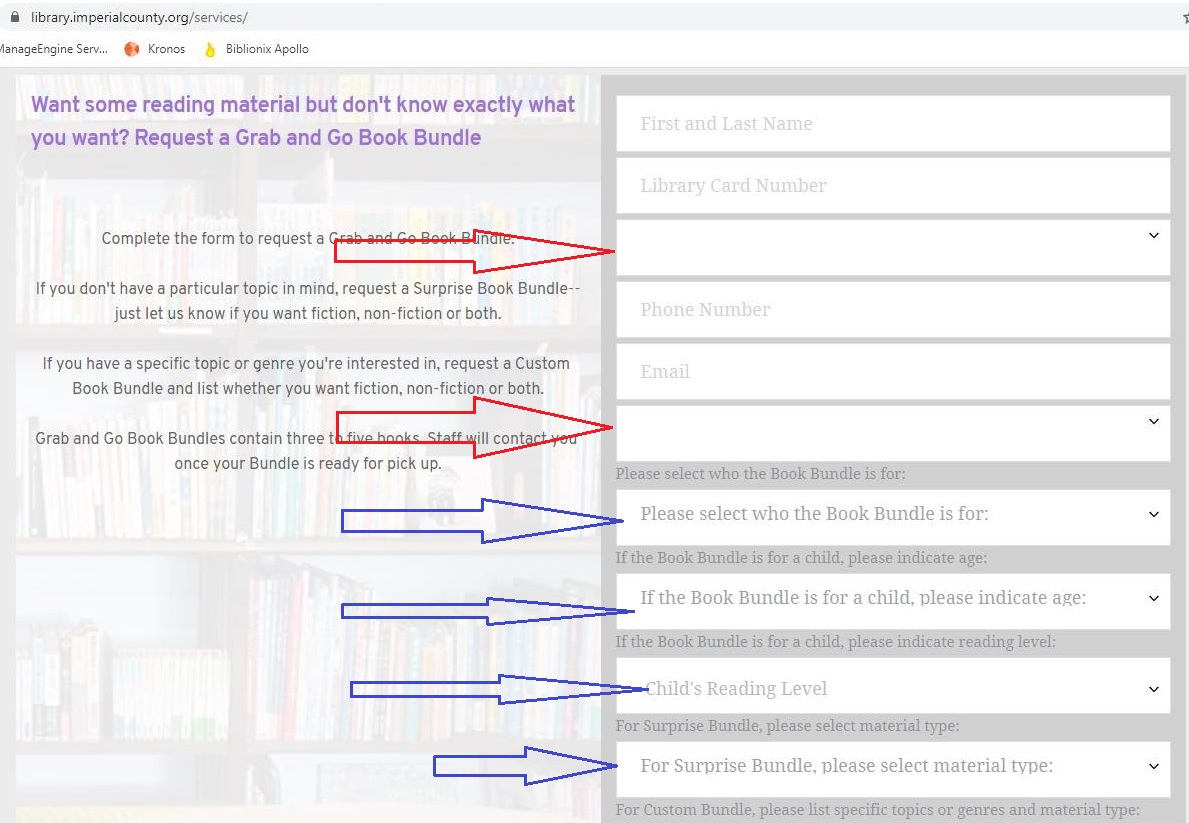
They show how the form displays inside brizy editor and how it actually displays in the browser.
The fields with red arrow don't display the field name and it also adds one more blank option.
The fields with the blue arrows do display the field name but it's displayed as an option.

-

Hi Leonel,
Could you please check if you didn't delete the field name for those fields than doesn't show the placeholder? Also, here you mentioned that this field display one empty option. In that empty option should be displayed the placeholder. In such a way is structured the select field.
Regarding the fields marked with a blue arrow - I identified that they have options https://jumpshare.com/v/c1m8gWbsPmFPcTAiLP7h (also, here you will be able to see that in the first option is displayed the name of the select field).
Best regards,
Sandra0 -
Hi Sandra,
As you can see in the picture of Brizy editor in my original post, the field name is there for the fields in red arrows.
For the fields in blue arrows, they have a field name and a label on top of them. For example:
Field name: Child's Reading level (see brizy editor image)
Label : "If the Book Bundle is for a child, please indicate reading level"
In the options for the field it displays the label as the first option
Field name: Intended Use (see brizy editor image)
label: Please select who the Book Bundle is for:
In the browser view, inside the field it shows the label instead of the field name. It also has the label as one of the options.
0 -
Hi Leonel,
I created a private ticket on this issue. You have to receive on the email notification regarding this. Could you please send us WP credentials of this site to check it? Also, could you please try to change the theme and check if the problem is still present in the form and indicate these details in the private message?
Thanks!
Best regards,
Sandra
0 -

Hi, same problem here...
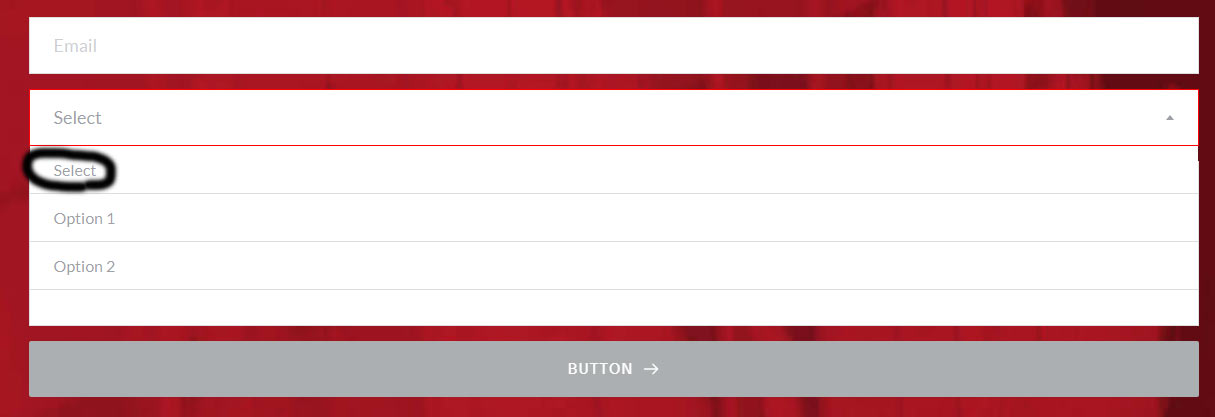
When i choose a brizy form field with type select (with 2 options), the title (Select) of the field appears and it shoulnd´t appear in the drop down menu. How can we not display it?
Thanks
0 -

Hi Bruno!
My name is Elena, Brizy customer team!
Thank you for the message.
It is not possible to delete, it is a HTML default function.
Best Regards
Elena
0 -
Hi Elena, thanks for the reply.
the strange thing is, is the brizy edit page screen it does not appear the 2º "Select". it is correct!
it does just appears in the rendered HTML page...
0 -
Hi, i was able to resolve this issue with CSS.
.brz.brz:not(.brz-ed) .brz-forms2__field-select .select2-container--default .select2-results__option--highlighted[aria-selected] {
background-color: inherit;
color: inherit;
display: none;
}0 -
Hi,
Thank you for your message. We are happy to hear that you find the solution and now all is working as you want.
I only want to add that the title of the Select field is the first option of the Select and it is displayed also as the placeholder of the Select field. Therefore, it is normal to be displayed when is opened the Select field. Also, this is the default protocol for creating the Select field. See this article about the Select field.
Yes, you can rewrite and not display it, as you did with Custom CSS, but by default, as general rules say, it has to be present.
Best regards,
Sandra0
Please sign in to leave a comment.
Comments
8 comments