Update button not working

1. Preview not working, shows blank even after page is published
2. Update button not working
3. Page not being published
Nb : Screenshots attached.
-

Hi Ansh,
I'm sorry about the problem you encounter. Unfortunately, I didn't receive the screenshots, could you please send them again? Could you please give to us more details regarding this problem? What pages did you try to edit with Brizy? Also, could you please check if you have the latest versions of Brizy Free (1.0.124) and Brizy Pro (0.0.41) versions?
Thanks!
Best regards,
Sandra
0 -
 0
0 -
Update function not working. Unable to publish the page as such. SHows blank even after CLicking Update.
0 -
Hello Ansh,
Could you please check if you didn't create a template for this page?
Best regards,
Sandra
0 -
No, i added a new page and i designed and published it. But unable to see any updates, the page show blank from the Menu even after I click the Update button and publish.
0 -
Hi Ansh,
Could you please go to Brizy -> Templates and check here all the template? Please, check here if no template has the display condition "Pages -> All".
Best regards,
Sandra
0 -
Sandra,
Please help fix this issue. Unable to see Updates.
Even after i create a template, how do I import it to make the webpage, i don't see any option.
Alternately, we can directly create a new page and then edit with Brizy, but still Update button is not working, after publishing via Update button.
Not sure, I am stuck.
0 -
I try to help you and understand the problem. In the previous message, I asked you to check templates, did you check the templates?
If you have a template that is displayed for all pages and this template doesn't have some content, all pages you will see black. You have to remove that condition from the template.
Best regards,
Sandra
0 -
Every page on the site is different. For this page, i have created a template now, tell me how do i use this exactly same Brizy template to make a new page and add to Menu now.
0 -
Hi Ansh,
I created a private ticket regarding this issue, could we please continue the discussion in private? On the email, you should receive a notification regarding this. In that private ticket, could you please send to us the WP credentials of the site? They will help us to identify the cause of the problem.
Thanks!
Best regards,
Sandra
0 -

Hi Sandra,
I am experiencing exactly the same problem. Could we create a private ticket so that I can send you the WP credentials for my site.
+ I see the exact same blank screen as Ansh when I click 'update' then 'preview'
+ I have the latest versions of Brizy Free (1.0.124) and Brizy Pro (0.0.41).
+ Under Brizy -> Templates I do not have any templates
Thanks in advance for your help.
Chris
0 -
Hi Chris,
At the moment we have the 1.0.126 version for Brizy Free, could you please update it? For Ansha, the problem was in the theme, therefore, could you please try to activate a WP default theme and deactivate all plugins (except Brizy Free and Brizy Pro)?
Also, could you please what page create this problem? Or did you find this problem on all pages?Thanks!
Best regards,
Sandra0 -
Hi Sandra,
Thanks for your guidance.
The problem is only observed on my home page, which has the WooCommerce products element. The pages I built that hve the WooCommerce cart and checkout elements were previewing correctly.
I applied the following changes:
- Update to Brizy 1.0.126 – no effect
- Activate a default WP theme – no effect
- Deactive WooCommerce plugin (my only plugin other than Brizy and Brizy Pro) – I can now preview the homepage that I was unable to previously but predictably, I no longer have the WooCommerce Cart that I need for my page.
- I reactivate the WooCommerce plugin and the homepage preview stops working again.
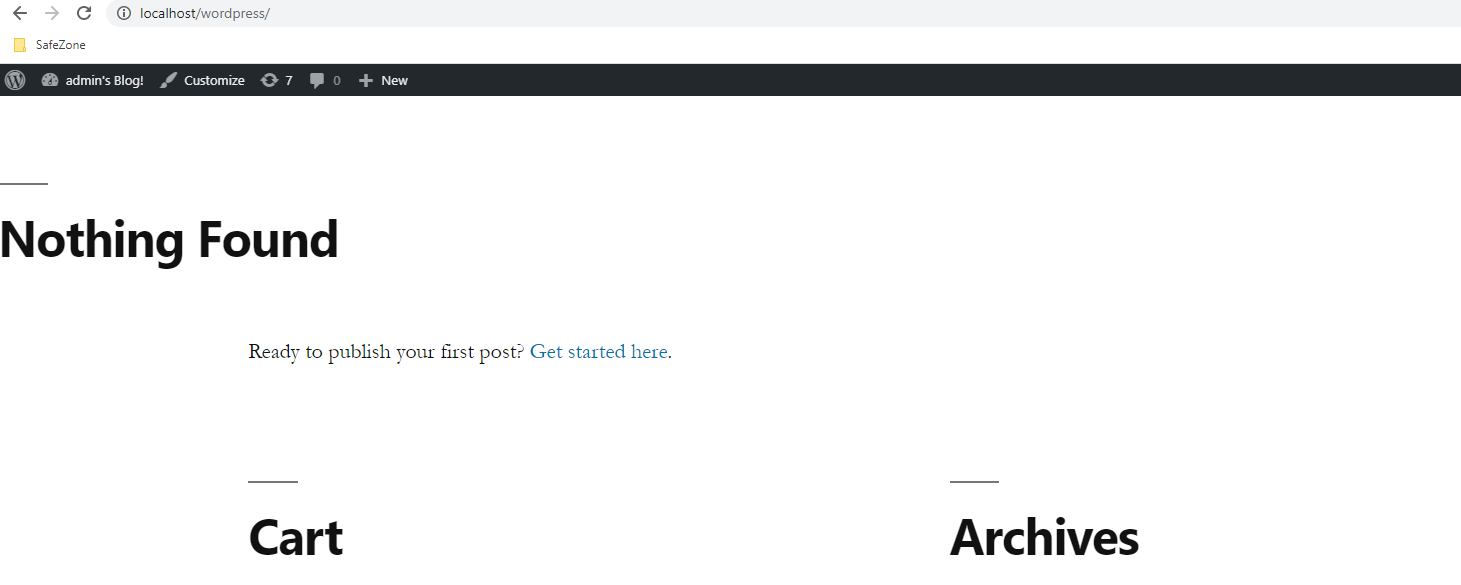
- As I have all the page elements saved, I move to trash all my existing pages and recreate all my pages out of frustration and the preview works but now the automatic WooCommerce links between products / cart / checkout don’t (i.e., in preview I click ‘add to cart’, click ‘view cart’ but it takes me to a blog as opposed to the cart web page that I just rebuilt - screenshot below)
This is a mess… can you advise what I can do to fix this… whether to keep trying to fix step 4 using my original pages (remove from trash) or instead try to fix step 5 using the rebuilt pages and how to do so following whichever route is the easier solution?
Thanks,
Chris
0 -
Hi,
At the moment, isn't possible to edit with Brizy WooComemrce pages and elements. In Brizy you can only to display them. If you find a problem when you try to "view cart", this can happen because the WooCommerce creates its own template for this page and when you click on view cart, it links you to a non-Brizy page.
You said that when you activate the WooCommerce you "no longer have the WooCommerce Cart that I need for my page" - how did you add the WooCommerce Cart? Did you add it on the menu? Is the menu created with Brizy?
Thanks!Best regards,
Sandra0 -
Hi Sandra,
Noted that it's not possible to edit the WooCommerce page and elements, although I don't have a need to do so at the moment. In response to your question, I had created the WooCommerce pages using the following vidoe:
So I first added the products from the WordPress screen, then I created a home + cart + checkout pages using brizy pro builder and inserted the WooCommerce elements in each page respectively - product (in my home page), cart (in my cart page) and checkout (in my checkout page). So the page was built using brizy pro but I just inserted the WooCommerce elements afterwards with the brizy builder.
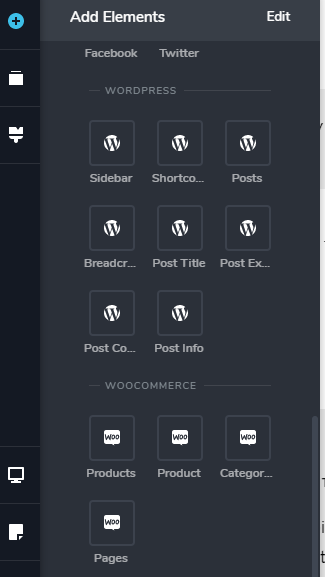
Here's a screenshot of the WooCoomerce elements from the Brizy Pro builder, if it helps.
Thanks
Chris
0 -
I'm sorry but isn't possible to edit with Brizy WooCommerce Cart page and WooCommerce Checkout page. On these pages isn't possible to add Brizy elements even if they are WooCommerce elements. If you will create other pages that will not be set as Cart page and Checkout page https://jumpshare.com/v/lJdxT827Qt8OUamZKD7N when you will try to "view cart" will not open that page with title "Cart page". It will be interpreted as a fake page and will not be open.
Here you can find more details regarding WooCommerce pages https://docs.woocommerce.com/document/woocommerce-pages/
Best regards,
Sandra0 -

Im having the same issue, please help. The update button is not working at all on this new site im building
0 -
Hi Nicholas,
Let's do some basic checks.
- Do you have the latest Brizy versions - Free 1.0.126 and PRO 0.0.41?
- If you change the theme do you have the same problem?
- Do you have the same problem if you disable all external plugins? This could be a third party issue and we need to check this.
Thanks!
Best regards,
Sandra0 -

Hello Sandra,
I am facing the same issue here, which I checked all templates are "posts->all" and the pages are not working......
quick attachment as follows. Could I ask for a private follow up about this issue?
 0
0 -
Hi,
Could you please give us more details about this problem? Where and when did you encounter it? Do you find it on all pages? If you encounter it on the pages, do you have a template where is added a display condition "Include - Pages - All". If you have it, could you please remove it?
Could you please check if you have the latest Brizy Free 2.2.7 and Brizy Pro 2.2.4 version? Also, could you please temporary deactivate all external plugins (except Brizy Free and Brizy Pro) and activate a WordPress default theme? Is this problem still appear?
We will create a private ticket if this will be necessary but firstly we want to exclude some general and easy to check details. If after your responses, we will need to look more deeply into your dashboard to fix the problem you encounter, we will create a private ticket and will continue there the discussuion.
Best regards,
Sandra0
Please sign in to leave a comment.
Comments
20 comments