Bug Report - text display and copy/paste

Display
I have several text blocks with some of the text pasted in. The size and line spacing on all text is identical. It displays uniformly in the builder window, as well as in Chrome (Portable) and Firefox (Portable) on a Win10 machine. However, on a Linux Mint machine using Firefox the text is shown with different sizes.
I traced this to the fact that some of the text was indicated as "paragraph" and some as "custom" in the T tool. When I made them all "paragraph" the display was uniform on both machines.
It is a bug, I think, since the size and the line spacing were set identically throughout.
Copy / Paste Issues (text)
When copying text, from elsewhere on the same builder page or from other places, some formatting is lost.
Line breaks do not always come over. This results in a block of text starting as separate lines becoming a solid paragraph block.
Hyperlinks do not come over.
TIA,
Jack
-

Hi Jack,
We are aware of this and it will be fixed in one of the next updates. Thanks for reporting.
0 -

Why not just give us a "raw" ability, to see the raw html so that advanced users can remove something manually if we need to.
0 -
Hi,
There is the Embed element in which you can paste custom HTML code, so advanced users can use it for this purpose. But, I will also add your suggestion to our internal desk.
0 -
Yes that is very useful as well and I'm glad you have the embed. This is very different however, and I can't tell you how many times I've had to switch over to "html" view using WP Bakery in the past. It's one of the reasons I haven't moved away from it for our main site, because being entirely locked out of what the editor is doing scares me to death. It could perhaps be something that's enabled in a settings area to keep most people locked out unless they specifically turn it on. The other thing that I've come across is that the page revisions don't actually show the content and again that's something I've had to use a lot to get back to a particular version of something when requested by a user. (sorry to go off topic)
0 -
Hi,
I will add a note about this on our internal desk and we will see in the future what we can do about it.
0 -

I still have this issue with copying/pasting. It's very frustrating to lose the formatting and line breaks every time I paste text!
0 -
Yes, I understand. We still have no news in this regard. It is an issue that involves rewriting the text element so it is not something easy. Thank you for your patience.
0 -
This issue is a year old. I think this is not the only support thread about it. Nevertheless, it is a very basic issue and one you HAVE TO FIX.
I have done some graphics for you to understand how messed up this is. As I recorded these samples, I actually had FEWER problems in Brizy than I had initially doing this. I will explain that later.
Here's an annotated screenshot of the source information for the videos that follow. As marked, I copied the text in the light blue box, went to an editor and pasted it in. I did this in Gutenberg, Elementor, and Brizy.
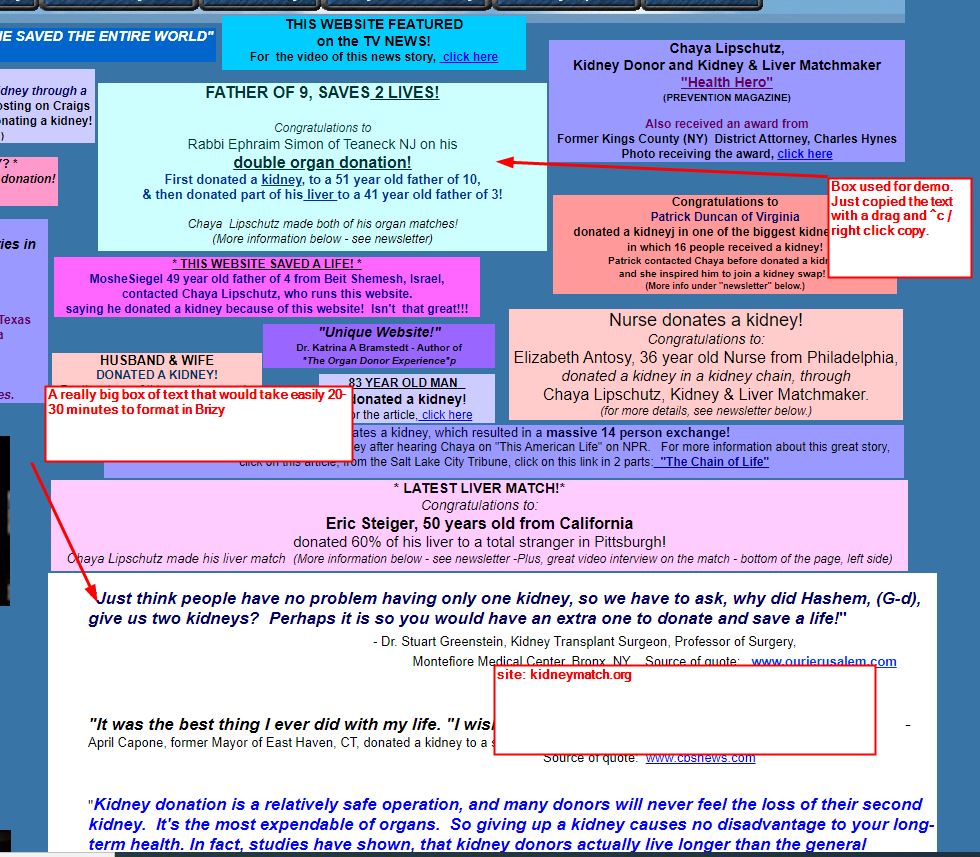
Here's the Gutenberg result https://www.loom.com/share/671d3e511a80488db73568cb60829a0e It pastes in cleanly, with line breaks and spacing intact. It did not preserve the centering, however.
Here's the Elementor result https://www.loom.com/share/51179f03fb6048c1982e8904e74e63b6 Everything is preserved.
Here's the Brizy result https://www.loom.com/share/61d93d0f4abd416b81cf65074390362c It lost the spaces and line feeds. This was actually better than what I experienced when I built the page. At that time the entire content was in the middle of the block, there was several lines of empty space before and after the pasted text and I am not sure that the bolding or italics were preserved. What was a ^v in the other two editors and took about 3 seconds, was a ~1 minute job in Brizy - and that's for a short text block. Look at the size of the "really big box" and imagine how much of your user's time is wasted. The fact that this sample was better than my previous experience may have been due to my duplicating a text element, rather than creating a new one.
I have a lifetime subscription to both the WordPress and Cloud builders. I've signed up as an affiliate. With this behavior, I can't provide a site to a client that they will be editing. They would get frustrated and angry at me for providing such a bad experience.
PLEASE, PLEASE FIX IT!!!
Jack
0 -
Hi Jack,
I understand your frustration and appreciate that you have invested time in these tests. We know the problem and how it manifests, but it takes us some time to fix it, plus the list of priorities is long. I will share your message with the team and we will try to prioritize this. Sorry for these inconveniences.
0 -
Alex,
I don't think you do understand my frustration or the position that Brizy is putting itself in.
This thread is a year old!
Directly because of this behavior I opted to not recommend using Brizy for a website I was preparing for a client to self-manage. I would look incompetent providing a website to someone in which they had to go through this kind of nonsense to paste text in from another source.
By not having this as the absolute highest priority, you are costing Brizy sales, market position, and competitive advantage. Gutenberg had no problem with pasting text. You could argue that Gutenberg is not a page builder and not a competitor. With Full Site Editing on the horizon, it will be a page builder and therefore direct competition. Elementor had no problem with pasting text. It is a page builder and therefore a direct competitor. Do you have advantages over Elementor? Sure, but this text issue is a killer for you and your market position.
As I said, I am a Pro lifetime owner of both the WP and Cloud products. I signed up as an affiliate. I presented on Brizy at a WordPress Meetup. I'm an advocate! ...and yet I just told you that I could not recommend using Brizy for a website for a client because of this issue. ARE YOU LISTENING?
Jack
0 -
Jack, it's worse than that from a client perspective. Clients are used to right clicking and having a "paste" option. Brizy is the only editor that I've used that does NOT have this. Any client who is not savvy will not know how to use ctrl-c and ctrl-v, nor will they appreciate having to click a button. Everyone at this point is used to right click/paste behavior and it's sorely needed. Due to that, regardless of the fact that we purchased Brizy, we cannot use it.
0 -
Hi guys,
I understand you perfectly, but we don't have a solution for you right now. I will insist that this issue be prioritized.
0 -

Since the last update, brizy has now crashed all the aspects of one of my clients site, yes latest on both downloaded from you. So they asked for a rebuild, this is where i come across yet again the dreaded run around on copy and paste. This is copying text from a brizy built site, to another via ctrl c and ctrl v and yet it brings over the colours etc and still the broken formatting. seems to me whats ever else you (brizy) have as a priority is tantamount to insignificant when website developers spend the afternoon looking over other site builders so as to not suffer the bane of formatting 60 pages of text. Doesnt seem how much people complain about this brizy doesnt seem to be bothered to fix it. I too complained about this over a year ago and still here i am trying to find and failing, a solution to this most basic of functions. 'We dont have a solution ', when will there be a solution ? or are you just going to keep sweeping it under the rug and wondering why such an 'easy' website builder is not being adapted by more web developers, when you can't fix a basic problem.
0 -
Hi Paul,
you seem to be talking about a different issue than the one discussed in this post. The big problem with text pasting refers to the text copied from other sources (other sites for example) and keeping the styles for it. What you say seems to be something else and we would like to know more details so we can help you.
I copied a text from a Brizy site and pasted it on another Brizy site. Styles are copied except for the font that applies from the current configurations. Please refer to this video: https://jmp.sh/z5Qq99X How could we reproduce the problem? Could you send us a screen recording?
Also please give us more details about the issues you had after the last update. Maybe it's not the case to rebuild it.
0 -
Got a flow going now and found that I can bring them across with no need for text maniupulation as long as both sites are brizy. Did also find a work round with the site fragmentint issue which as im doing a rebuld now for the client, may help some one else instead. I reinstalled the new brizy pro, then opened every page and just updated the page and it placed everything back where it should be.
0
Please sign in to leave a comment.
Comments
15 comments