Woocommerce products not displaying in 3 columns

Hello,
I went through some already asked questions, but couldn't find anything.
On this page: https://dantasy.breynaert.eu/en/products/ I'm trying to display all products in 3 columns.
Via the Brizy editor, I set the Woocommerce products element to 3 columns. However, one way or another, I think, there must be a css conflict with Woocommerce or the Woocommerce Storefront theme and it only shows 1 column. When you go directly to the shop, outside Brizy, (https://dantasy.breynaert.eu/shop/) it displays 3 colums.
Do you have any advise on how to solve this? Maybe overrride through some css?
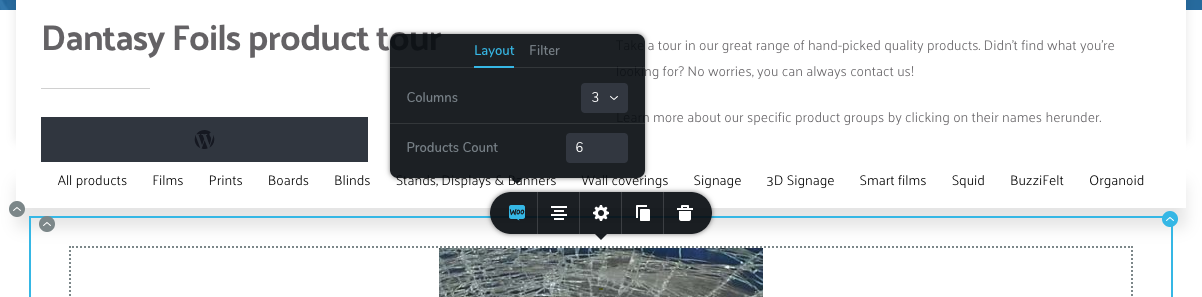
-

Hi Matthias,
We don't use these themes and we can't know what's going on. Firstly, please make sure you have the latest Brizy Versions - Free 1.0.124 and PRO 0.0.41. If you activate another theme then the products will be displayed in 3 columns? If this works with another theme then you will have to inspect the theme code and rewrite some styles.
-1 -
Hi Alex,
I run the latest versions of free and pro.
Ok, so I went in the woocommerce.css itself and brute-forced the width to 33% + added a mobile-only css rule in the brizy editor to force it to 100% :-)
Quick 'n dirty, but it works, for now.
0 -
Another comparable issue I have is that I can't seem to find a way to remove the bullets from product lists with WooCommerce. Here is an example: https://dantasy.breynaert.eu/en/product/films/distraction-markers/
If I inspect element, this one is coming from Brizy itself, I think.
.brz .brz-reset-all {
list-style-type: disc;
}
The bullets are present with the default Wordpress theme, too. The template to this template is set to "Brizy Template".
I already added this to Custom CSS in Brizy builder but without success.
.brz .brz-reset-all {
list-style:none; !important
list-style-position: hidden;
}Any suggestions?
0 -
Update: it got solved by adding this css:
.brz .brz-rich-text ul li:before {
content: none;
}0 -
Hi,
I'm glad you solved that. However, I've just added a few products to a Brizy page and I don't see any visible bullets: https://jmp.sh/lpoUOth
0 -

Matthais, can you please share how you edited the woocommerce.css to fix the column issue?
0
Please sign in to leave a comment.
Comments
6 comments