Box content width

Hi,
When I change element width to "box" it stuck on 1170px and don't go over that, no matter what the page size is.
is that Brizy restriction?
Thanks
-

Hi,
Yes, the box width of Brizy page is set to 1170px, but if you want to set the block on the full width of the device, I can recommend using the "Full" width and if you want having some space in the left and right side of the block, I suggest adding some padding or margin.
Best regards,
Sandra
0 -

But this is very stupid idea. why you limit people who want to make a website bigger then 1170px?? I need 1250px or 1600 px website what will I do? play around plugin source code???
And do not answer about full width with padding. its not the same about max width solution..
Just mount ago joined to brizy and day by day I am going to cold of this editor.
Fix this please, or if u done already give us information. its not a hard hack just create a field for max width and let us change it as web page creators.
0 -
Hi,
At the moment isn't possible to change the container width for Brizy pages on different devices. Now we have the predefined values for container width and they are regarding the Bootstrap grid system we are using. We think about this option and this flexibility but we didn't take any certain decision regarding this. We are still investigating it.
Regarding "full width with padding" - I'm sorry but I didn't say that it is the same as max-width, I just offer a solution. Yes, maybe it isn't perfect but can help you.
Thanks!
Best regards,
Sandra0 -

Hi Sandra,
I completely agree with Ongun here...I just joined and already run into this issue on day 1. You've build such a nice interface and clean versatile builder. However, the solution you suggest is REALLY inefficient to do that for every block OR to override this with manual CSS.
Please consider solution Ongun suggested. Max width would be by far the best solution imo. I also think most builders have that. Or otherwise, just let it read out the max width of the theme options from Wordpress? I'm not a programmer, so wouldn't know if this is possible, but there must be a solution somewhere. If you're not considering fixing this I think more people might start to question Brizy.
Screens are getting bigger, it's just a thing of being up to date of present time, right? Bet you gonna find a solution for it :)
Thanks!
0 -
Hi, Stijn,
Thank you for your message. Yes, we taken into consideration the Ongun's message and this feature are already in our To-Do list and our team are working hard on it. It isn't a simple feature nut we will strive to release it as soon as possible.
Best regards,
Sandra0 -

I have run into the same very annoying limitation, but using the Brizy Wordpress plugin, I guess I could make the modification that Keith Mifsud is suggesting in this thread: https://stackoverflow.com/questions/38480156/how-to-increase-width-of-bootstrap-container-on-max-width.
Sandra, can you confirm that it would work with Brizy?
Thanks0 -
Hi, Mathias,
We don't recommend adding that code in Brizy because is a high risk to create other problem like not loading images and other inconvenience.
Thanks!
Best regards,
Sandra0 -

Hi,
you can override the standard css rule of the container_wrap class.
Note: Fullscreen elements wont work anymore, so you have to always work with the container.
Code:
@media screen and (min-width: 1800px) {
.brz-container__wrap {
max-width: 1300px!important;
}
}To the Brizy team: To be on top of the game, we need to be able to change the container width and we also need more customizable breakpoints. It is just a struggle to get the Tablet Landscape and smaller Desktops right. I have to make compromises on Larger Desktops.
-1 -
Hi, Philipp,
Thank you for the message. Yes, we have this feature in our list and we are investigating it.
Best regards,
Sandra0 -

Hi Brizy team,
I have to agree with the others here.
Please implement a user accessible max-width setting default for boxed-blocks. I’m building a client site and we need a standard boxed blocks setting of 1280px. I dont want to change the container setting via css as this would affect the full width elements on that clients page!
Please consider adding a numerical default setting for boxed elements.
Thanks.
0 -
Hi, Sandra,
Thank you for your message! We will take it into consideration!
Best regards,
Sandra0 -

Just run into this 'problem' myself. I've worked with more website builders then I'd like, and this is the first one that doesn't give that option.
Feature request:
In the list with Settings, Popups etc. Just add the link "style options".
There it should be possible to set the defaults for the entire website!- Website logo
- Default fonts + sizes
- Default colors
- Color themes
- Page / Container width
- So much more
I don't want to have to open a random page to change settings.
Nor do I want to apply changes to seperate pages manually when I prefer to change my theme colors.And I don't want this in the theme customizer because I might have to change themes all together.
0 -
Hi Maurice,
At the moment in Brizy pages, you have the possibility to set Global Styling option. See here. All settings you select here will be applied for all Brizy pages and templates. Also, at the moment, in Brizy you can create a header and footer and after this using Global Conditions to display them on all pages (All Brizy pages). For more details about this feature, you can see this video.
Moreover, if you set in the WordPress settings what is your Logo, you can use Dynamic Content to display it in the Brizy Pages without adding it manually from Media Library https://jmp.sh/JXPyqJV.Thanks!
Best regards,
Sandra0 -

I see this 5 years old but Is there now an option to set custom 'Boxed' width?
0 -

Hi Jeffrey,
Thank you for contacting us.
The default boxed width in Brizy is 1170px when using the sliders. However, you can manually enter a custom value greater than 1170px directly into the width field in the Block settings if you'd like to set a larger boxed width.
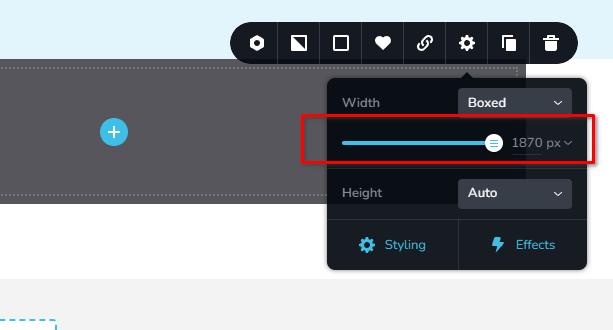
If you have any further questions, please let us know.Best regards,
Ariel H0
Please sign in to leave a comment.
Comments
15 comments