Post tags not showing up (anymore) in template display conditions

Hello,
I'm using the latest versions of Brizy (1.0.124) and Brizy Pro (0.0.41)
I finally found out a way to distinguish different languages for posts in the template display conditions (since selecting a category only works for archive pages and not the posts within the category
Instad I added a tag to every post of a certain language, and tell the template to be displayed when that particular tag is used.
This worked fine, until yesterday. Today I create a new tag, but it doesn't show up in the lookup list:
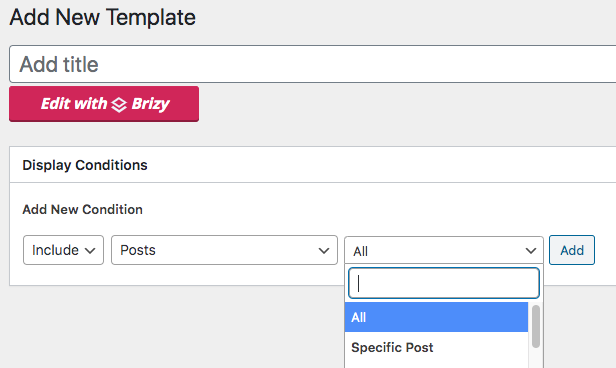
Until yesterday they showed up above 'specific' post.
Can someone take a look please? I'm completely blocked, since I work on a multilingual website.
I'm happy to provide credentials if necessary.
Thank you.
-

Hi,
I have created a ticket for you so please send the login details there and we will look into it. Thanks.
0 -

I have the same problem but only on some sites. I have exactly the same versions of Brizy and Brizy Pro plugins on various sites. On some sites I have the option to assign a template by post ctaegory. But on others, that option isn't there.
0 -
Hi,
Is there anything specific on these sites? Did you check this with all plugins disabled?
0 -
Meanwhile support showed me I needed to select Include > tags and not Include > posts > tag.
However, when doing so, articles with that specific tag aren't showing up in the template.
0 -
I've discovered that if I disable Custom Post Types UI plugin, the categories are available again. CPT UI hasn't had an update for two months though so I'm guessing this problem may lie with the last update of Brizy Pro?
0 -
Although I also have sites that have CPT UI active and the post categories in Brizy templates are still available.
0 -
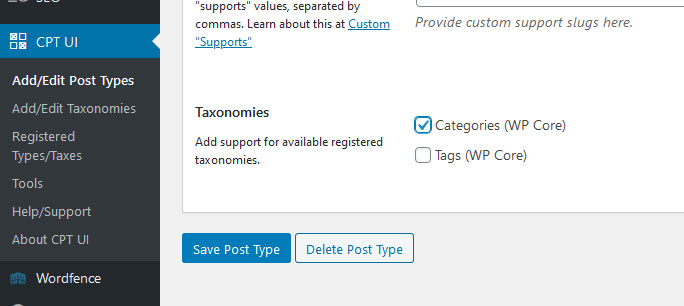
OK I've worked it out. I created a Custom Post Type and at the bottom of the post type form there is a section called Taxonomies that had 'Categories' ticked. I unticked it and everything works again.
 0
0 -
I'm glad you solved the problem ;)
0
Please sign in to leave a comment.
Comments
8 comments