Header & menu - some issues and requests

Hi,
So the questions and feature requests seem fairly simple. I know.. it's simple when I'm writing and I'm aware that it's something else to code it but I think all Brizy userrs would appreciate such changes / options / addons :)
1. How do I duplicate the menu from the main state to the other one (on scroll) when sticky mode is active? Thing is that I would like the menu to be the same in both instances, but how to achieve this without repeating all steps?

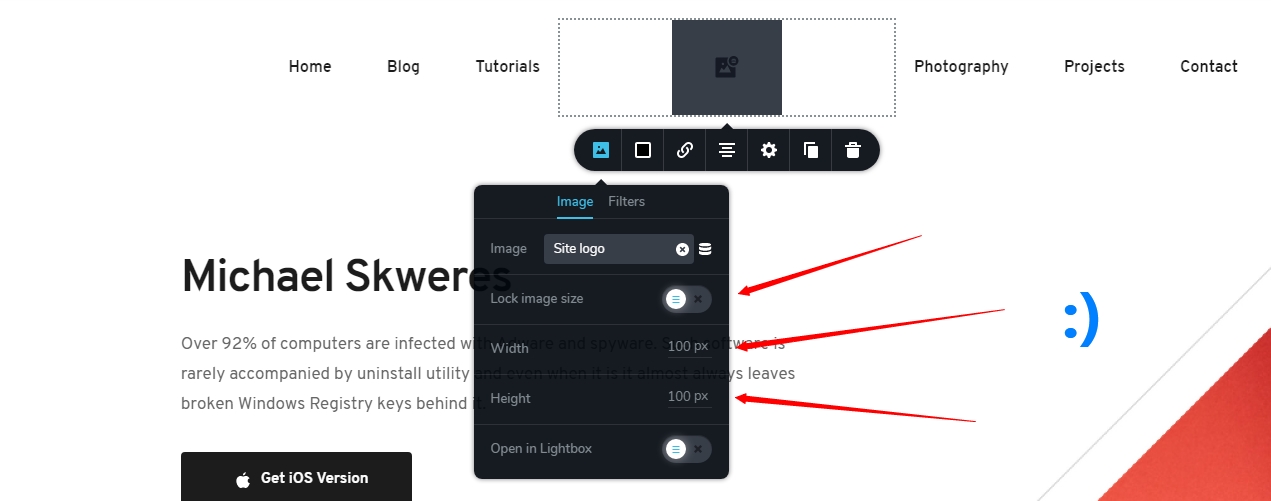
2. I have there a square logotype. By default it's a rectangle in module and fine. I can switch images, choose the site logo I have setup in customization part but there are no options or I can't see one to make a perfect square. I can just play and try to set the placeholder by hand to be square'ish. Any solution?
3. When I'm using the header type where there is: menu 1 - logotype - menu 2 and start to change the width of the blocks for example menu 1, there seem to be no way to recenter everything.
Again some percentage indicators would be great and maybe even some additional template which would automatically recenter the blocks.

In ideal scenario when I would choose to recenter the middle block with logotype it would go to the center, resizing accordingly the left and right block.

4. Also.. the option to lock the logotype size would be great. When I'm resizing blocks I just don't want always the logotype to resize with the block or at least not to the point where the block width would be smaller than the image width. Then of course by logic the image should go down with it.
-

Hello Michael,
thank you for the complete overview and ideas provided here.
Indeed, some of them are on the list, we know about them and they will come sooner or later.
1. This can be worked-around using a row for your original header. If you are using a row, just duplicate the row, and drag it below to a certain block (the middle "man"). After that scroll a bit until sticky header appears, and drag the duplicated row to sticky header, like in this screen recording.
2. the gear for the image should have the height set to 100%. Then it should be square. Like in this screen recording
3. this is not only for the header, but are usability problems throughout the builder's experience and we will address them sometimes in the future.
4. Image element is indeed in great need of being re-thought a bit. The px sizes will come, for sure, and some other improvements.
All the best,Bogdan Condurache
Brizy Design Team1 -
Hi and thank you for tips and recordings :)
One with menu is simple yet I did not thought about such solution :)
0 -

Hey. I`ve been having a lot of trouble setting my menu up. Apart from the fact that I just can`t set it up (already filed a separate ticket for that) I`ve been also having issues with the logo. It appears normal and fine in the media gallery but when I set it in the header it´s all cut up like it doesn´t fit and it appears pixelated. Would appreciate the help, thanks.
0 -
@Pedro Copelmayer,
The image is cut-up because you probably have not set the height to 100%. Like so: https://www.loom.com/share/5566c2a01cf748b9a5d64773dc940257
Regarding "I can't set it up" I don't think I can help with that because it is hard to diagnose from such generic info given.All the best,
Bogdan Condurache
Brizy Design Team0
Please sign in to leave a comment.
Comments
4 comments