size of featured images

Hi,
i tried to create a template for the blog post. In this the featured image should be in full width an cover the whole screen.
like this as example https://photo-passion.net/ein-traumfotoshooting-auf-ueber-1900m-hoehe/
but when i use the featured image it's blurry because the resolution of the featured image is only 1228x691.
Do you have any idea how i can change the dimensions of the featured image?
Didn't find this dimensions in the Media section of WP.
add_image_size( 'medium_large', '768', '768', false );
add_image_size( '1536x1536', '1536', '1536', false );
add_image_size( '2048x2048', '2048', '2048', false );
add_image_size( 'gg_gallery_thumbnail', '450', '250', true );
add_image_size( 'fw-theme-blog-full', '2500', '2500', false );
add_image_size( 'fw-theme-blog-sidebar', '1010', '250', true );
add_image_size( 'fw-theme-category-slider', '295', '524', true );
add_image_size( 'fw-theme-category-slider-2x', '590', '332', true );
add_image_size( 'fw-theme-portfolio-portrait', '295', '393', true );
add_image_size( 'fw-theme-portfolio-portrait-x2', '590', '786', true );
add_image_size( 'fw-theme-portfolio-landscape', '295', '166', true );
add_image_size( 'fw-theme-portfolio-landscape-x2', '590', '332', false );
add_image_size( 'fw-theme-category-square-800', '800', '800', true );
add_image_size( 'fw-theme-category-square-300', '300', '300', true );
add_image_size( 'medium_large', '768', '768', false );
I used the Exposure Theme in the past now switching to Brizy.
Hope you can help
-

Hi,
The image in Brizy will have the size of the container in which it is located. So if you have a full-width section that contains featured image and image will be set to 100% size and 100% height then everything will be fine: https://jmp.sh/c5fsCOv -> https://jmp.sh/m04qIxt
0 -
Hi Alex,
thank you for your reply.
Tried it again and it's pretty blurry and not sharp.https://photo-passion.net/?page_id=1305372
I tried is as Background for a new block (because here i can use Paralax)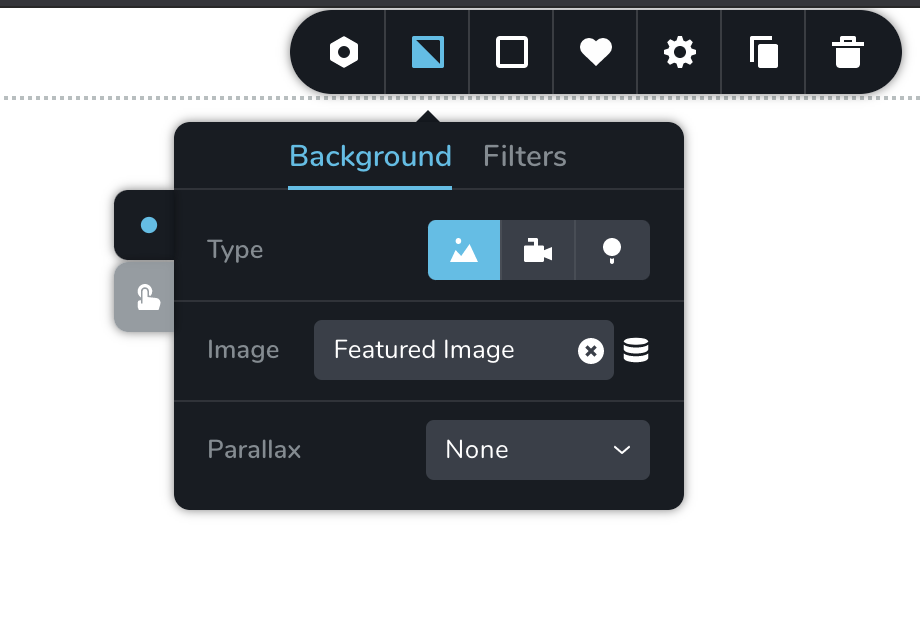 sorry for this big screenshot. Don't know how to crop in the answer field.
But you are right when i add it as image placeholder it works. Is there a way to use this with paralax?
Best wishes
0 -
Additinal Question regarding the same issue. Is it a difference if the featured image is selected in the Brizy editor or in WP Post directly?
Because when using a template itßs not possible to select a featured image in the Brizy Editor
Thanks again0 -
Unfortunately, no. Parallax is only for background. I will send a note to our devs and they will check the featured image compression when set to the background. At the moment, the solution will be to use the image element.
Regarding the second question: If your posts are created with Brizy, you can choose a featured image for that post directly in the Brizy editor: https://jmp.sh/dtvgf0w
0 -
Thanks for your answer Alex,
unfortunately this doesn't work. because the Post i s not created via Brizy. It's created via the Wordpress Editor.
I use a Brizy Template for Blog Post, which is set to be automatically selected for all Blog Post.
So looks like i have to wait. :/
0 -
I'm not sure I understand. You can add a featured image via WordPress editor: https://jmp.sh/KPuFer9 and then in Brizy Template add an image element and set the source to "Featured" Image:https://jmp.sh/xn7yF5u
That's all you need. The only thing you won't have is parallax.
0 -
Hi Alex,
sorry for the confusion, thats the workaround that i use now. Thanks for that.
My answer was regarding what you have also written:
"Regarding the second question: If your posts are created with Brizy, you can choose a featured image for that post directly in the Brizy editor: https://jmp.sh/dtvgf0w"
And thats not possible when with an Brizy template for all Blog Posts
0 -
Got it.
Let us know if you need anything else.
0 -
Thanks Alex.
Only my open question regarding the blurriness when using featured images as background.
You have written: "I will send a note to our devs and they will check the featured image compression when set to the background."
Thanks in advance.
0 -
Sure. This is not something that is instantly fixed. I have added to the list and we will check what can be done. If there will be changes in this regard we will come back with an update.
0 -
Sure Alex. No worries. As written i will wait :)
0
Please sign in to leave a comment.
Comments
11 comments