architekt theme

I'm getting this error in the backend.
Warning: Declaration of FW_Auto_Install_Upgrader_Skin::feedback($string) should be compatible with WP_Upgrader_Skin::feedback($string, ...$args) in /homexxxxx.com/wp-content/themes/architekt/theme-includes/includes/sub-includes/auto-setup/class-fw-auto-install.php on line 1880
The website looks fine to the public. I've tried several methods to fix it but I can't seem to remove the warnings.
-

Hi Danny,
Please note that Themefuse themes are no longer supported and here we can provide support only for Brizy Builder.
I will give you a hint now but please be aware next time that here is the Brizy forum. In this video you can see the changes that need to be made to solve the problem.
0 -

Understood. Thank you ! That was really helpful !
0 -
Thank you for your understanding ;)
0 -

Hi,
I have a question regarding the Architekt theme: how do I stop it from sliding after choosing the Home page?
Can we make the image on my Home page a little brighter?
Thanks and keep up the good work.
Bo
0 -

Hi Bo,
To set the hero block as a regular block and remove the slider, please select the Block Settings icon (black dot) and select the first icon on the left and toggle the switch "Make it a Slider"
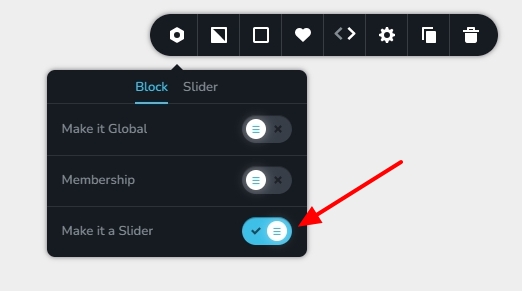
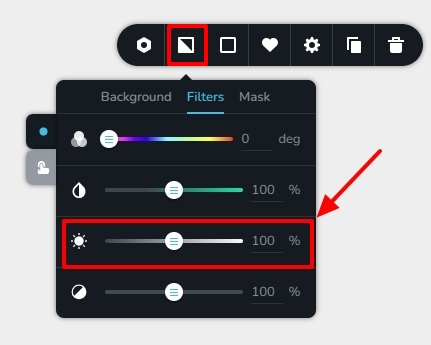
In the the Block Settings, please select the background icon and then the 'Filters' tab. Use the brightness slider to increase the brightness of the background image.
 0
0
Please sign in to leave a comment.
Comments
5 comments