Contact Form says email not sent

Hi
I am trying to set up a contact form for my site. I have tried to set u with Google and Convertkit but everytime I test to send an email as a visitor it says "email not sent" and then the request does not go through. I am looking to use the form as a contact form but how can I get it to work so when people put in their questions it gets sent?
-

Hi,
Firstly, please make sure you have the latest Brizy versions - Free 1.0.123 and PRO 0.0.40.
Now, regarding the problem: from I understand you have configured your form with gmail, right? https://jmp.sh/BEFOHIN If so, please log into your Gmail account, and disable the Less secure app access - https://jmp.sh/J5eDsUO
What about the other two options? Have you tested the form with wp-mail and SMTP? Doesn't work?
Here's a video about Brizy Contact Form: https://youtu.be/ceRRayuv2uw Maybe somewhere is a misunderstanding.
0 -

I'm having the same issue. Has it been resolved?
0 -
Hi,
What send method did you use? Gmail? If so did you add the gmail username and password to the form setup: https://jumpshare.com/v/Yd3CGBdBUMakuJxbB4XA ?
0 -

Hi,
My customised form said your email was not sent after i filled up and submit from the form. I did received the mail from the form though, but the message keep on showing after sending.
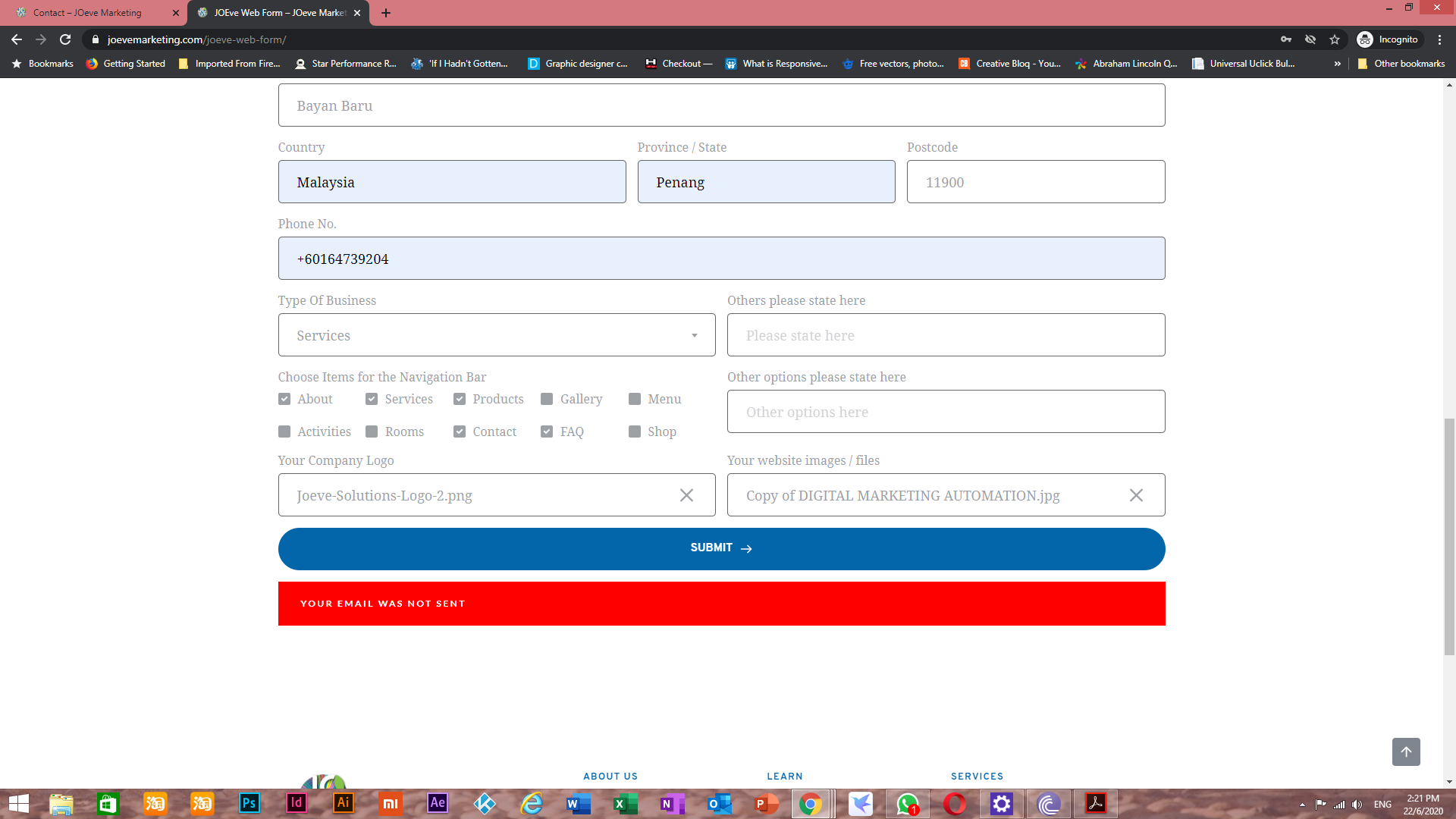 1
1 -
Hi
What send method did you use? Did you set up only one method or do you have multiple options enabled for the same form?
0 -
Hi,
I use gmail and wordpress send method, and captcha activated.
0 -
Probably one of them is not configured correctly. I recommend that you use only one method, not both. Just duplicate the form and configure one send method.
0 -
Hi,
I replaced the settings with only Gmail, but the message still appeared.
Regards,
Thomas
0 -
The error message appears, but do you still receive the email in your inbox?
0 -

https://www.loom.com/share/5e9adf49b3524fb69c16ff827ed2e905?fbclid=IwAR0MIQ4q3vDiJS9CoOb1fblyt3Hmko7kzIS9bVDpR7sOs-pTcd6sAkafJyk
the same issue. probably the error is probably header. I made the page again. I have done header again. but doesnt work.0 -
Hi,
No, we didn't received any email after this..
Regards,
Thomas
0 -
Hi @Ferhat Firat,
this is strange behavior. Do you also use Gmail send method? Can you please confirm you have the latest Brizy versions - Free 1.0.126 and PRO 0.0.41? Do you have the same problem if you disable all your external plugins?
@Joeve Smart solutions - can you please confirm that you have added your Gmail login details to the form settings: https://jmp.sh/8agvzEQ ? Also, try to disable the Less secure app access - https://jmp.sh/J5eDsUO
0 -
ı tried gmail login. again gave the same error. I made a new website. same again. the message does not go when the page is full.(i think).. same on local server.
0 -
Hi,
I switched all my forms to Wordpress sending method and its works fine and the message did not show up anymore, but I tried with Gmail setting, the form still show your email was not sent. I did set the username and password to my email account below the Gmail setting panel, the problem still occurred. the less secure app access was off too.
Regards,
Thomas
0 -
Hi,
we need to take a look at the browser console. Please send the link to your website and we will check it. Maybe the error in the console gives us a clue.
Also, it could be a server-side issue. Please contact your hosting provider and ask them if, your hosting can connect to wp SMTP within Gmail option. The port may not be set correctly.
0 -
Hi,
I have one form with Gmail setup that doesn't work, here is the page https://joevemarketing.com/social-media-management/
The schedule form on top.
Regards,
Thomas
0 -
hey Thomas,
we have to do some tests on the dashboard. I have created a ticket for you so please send your login details there and we will look into it. Thanks.
0 -

Hello, I have been having this issue as well, can someone please call me for assistance?
Thank you
0 -
Hi,
unfortunately, we don't offer phone support. Can you please confirm that you have completed all the steps described in this article: https://support.brizy.io/hc/en-us/articles/360044216151 ?
0 -

I am having the same issue reported here in this article by several different Brizy users.
This is the page where I am having the issue with the contact form https://culturalbrokerfa.com/contact/
I have completed the steps here https://support.brizy.io/hc/en-us/articles/360044216151 weeks before trying to send a test email to no avail.
0 -
Hi,
this is the error I see on your website: https://jmp.sh/FkpLfUv That could mean you added wrong SMTP authentication details. Do you use the Gmail send method, right? Can you please confirm with your hosting provider that Gmail SMTP has the ports configured correctly on the server?
0 -
Hey Everyone,
This solved the issue for me. https://wpmailsmtp.com/docs/how-to-set-up-the-gmail-mailer-in-wp-mail-smtp/ I was able to do this in 10-15 minutes. I am using Gmail to send my emails but it works with a variety of other platforms as well.
The issue seems to be that the server that our websites are on are not autorized to use external methods like Gmail or Microsoft. A a result if we enter our credentials into Brizy correctly we are going to get a warning in our Gmail account saying that "
Sign-in attempt was blockedyou@gmail.com Someone just used your password to try to sign in to your account. Google blocked them, but you should check what happened."That is because we need an authorized application. Anyhow the link will walk you through through the appropriate solution for Gmail. Now you know the plugin that can help you you can find the documentation for the service of your choice.To answer the community team yes my domain provider has SMTP ports configured properly.0 -
Thank you for sharing.
0
Please sign in to leave a comment.
Comments
23 comments