Onepagers menu sticky + Arrow up code
Completed
Hi got 2 questions:
These are for the Brizy builder, so I guess theyre relevant both for the Cloud and WP - I have however tried it in the Cloud.
Question 1
I have tried to import some of the onepagers, theyre are great for a short resume :) - and then tried to make the menu sticky.

Found out that I could link the diff blocks ("pages") to the "menu" buttons :) But after that I would have liked to make the menu sticky - but as the buttons are not part of the menu block - this can not be achieved.
In order to circumvent this, I imported a header block - but getting the fake "menu" from the onepager to be visible as a real menu in the header block - is impossible as the menu block does not recognize linking to specific other blocks..
So how would u do this ???
Question 2
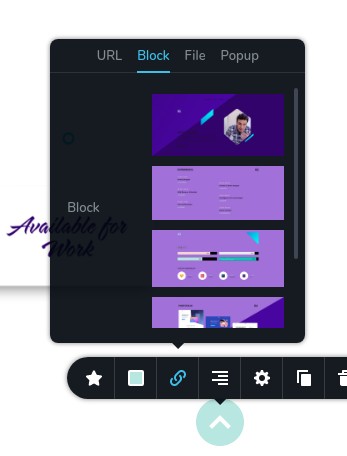
The "arrow up" at the bottom of this one pager, how can i see how it is functioning, as an arrow up ?. I would have liked to copy it to another layout - as it is very functionel on every page, viewed by mobile ? And it seems, see screenshot, that it is not linked to any block... Where is the hiding CSS here ?
Thanx for answering, and btw, thanx for a brilliant builder, it leads the way forward :)
Regards, Claus (proud buyer of the pro onetime offer)
-

Hi,
1) The "menu" that comes with the layout is not a menu element. They are just simple links. Now, if you want to have a sticky menu, you need to import a header and use the Menu element instead of these links. Basically you have to re-create the menu.
In project settings, you can add custom links to the menu element: https://jmp.sh/P8ngyn3 This option was added recently and because of this the one page layouts were created with simple links not with Menu element.
2) This is a simple icon that can be linked to one of your top sections. By default it doesn't have a specific block, so you can choose it: https://jmp.sh/ccM3leK
Hope this helps.
1 -
Thanx :) saved my day....
0 -
Most welcome ;)
0
Please sign in to leave a comment.
Comments
3 comments